Week - 5 - Checking and correcting the Normals
Program:
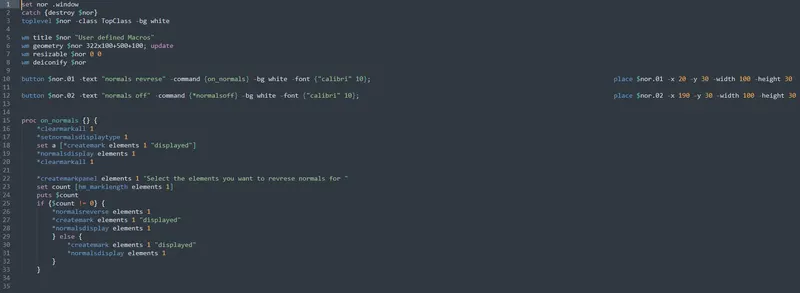
The above program describes the commands required to "reverese normals" and "to turn off normals".
The lines from 1-3 is defined to generate a simple plain window using Tk programming.
The lines from 5 to 8 are defined to assign window title, window dimensions and make it a current active window, when executed.
Lines 10 and 11 are used to generate GUI buttons to exable user to run the procedures as required by the user.
Line 15: defines a procedure to turn on macros
Line 17: displays normals with color as noticiable factor.
Line 18: selects the elemenst that are displayed to turn on normals
Line 22: Enables the user to select the elements whose normals are to be reersed.
Line 23: calculates the length of list of selected elements.
Line 25: checks weather the length of elements selected are not equal to zero
Line 26-28: if elemenrs are selected, it reverses the normals of the selected elements.
Line 29-32: if no elements are selected, these codes are executed. These set of statements make sure that the element normals are turned on.
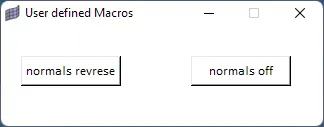
The above .tcl file is linked to keyboard shortcut shift + n. When called a GUI appears on top of the screen making two buttons i.e., one button to reverse normals and other to turn off normals is displayed.
Output: