Checking and correcting the Normals in HyperMesh by using TCL/TK
ABSTRACT:
To write a code that displays the normals for the displayed component. For that a TCL/TK code is created and executed in Hypermesh. Then by using that command normals in the component is reversed and make it off.
PROCEDURE:
For this operation Notepad++ scripting tool is used. In that different commands are executed. I that command a pop-up window is created and that contains some buttons like normals on, normals off and reverse normals are displayed. By clicking each button operations like reversing normals, displaying the normals are executed.
PROGRAM:
*setnormalsdisplaytype 1
*setsurfacenormalsdisplaytype 1
*createmark elems 1 "displayed"
proc box {} {tk_messageBox -message "No elements were selected" -icon warning -type ok}
set a .window
catch {destroy $a}
toplevel $a -class TopClass
wm title $a "Normals"
wm geometry $a 400x200+100+100
wm resizable $a 0 0
wm deiconify $a
button $a.01 -text "Normals on" -font {times 15 bold}  -command {*createmark elems 1 "displayed";*normalsdisplay elems 1 1}
place $a.01 -x 10 -y 10 -height 35 -width 380
button $a.02 -text "Normals off" -font {times 15 bold}  -command {*createmark elems 1 "displayed"; *normalsoff}
place $a.02 -x 10 -y 80 -height 35 -width 380
button $a.03 -text "Reverse normals" -font {times 15 bold}  -command {
proc set b 2
set b [hm_getmark elems 2]
*createmarkpanel elems 2 "Select elements for reversing normal"; set b [hm_marklength elems 2]
if {$b!=0} {*normalsreverse elems 2} else {puts [set prompt [box]]}
*normalsoff}
place $a.03 -x 10 -y 150 -height 35 -width 380
EXPLANATION FOR THE CODE:
*setnormalsdisplaytpe is used to display the type of visualization whether with direction of normal (0)or color(1).
Then the elements displayed in were selected using *createmark command.
Normals were displayed for the selected element with color representation using
*normalsdisplay elems
Functions were created for the reversing the normals and select the elements using proc and these functions are called by assigning the respective buttons.
To reverse the normals of the selected elements *normalsreverse command is used.
hm_framework is used to create a separate tab.
The box is also created using the command button command. The dimensions are inputted for the window with the name at the top of the window.
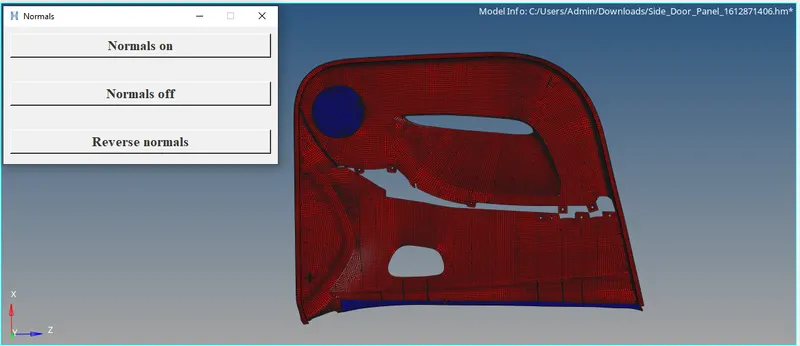
Thus the code is executed in the Hypermesh and then the errors are rectified in the Notepad++ tool. The given component is fully verified with the normals checks and also reversed in the required palces of the component.