Transient simulation of a cold plate model using ANSYS Icepak
I. Aim
To perform CFD analysis of a model consisting of two heated plates, cooled by water circulating inside the cold-plate cavity, as well as by air driven by natural convection externally.
II. Introduction
In the current project, the following activities are performed:
i. The model is designed in ANSYS Icepak using the given design specifications.
ii. Non-conformal meshing is done to refine the mesh selectively in the regions where more number of elements are desired to capture the physics of the problem effectively.
iii. The model is solved for flow and temperature.
iv. The simulation results are examined.
III. Design
The following objects are created in the model as per the given design specifications:
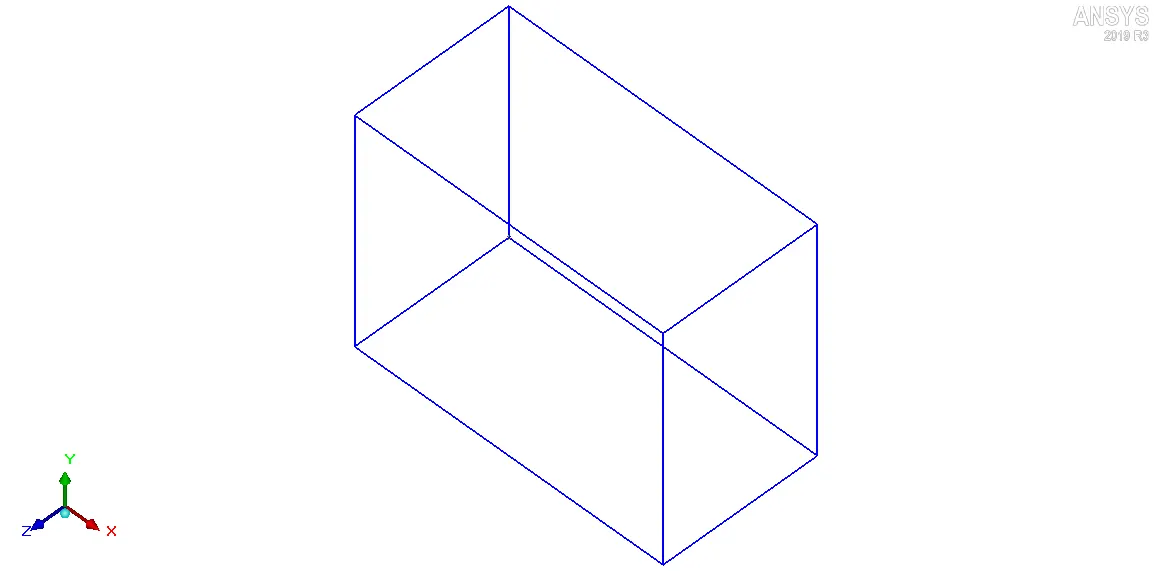
1. Cabinet: It is the bounding box within which the governing equations are solved. The following settings are used to define the Cabinet:
1.1. Geometry
i. Shape: Prism
ii. Starting X-coordinate, xS: 0
iii. Starting Y-coordinate, yS: 0
iv. Starting Z-coordinate, zS: 0
v. Length along the X-coordinate, xL: 400mm
vi. Length along the Y-coordinate, yL: 300mm
vii. Length along the Z-coordinate, zL: 200mm
1.2. Properties
The following properties are attributed to the Cabinet walls:
i. Wall type for Min X: Opening
ii. Wall type for Max X: Opening
iii. Wall type for Min Y: Default
iv. Wall type for Max Y: Default
v. Wall type for Min Z: Default
vi. Wall type for Max Z: Default
The Default wall type defines the specified Cabinet wall to have no thickness and have zero velocity and zero heat flux (adiabatic) boundary conditions. The Opening wall type defines the specified Cabinet wall as an opening object. In other words, the following two objects are automatically created as a result of attributing Opening wall type to two Cabinet walls:
i. cabinet_default_side_minx
ii. i. cabinet_default_side_maxx
The image attached below shows the Cabinet.
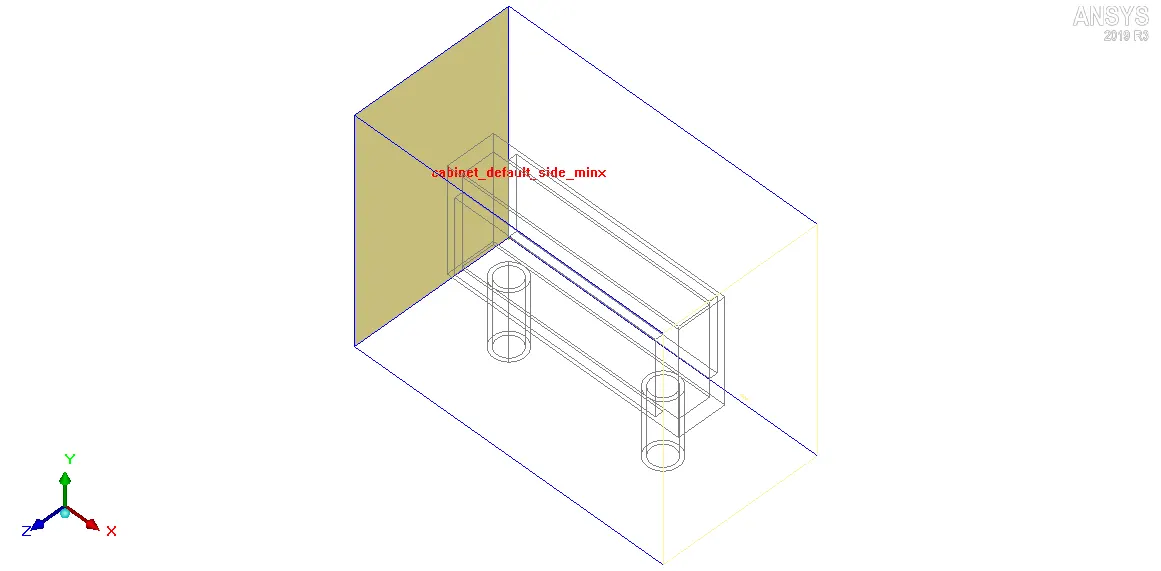
2. cabinet_default_side_minx: It is automatically created as an opening object when the Min X Cabinet wall is defined as an Opening. The following properties are attributed to cabinet_default_side_minx:
i. Temperature: ambient (20 deg. C)
ii. Static pressure: ambient (Gauge Pressure: 0 N/m2)
The image attached below shows the Cabinet with Min X wall (cabinet_default_side_minx) highlighted.
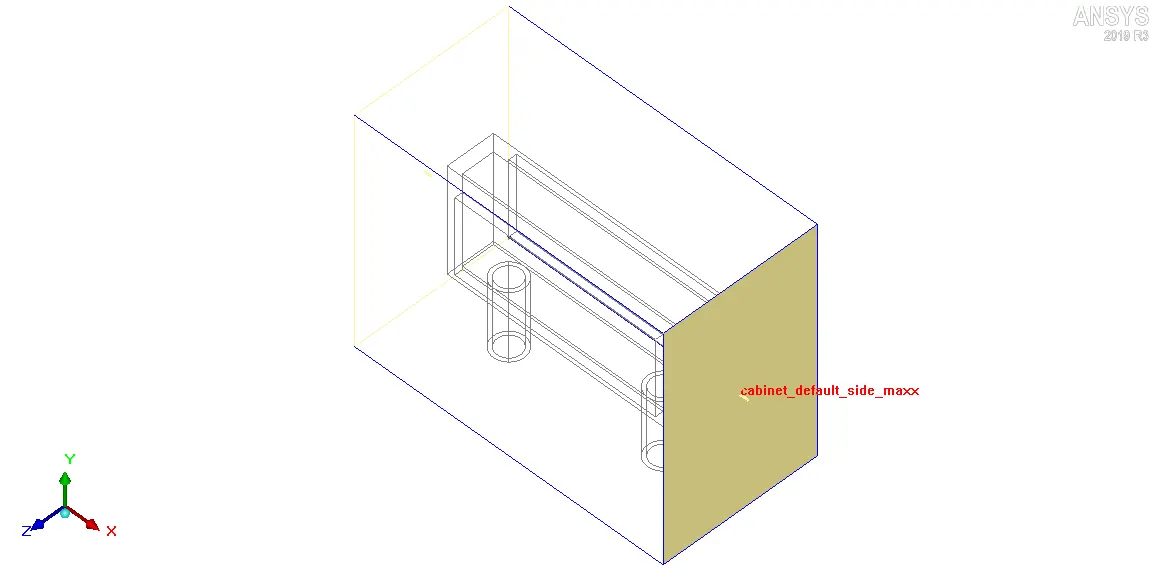
3. cabinet_default_side_maxx: It is automatically created as an opening object when the Max X Cabinet wall is defined as an Opening. The following properties are attributed to cabinet_default_side_maxx:
i. Static pressure: ambient (Gauge Pressure: 0 N/m2)
The image attached below shows the Cabinet with Max X wall (cabinet_default_side_maxx) highlighted.
4. Solid_block: It is located between the two heated plates, and forms the cavity within which cooling water is circulated. The following settings are used to define Solid_block:
4.1. Geometry
i. Shape: Prism
ii. Starting X-coordinate, xS: 50 mm
iii. Starting Y-coordinate, yS: 80 mm
iv. Starting Z-coordinate, zS: 70 mm
v. Ending X-coordinate, xE: 350 mm
vi. Ending Y-coordinate, yE: 220 mm
vii. Ending Z-coordinate, zE: 130 mm
4.2. Properties
i. Block type: Solid
ii. Solid material: Al-Extruded
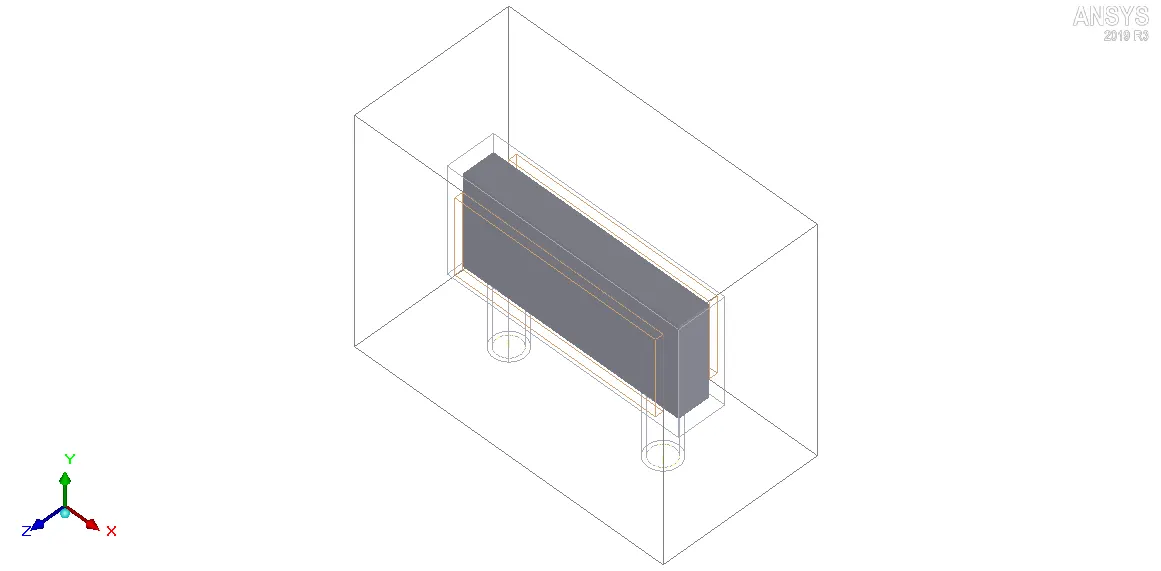
The image attached below shows the geometry with Solid_block highlighted.
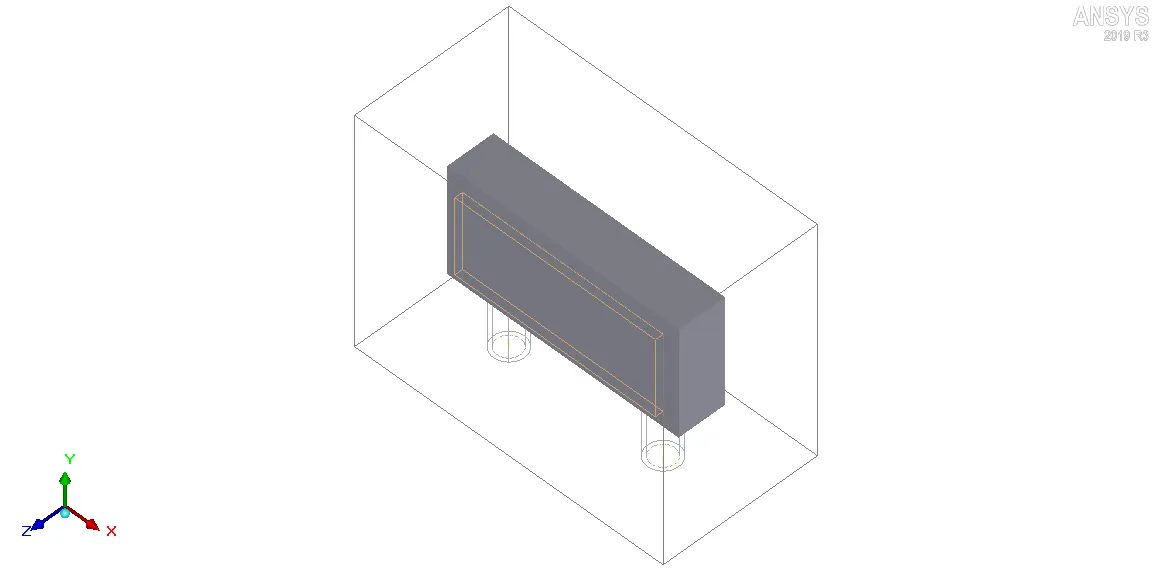
As evident from the Geometry settings, the Solid_block is a solid object with no available cavity for the circulating fluid. In order to simulate the fluid cavity, a fluid block of appropriate dimensions (equal to that of the desired cavity in the Solid_block) is defined with a higher meshing priority than the Solid_block. This informs the mesher to mesh the fluid block and not the Solid_block in the overlapping region.
5. Fluid_block: It forms the fluid domain, which represents the circulating fluid, inside Solid_block. It is imparted a higher meshing priority than the Solid_block. The following settings are used to define Fluid_block:
5.1. Geometry
i. Shape: Prism
ii. Starting X-coordinate, xS: 60 mm
iii. Starting Y-coordinate, yS: 90 mm
iv. Starting Z-coordinate, zS: 80 mm
v. Ending X-coordinate, xE: 340 mm
vi. Ending Y-coordinate, yE: 210 mm
vii. Ending Z-coordinate, zE: 120 mm
5.2. Properties
i. Block type: Fluid
ii. Fluid material: Water
The image attached below shows the geometry with Fluid_block highlighted.
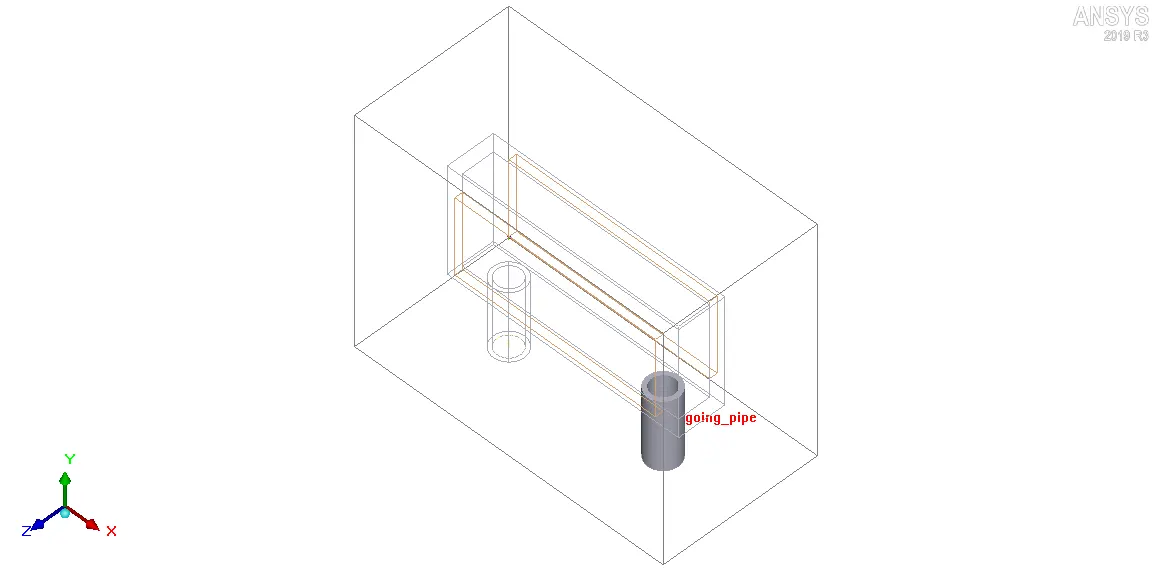
6. Outgoing_pipe: It carries the circulating fluid leaving the cold-plate cavity. The following settings are used to define Outgoing_pipe:
6.1. Geometry
i. Shape: Cylinder
ii. Plane: X-Z
iii. X-coordinate of the center of the circle, xC: 300 mm
iv. Y-coordinate of the center of the circle, yC: 0 mm
v. Z-coordinate of the center of the circle, zC: 100mm
vi. Height: 90 mm
vii. Radius: 20 mm
viii. Internal radius: 15 mm
6.2. Properties
i. Block type: Solid
The image attached below shows the geometry with Outgoing_pipe highlighted.
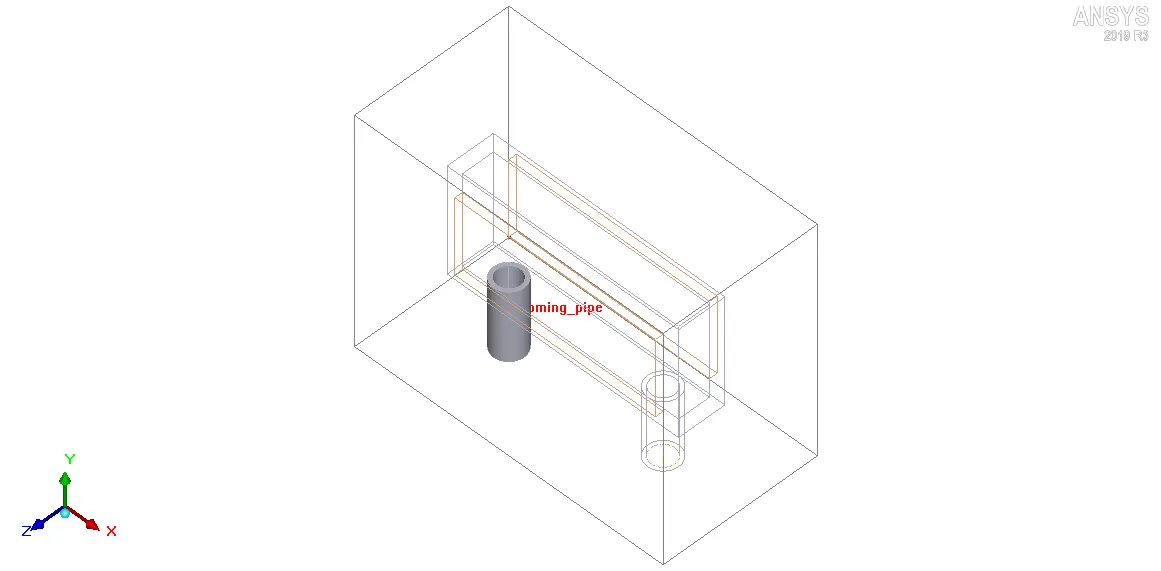
7. Incoming_pipe: It carries the circulating fluid entering the cold-plate cavity. The following settings are used to define Incoming_pipe:
7.1. Geometry
i. Shape: Cylinder
ii. Plane: X-Z
iii. X-coordinate of the center of the circle, xC: 100 mm
iv. Y-coordinate of the center of the circle, yC: 0 mm
v. Z-coordinate of the center of the circle, zC: 100mm
vi. Height: 90 mm
vii. Radius: 20 mm
viii. Internal radius: 15 mm
7.2. Properties
i. Block type: Solid
The image attached below shows the geometry with Incoming_pipe highlighted.
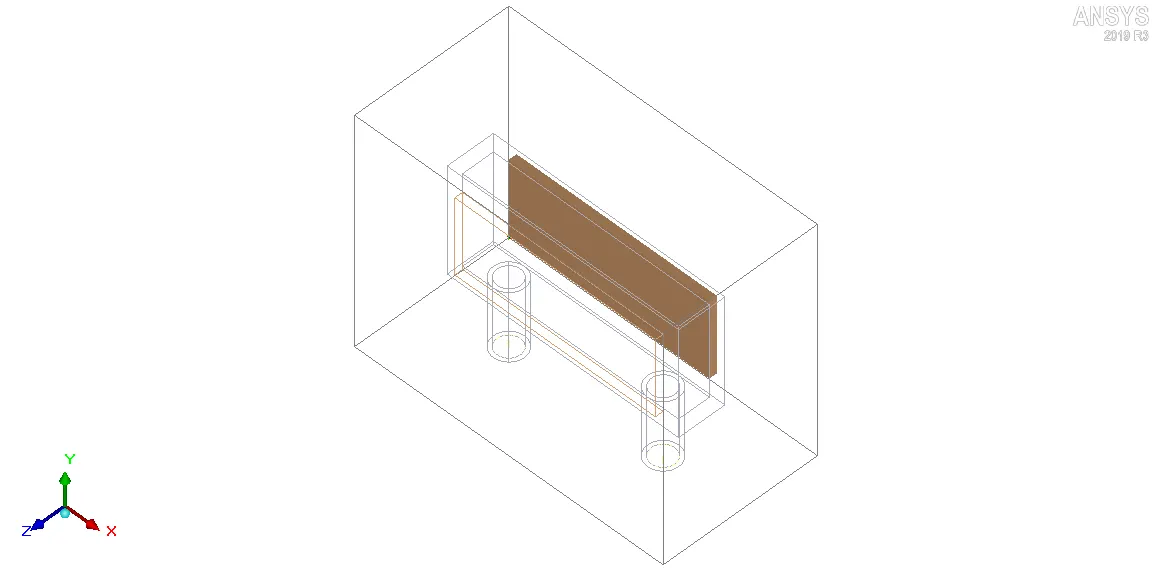
8. Plate_1: It forms one of the heated plates which is being cooled by the circulating fluid (inside the cold-plate cavity) on one side and by air driven by natural convection on the other side. The following settings are used to define Plate_1:
8.1. Geometry
i. Shape: Rectangular
ii. Plane: X-Y
iii. Starting X-coordinate, xS: 70 mm
iv. Starting Y-coordinate, yS: 100 mm
v. Starting Z-coordinate, zS: 60 mm
vi. Length along the X-coordinate, xL: 260 mm
vii. Length along the Y-coordinate, yL: 100 mm
viii. Length along the Z-coordinate, zL: 0 mm
8.2. Properties
i. Thermal model: Conducting thick
ii. Thickness: 10 mm
iii. Total power: 200 W (constant)
The image attached below shows the geometry with Plate_1 highlighted.
9. Plate_2: It forms one of the heated plates which is being cooled by the circulating fluid (inside the cold-plate cavity) on one side and by air driven by natural convection on the other side. The following settings are used to define Plate_2:
9.1. Geometry
i. Shape: Rectangular
ii. Plane: X-Y
iii. Starting X-coordinate, xS: 70 mm
iv. Starting Y-coordinate, yS: 100 mm
v. Starting Z-coordinate, zS: 130 mm
vi. Length along the X-coordinate, xL: 260 mm
vii. Length along the Y-coordinate, yL: 100 mm
viii. Length along the Z-coordinate, zL: 0 mm
9.2. Properties
i. Thermal model: Conducting thick
ii. Thickness: 10 mm
iii. Total power: 200 W (constant)
The image attached below shows the geometry with Plate_2 highlighted.
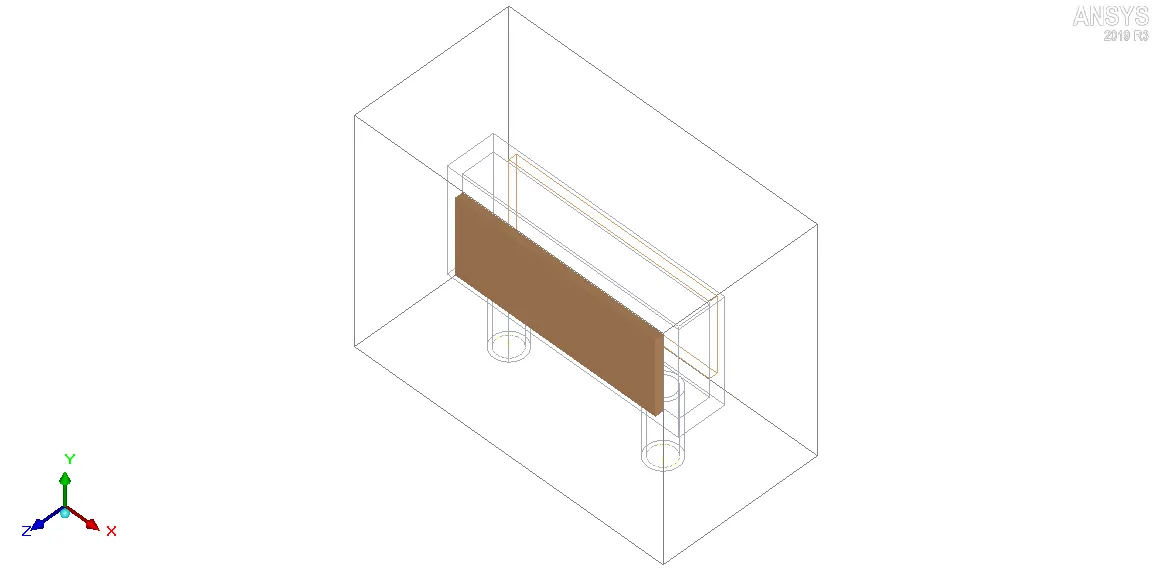
10. Inlet: It is created as an Opening object on the Min Y Cabinet wall to allow the circulating fluid to enter the Cabinet. The following settings are used to define Inlet:
10.1. Geometry
i. Type: Free
ii. Shape: Circular
iii. Plane: X-Z
iv. X-coordinate of the center of the circle, xC: 100 mm
v. Y-coordinate of the center of the circle, yC: 0 mm
vi. Z-coordinate of the center of the circle, zC: 100 mm
vii. Radius: 15 mm
10.2. Properties
i. Temperature: ambient (20 deg. C)
ii. Y-velocity: 0.2 m/s
The image attached below shows the geometry with Inlet highlighted.
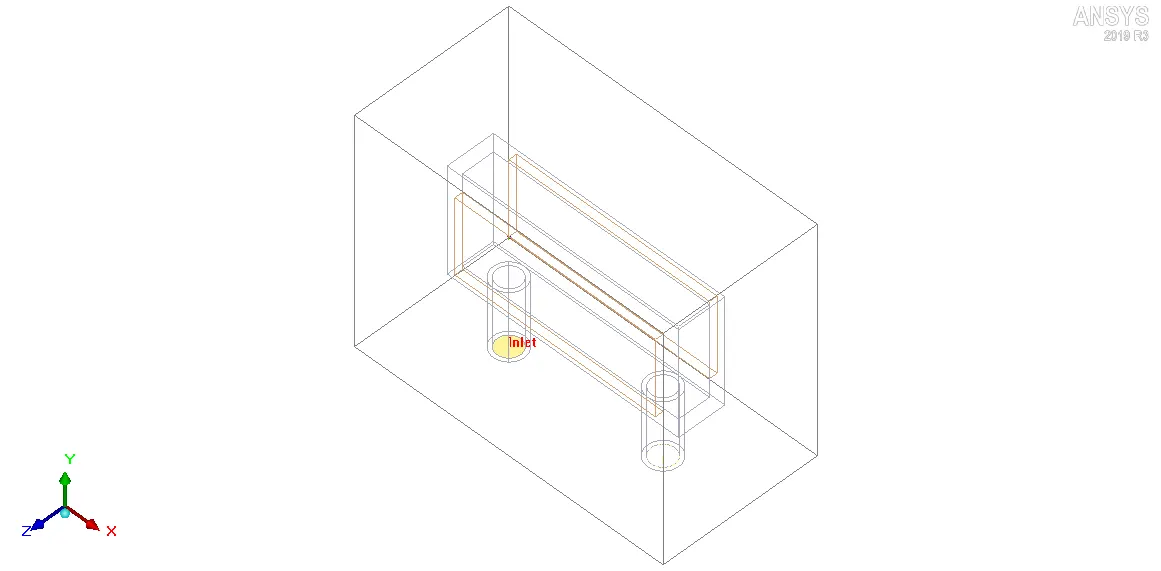
11. Outlet: It is created as an Opening object on the Min Y Cabinet wall to allow the circulating fluid to leave the Cabinet. The following settings are used to define Outlet:
11.1. Geometry
i. Type: Free
ii. Shape: Circular
iii. Plane: X-Z
iv. X-coordinate of the center of the circle, xC: 300 mm
v. Y-coordinate of the center of the circle, yC: 0 mm
vi. Z-coordinate of the center of the circle, zC: 100 mm
vii. Radius: 15 mm
The image attached below shows the geometry with Outlet highlighted.
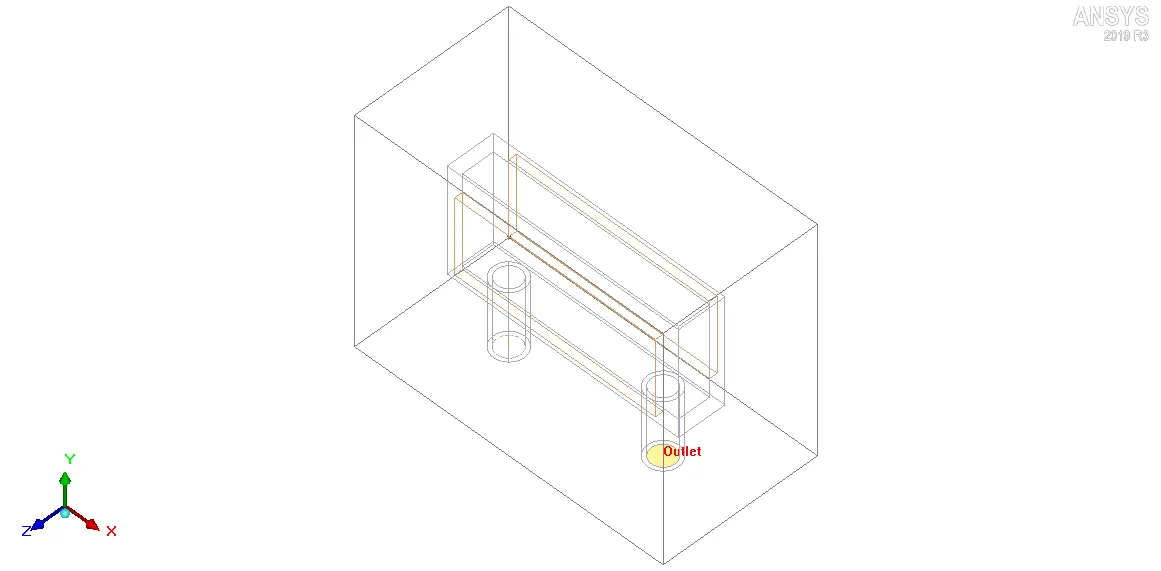
12. Incoming_fluid: It forms the fluid domain, which represents the circulating fluid, inside Incoming_pipe. The following settings are used to define Incoming_fluid:
12.1. Geometry
i. Shape: Cylinder
ii. Plane: X-Z
iii. X-coordinate of the center of the circle, xC: 100 mm
iv. Y-coordinate of the center of the circle, yC: 0 mm
v. Z-coordinate of the center of the circle, zC: 100 mm
vi. Height: 90 mm
vii. Radius: 15 mm
viii. Int radius: 0 mm
12.2. Properties
i. Block type: Fluid
ii. Fluid material: Water
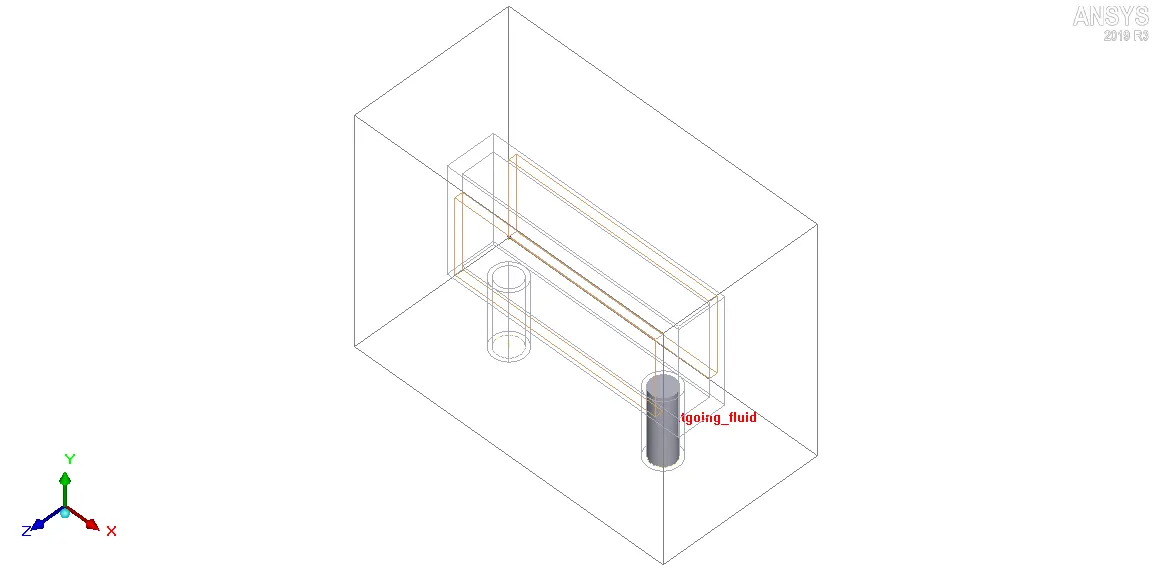
The image attached below shows the geometry with Incoming_fluid highlighted.
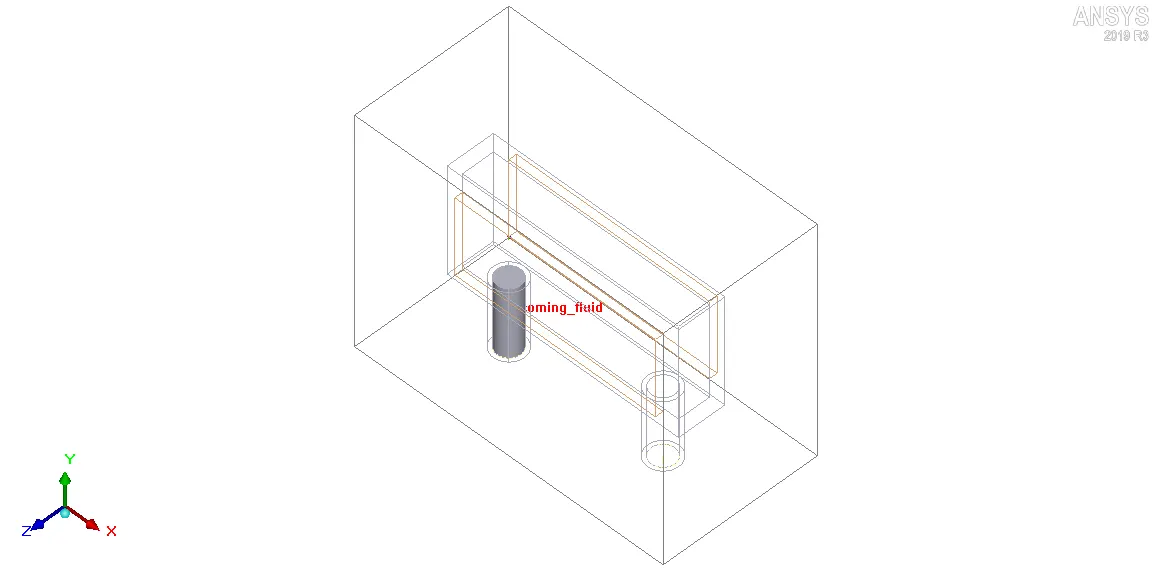
13. Outgoing_fluid: It forms the fluid domain, which represents the circulating fluid, inside Outgoing_pipe. The following settings are used to define Outgoing_fluid:
13.1. Geometry
i. Shape: Cylinder
ii. Plane: X-Z
iii. X-coordinate of the center of the circle, xC: 300 mm
iv. Y-coordinate of the center of the circle, yC: 0 mm
v. Z-coordinate of the center of the circle, zC: 100 mm
vi. Height: 90 mm
vii. Radius: 15 mm
viii. Int radius: 0 mm
12.2. Properties
i. Block type: Fluid
ii. Fluid material: Water
The image attached below shows the geometry with Outgoing_fluid highlighted.
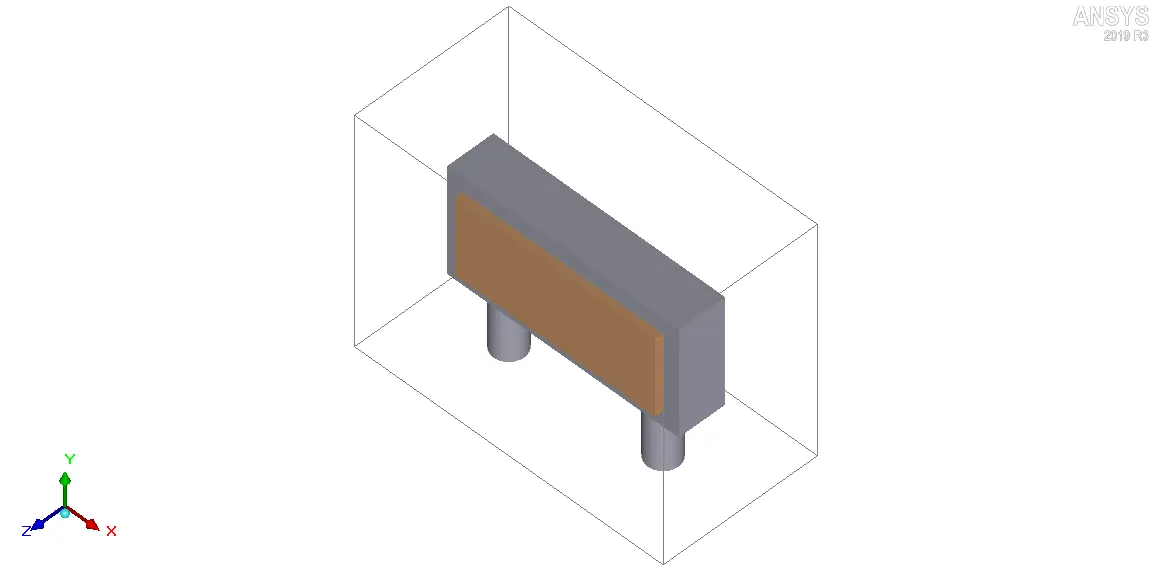
The complete geometry is shown in the image attached below.
IV. Meshing
Non-conformal meshing is employed in the current project to refine the mesh selectively. In a non-conformal mesh, two adjacent elements share only a fraction of their contiguous faces with each other. The image attached below shows an example of adjacent elements in a non-conformal mesh.
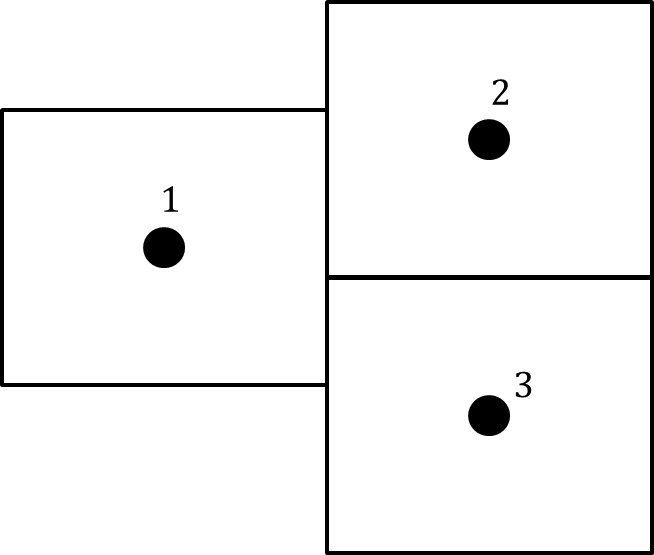
The mesh element pairs 1, 2 and 1, 3 display non-conformal mesh arrangement since they share only a part of their contiguous faces.
Non-conformal mesh prevents mesh bleeding and hence yields a lower mesh count than conformal mesh, while maintaining the same level of accuracy and resolution. In order to generate non-conformal mesh, an assembly is created with the following objects:
1. Solid_block
2. Fluid_block
3. Outgoing_pipe
4. Incoming_pipe
5. Plate_1
6. Plate_2
7. Inlet
8. Outlet
9. Incoming_fluid
10. Outgoing_fluid
The following settings are applied to further define the assembly:
1. Mesh separately: Enabled
2. Min X slack: 5 mm
3. Min Y slack: 0 mm
4. Min Z slack: 5 mm
5. Max X slack: 5 mm
6. Max Y slack: 5 mm
7. Max Z slack: 5 mm
8. Use global mesh control settings: Enabled
After creating and defining the assembly, the following settings are applied in the "Mesh control" window:
1. Mesh type: Hexa unstructured
2. Mesh units: mm
3. Concurrency: 1
4. Maximum element size along the X-coordinate: 20 mm
5. Maximum element size along the Y-coordinate: 15 mm
6. Maximum element size along the Z-coordinate: 10 mm
7. Minimum gap along the X-coordinate: 8e-5 m
8. Minimum gap along the Y-coordinate: 8e-5 m
9. Minimum gap along the Z-coordinate: 8e-5 m
Global mesh settings
1. Mesh parameters: Normal
2. Minimum elements in gap: 3
3. Minimum elements on edge: 2
4. Maximum size ratio: 5
5. Mesh assemblies separately: Enabled
Local mesh settings
1. Object parameters: Enabled
2. The following Per-object parameters are used to refine the mesh locally near the assembly:
2.1. Mesh object separately: Enabled
2.2. Use per-object parameters: Enabled
2.3. Outside low X height: 2 mm
2.4. Outside high X height: 2 mm
2.5. Outside high Y height: 2 mm
2.6. Outside low Z height: 2 mm
2.7. Outside high Z height: 2 mm
2.8. Inside low X height: 2 mm
2.9. Inside high X height: 2 mm
2.10. Inside high Y height: 2 mm
2.11. Inside low Z height: 2 mm
2.12. Inside high Z height: 2 mm
Miscellaneous settings
1. Allow minimum gap changes: Enabled
The non-conformal mesh generated using the settings outlined above contains 50730 elements and 55350 nodes. The images attached below show the mesh along different cut-planes.
1. Mesh along X plane through the center
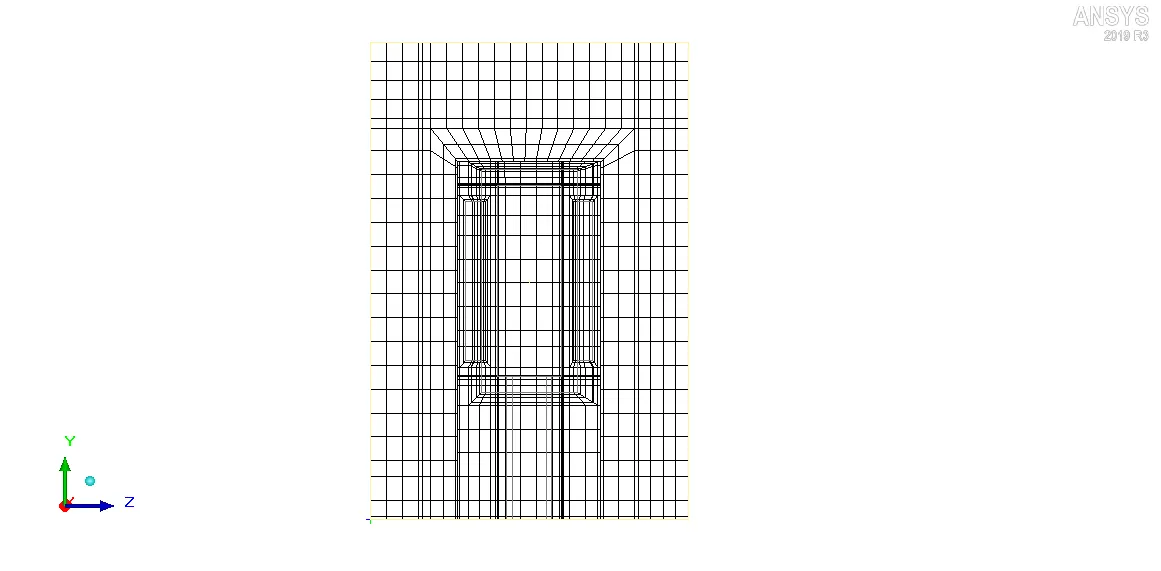
2. Mesh along Y plane through the center
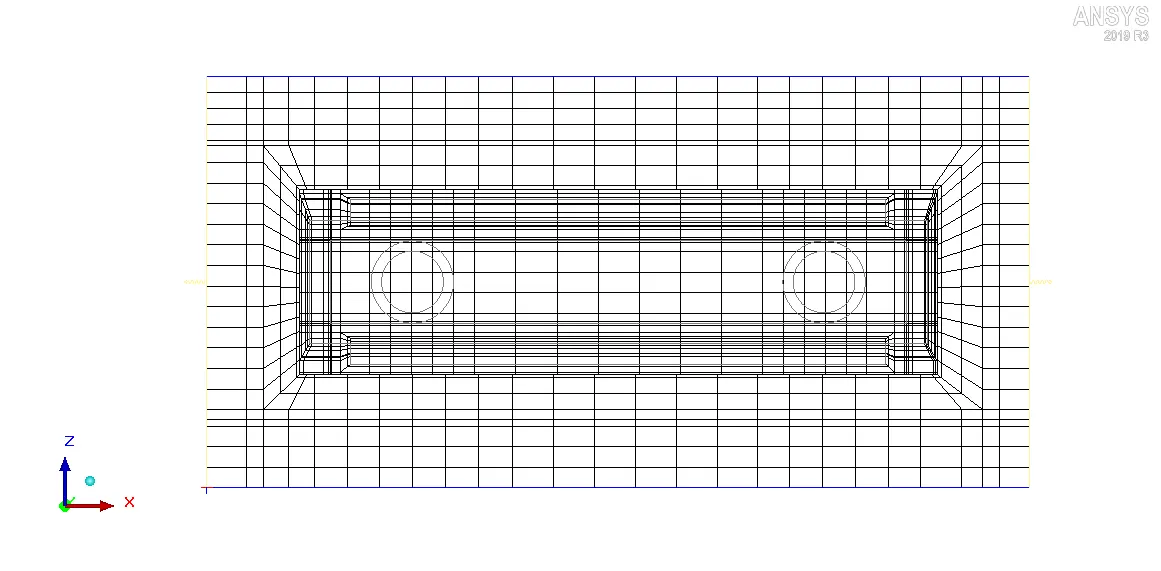
3. Mesh along Z plane through the center
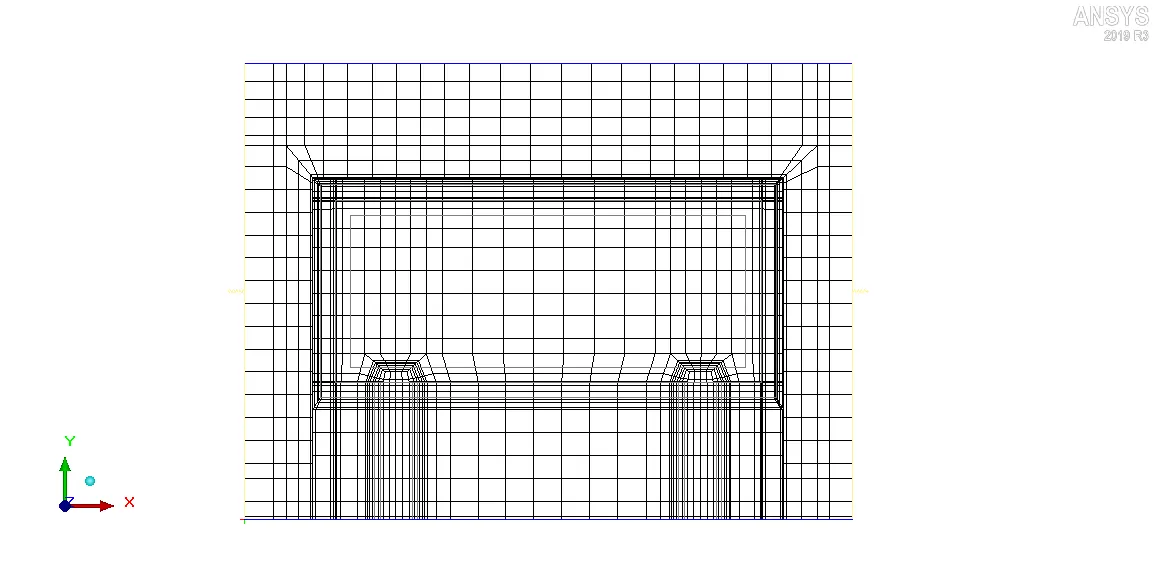
Visually, the mesh appears to be dense within and near the assembly (which is desired). The following checks are performed to further assess the mesh quality:
i. Face alignment: It is a measure of the relative face alignment between two adjacent elements in the mesh. The image attached below shows the face alignment histogram for different elements in thecurrent mesh.
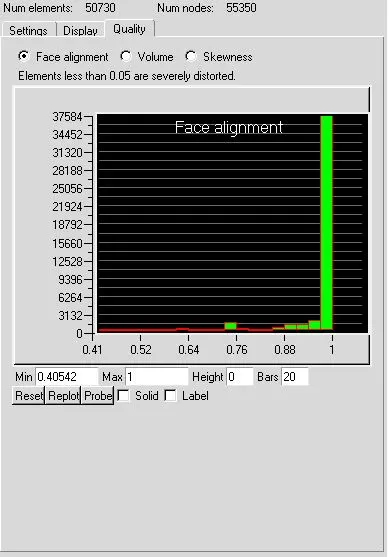
Face alignment values less than 0.15 indicate a severely distorted mesh. For the current mesh, the minimum face alignment value is 0.40542 which indicates that the mesh elements are properly aligned.
ii. Volume: It is measures the volume of all the elements in the mesh. The image attached below shows the volume histogram for different elements in the current mesh.
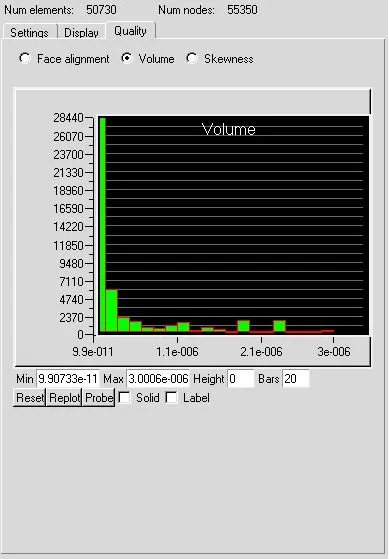
For a double precision solver (used in the current analysis) the minimum volume of mesh element should not be less than 1e-15 m3 otherwise the solver may face issues. The minimum volume of mesh element for the current mesh is 9.90733e-11 m3 which indicates that the mesh elements aren't small enough to cause problems in the solver.
iii. Skewness: It is a measure of how close to the ideal (equilateral/equiangular) a mesh element is. The image attached below shows the skewness histogram for different elements in the current mesh.
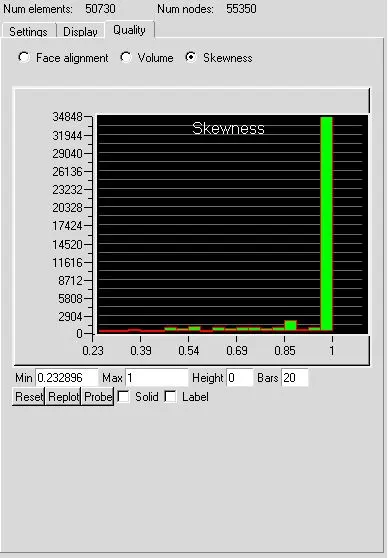
A skewness of 0 indicates that the mesh element is degenerate whereas a skewness of 1 indicates that the mesh element is ideal (equilateral/equiangular). For the current mesh, the minimum skewness is 0.232896 which indicates that the mesh elements aren't severely skewed.
V. Solver
ANSYS Icepak package employs the Fluent solver engine to solve the discretized governing equations within the computational domain. The following settings are applied in the Problem setup and Solution settings nodes of the Model manager window:
1. Problem setup
i. The governing equations are solved for flow (velocity/pressure) and temperature.
ii. Radiation modeling is disabled.
iii. Zero equation turbulence model is employed.
iv. For modeling natural convection: Boussinesq approximation is applied at an operating pressure of 101325 N/m2; the gravity vector is defined as: `-9.80665hat{i}+0hat{j}+0hat{k}`m/s2.
v. Transient simulation is performed with a time step of 1 s; the simulation starts at t=0 s and ends at t=300 s; solution is saved at an interval of 6 time steps.
vi. At t=0 s the solution is initialized as follows:
X velocity: 0.005 m/s
Y velocity: 0 m/s
Z velocity: 0 m/s
Temperature: ambient (20 deg. C)
2. Solution settings
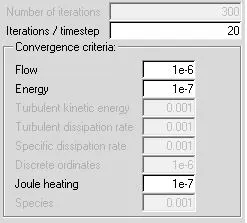
2.1. Basic settings
The image attached below shows the various parameters specified in the Basic settings node available within the Solution settings node in the Model manager window.
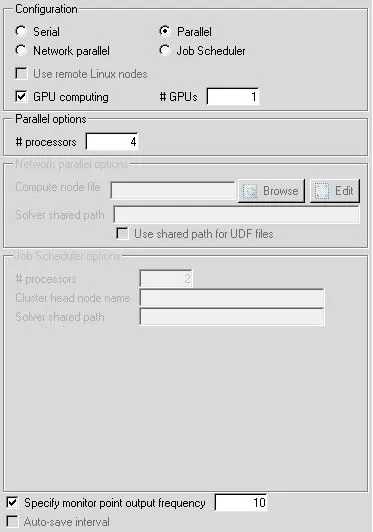
2.2. Parallel settings
The image attached below shows the various parameters specified in the Parallel settings node available within the Solution settings node in the Model manager window.
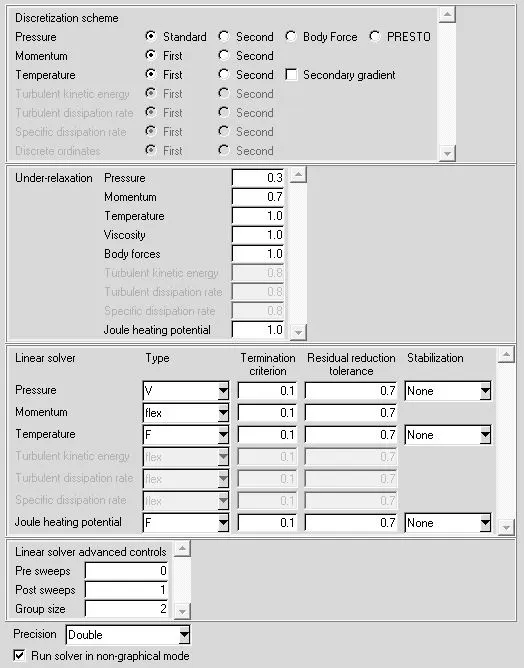
2.3. Advanced settings
The image attached below shows the various parameters specified in the Advanced settings node available within the Solution settings node in the Model manager window.
VI. Results
In the current section the simulation results are discussed:
1. Residuals
The residuals for the following governing equations are monitored:
i. Continuity equation
ii. X-Momentum equation
iii. Y-Momentum equation
iv. Z-Momentum equation
v. Energy equation
The image attached below shows the monitored residuals for the entire duration of simulation (t=0 s to t=300 s).
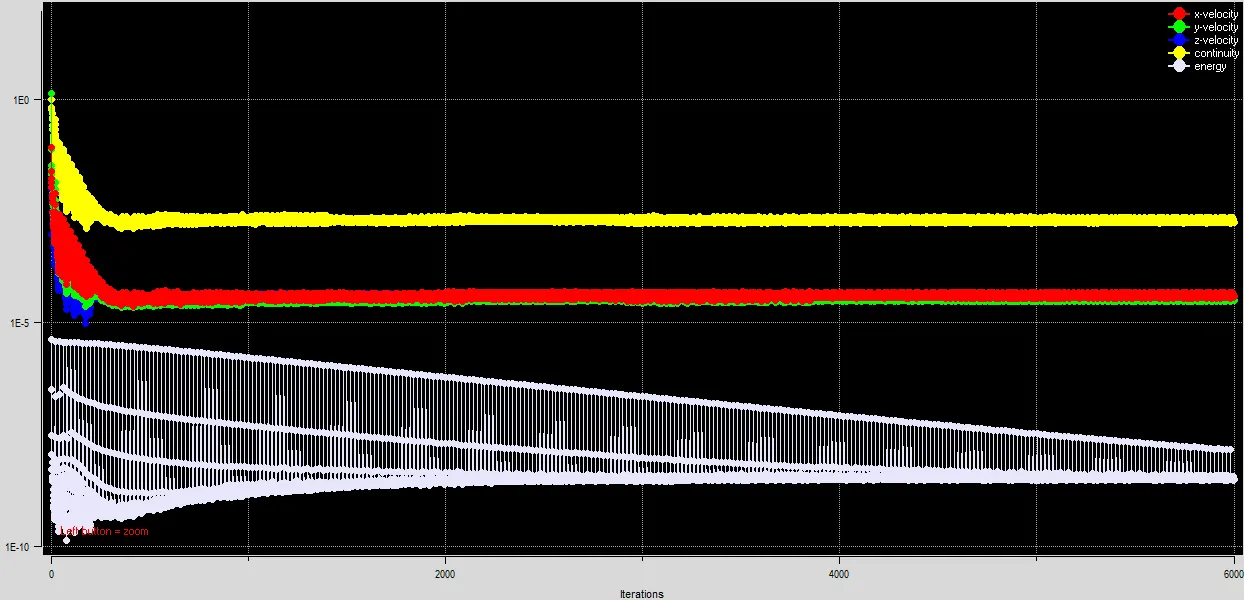
As evident from the plot, all the monitored residuals are quite small in magnitude and don't change appreciably between 4000 to 6000 iterations indicating that steady state has been achieved. The physical time equivalent to 6000 iterations is 300 s. Hence physically the steady state is achieved after 300 s.
2. Temperature monitor plots
The following four surface probes are setup to monitor average temperature over the specified surfaces for the entire duration of simulation (t=0 s to t=300 s):
i. Air_in: It is used to monitor average temperature over the object cabinet_default_side_minx.
ii. Air_out: It is used to monitor average temperature over the object cabinet_default_side_maxx.
iii. Water_in: It is used to monitor average temperature over the object Inlet.
iv. Water_out: It is used to monitor average temperature over the object Outlet.
The image attached below shows the output of all the four surface probes, defined above, as a function of time.
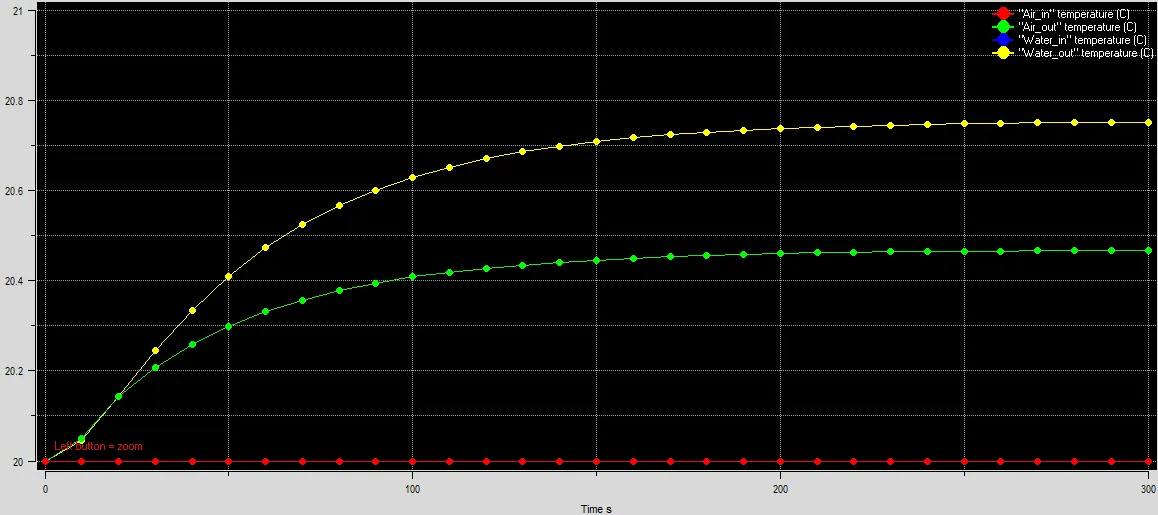
The monitor plots confirm that steady state is achieved after 300 s since the temperature values cease to change appreciably between 250 s and 300 s. The output for Water_in probe is overlapped by the output of Air_in probe and hence only one of them (Air_in) is visible. The steady state average temperature values measured by the four surface probes are as follows:
i. Air_in: 20 deg. C
ii. Air_out: 20.47 deg. C
iii. Water_in: 20 deg.C
iv. Water_out: 20.75 deg. C
Mass flow rate of air entering the system, `dot{m}_{air,i}`=0.00179785 kg/s
Mass flow rate of air leaving the system, `dot{m}_{air,o}`=0.00179785 kg/s
Mass flow rate of water entering the system, `dot{m}_{water,i}`=0.127408 kg/s
Mass flow rate of water leaving the system, `dot{m}_{water,o}`=0.127409 kg/s
The total mass flow rate entering the cabinet=`dot{M}_i=dot{m}_{air,i}+dot{m}_{water,i}=0.00179785 kg//s+0.127408 kg//s=0.12920585 kg//s`
The total mass flow rate leaving the cabinet=`dot{M}_o=dot{m}_{air,o}+dot{m}_{water,o}=0.00179785 kg//s+0.127409 kg//s=0.12920685 kg//s`
Percentage mass loss inside the cabinet, at steady state=`((dot{M}_i-dot{M}_o)/dot{M}_i)times100=-7.74times10^-4` (negligible)
Thermal energy entering the cabinet due to air=`dot{m}_{air,i}timesc_{P,air}timesT_{air,i}=0.00179785 kg//stimes1005J//kg.Ktimes20^oC=36.1368W`
Thermal energy entering the cabinet due to water=`dot{m}_{water,i}timesc_{P,water}timesT_{water,i}=0.127408 kg//stimes4180J//kg.Ktimes20^oC=10651.3088W`
Thermal energy leaving the cabinet due to air=`dot{m}_{air,o}timesc_{P,air}timesT_{air,o}=0.00179785 kg//stimes1005J//kg.Ktimes20.47^oC=36.9860W`
Thermal energy leaving the cabinet due to water=`dot{m}_{water,o}timesc_{P,water}timesT_{water,o}=0.127409 kg//stimes4180J//kg.Ktimes20.75^oC=11050.8196W`
Total thermal energy entering the cabinet=`dot{E}_i=dot{m}_{air,i}timesc_{P,air}timesT_{air,i}+dot{m}_{water,i}timesc_{P,water}timesT_{water,i}=36.1368W+10651.3088W=10687.4456W`
Total thermal energy leaving the cabinet=`dot{E}_o=dot{m}_{air,o}timesc_{P,air}timesT_{air,o}+dot{m}_{water,o}timesc_{P,water}timesT_{water,o}=36.9860W+11050.8196W=11087.8056W`
Total thermal energy generated inside the cabinet (due to heated plates)=`dot{Q}_{gen}=2times200W=400W`
Percentage loss of thermal energy inside the cabinet, at steady state=`((dot{E}_i-dot{E}_o)/dot{E}_i)times100=((10687.4456W-11087.8056W)/10687.4456W)times100=-3.75` (fairly small)
Total thermal energy carried away by air=`dot{E}_{air}=dot{m}_{air,o}timesc_{P,air}timesT_{air,o}-dot{m}_{air,i}timesc_{P,air}timesT_{air,i}=36.9860W-36.1368W=0.8492W`
Total thermal energy carried away by water=`dot{E}_{water}=dot{m}_{water,o}timesc_{P,water}timesT_{water,o}-dot{m}_{water,i}timesc_{P,water}timesT_{water,i}=11050.8196W-10651.3088W=399.5108W`
Total thermal energy carried away by both air and water=`dot{E}_T=dot{E}_{air}+dot{E}_{water}=0.8492W+399.5108W=400.36W`
Percentage of total thermal energy carried away by water=`(dot{E}_{water}/dot{E}_T)times100=99.79%`
Percentage of total thermal energy carried away by air=`100-99.79=0.21%`
It can be seen that majority of the heat generated inside the cabinet (due to heated plates) is carried away by the water (due to forced convection) and only a very small portion of it is carried away by air (due to natural convection).
3. Temperature contours
The temperature contours are plotted along different cut-planes as well as object faces to observe the temperature distribution throughout the domain at steady state (t=300 s).
3.1. Temperature contours plotted on the Z plane through the center
The image attached below shows the steady state temperature contours plotted on the cut-plane passing through the center of the cabinet and perpendicular to the Z-axis.
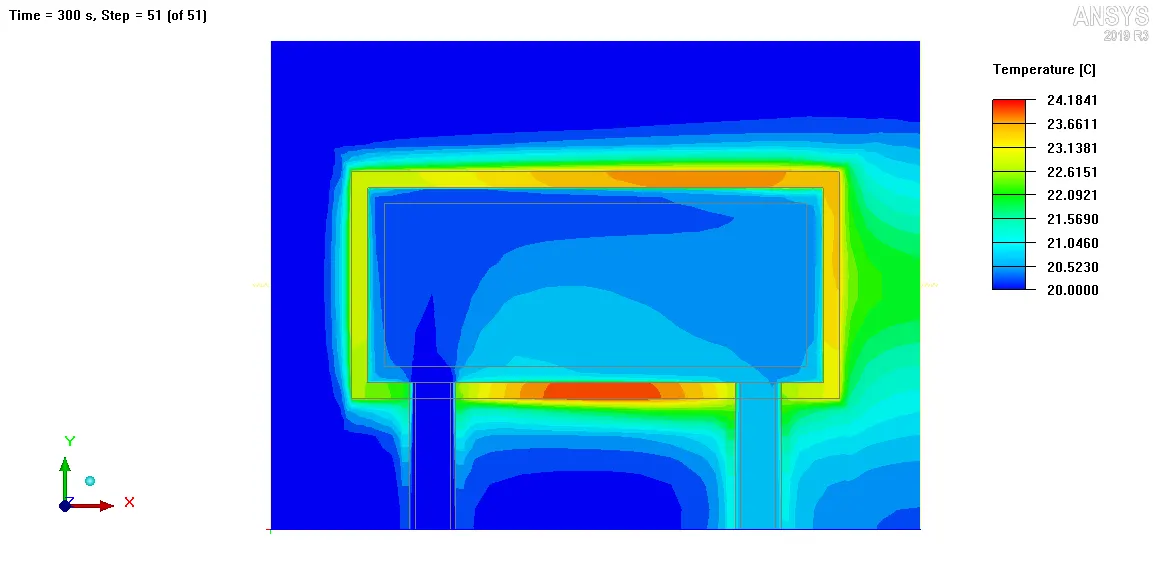
The plot clearly shows that water enters into the cold-plate cavity at ambient temperature (20 deg. C) and as it moves further inside the cavity its temperature increases. This is because of the heat transfer from Solid_block to water. The contours show the presence of thermal boundary layers around Solid_block. This is due to the heat transfer between Solid_block and air by natural convection. The thermal boundary layers on all the surfaces of Solid_block aligned along the X-coordinate, grow in the +X direction since the gravitational field is directed along -X direction. The animation attached below shows the temperature contours plotted on the Z plane through the center, as a function of time.
3.2. Temperature contours plotted on the Y plane through the center
The image attached below shows the steady state temperature contours plotted on the cut-plane passing through the center of the cabinet and perpendicular to the Y-axis.
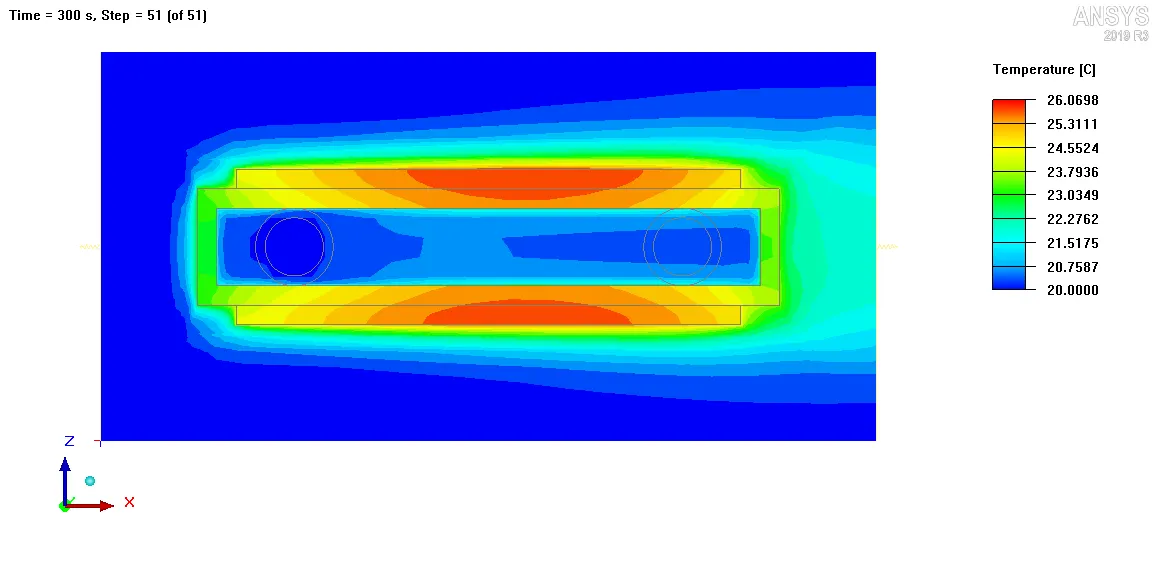
The plot shows that the heated plates achieve the highest temperature and as we move from the heated plates to Solid_block the temperature decreases. In other words temperature gradients are present in the solid domain between the heated plates and Solid_block, with the heated plates at a higher temperature. This indicates that the heated plates lose heat to Solid_block. Similarly temperature gradients are also present as we move from Solid_block to Fluid_block, with Solid_block at a higher temperature. This indicates that Solid_block loses heat to Fluid_block. Hence the heat generated in the heated plates is transferred to Solid_block (by conduction) from where it is finally dissipated into Fluid_block (by forced convection). The contours also clearly show the presence of thermal boundary layers on the outer surfaces of the heated plates. These thermal boundary layers are formed as a result of the heat transfer between the heated plates and the ambient air (by natural convection), and they (thermal boundary layers) grow against the gravitational field. The animation attached below shows the temperature contours plotted on the Y plane through the center, as a function of time.
3.3. Fluid face temperature contours
The image attached below shows the steady state temperature contours plotted on the outer faces of all the objects in the geometry that are defined as fluid type.
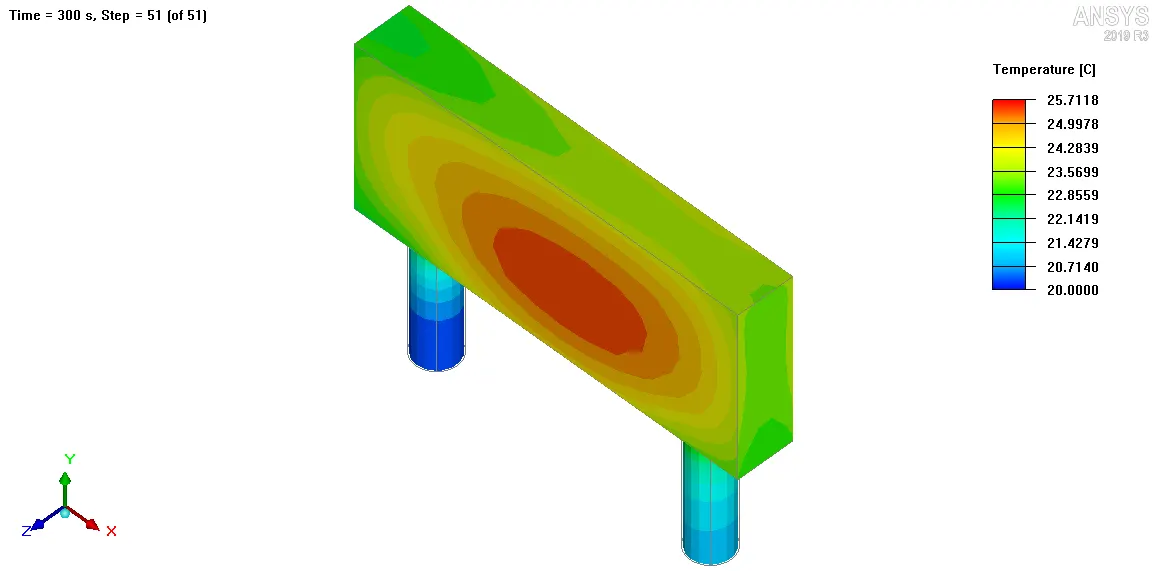
According to the contour plot the maximum temperature (25.71 deg. C) is observed beneath the heated plates. The outgoing fluid is hotter than the incoming fluid which indicates that the circulating fluid gains heat as it moves through the cold-plate cavity. The animation attached below shows the fluid face temperature contours as a function of time.
3.4. Solid face temperature contours
The image attached below shows the steady state temperature contours plotted on the outer faces of all the objects in the geometry that are defined as solid type.
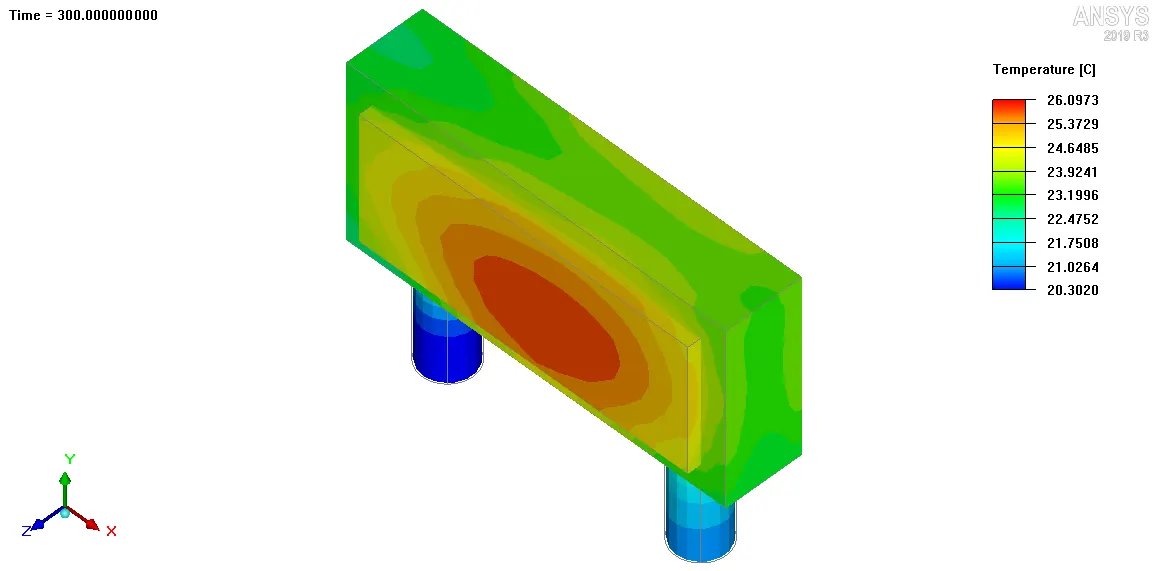
According to the contour plot, the maximum temperature (26.10 deg. C) is observed over the heated plates. The animation attached below shows the solid face temperature contours as a function of time.
4. Velocity contours
The velocity contours are plotted along different cut-planes to observe the velocity distribution throughout the domain at steady state (t=300 s).
4.1. Velocity contours plotted on the Z plane through the center
The image attached below shows the steady state velocity contours plotted on the cut-plane passing through the center of the cabinet and perpendicular to Z-axis.
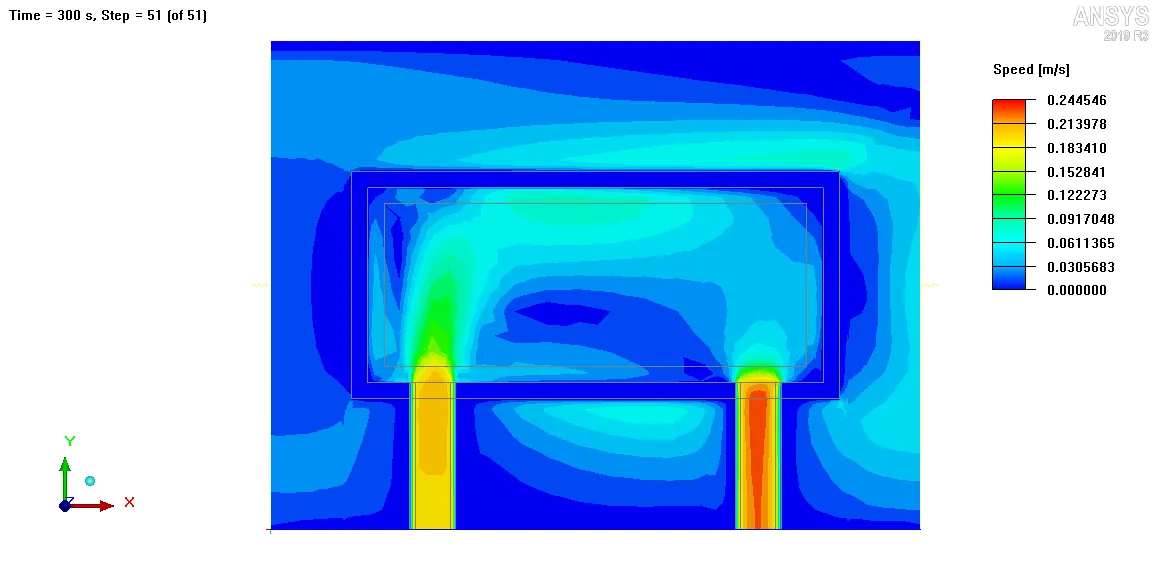
The contour plot clearly shows the convection cells in the XY plane present around Solid_block at Min Y and Max Y walls. These convection cells represent the convection currents established in the ambient air due to the heat transfer between Solid_block and ambient air by natural convection. The animation attached below shows the velocity contours plotted on the Z plane through the center, as a function of time.
4.2. Velocity contours plotted on the Y plane through the center
The image attached below shows the velocity contours plotted on the cut-plane passing through the center of the cabinet and perpendicular to Y-axis.
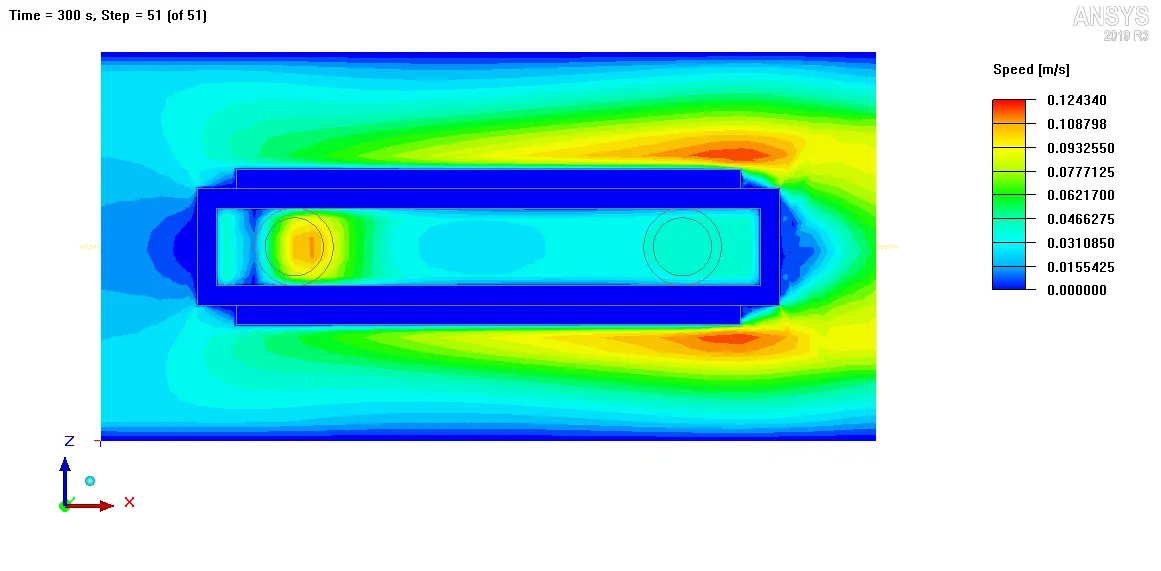
The contour plot clearly shows the convection cells in the XZ plane present around the heated plates. These convection cells represent the convection currents established in the ambient air as a result of the heat transfer between heated plates and ambient air by natural convection. The animation attached below shows the velocity contours plotted on the Y plane through the center, as a function of time.
5. Velocity vectors
The velocity vectors are plotted along different cut-planes to gain further insight into the velocity distribution throughout the domain at steady state (t=300 s).
5.1. Velocity vectors plotted on the Z plane through the center
The image attached below shows the steady state velocity vectors plotted on the cut-plane passing through the center of the cabinet and perpendicular to Z-axis.
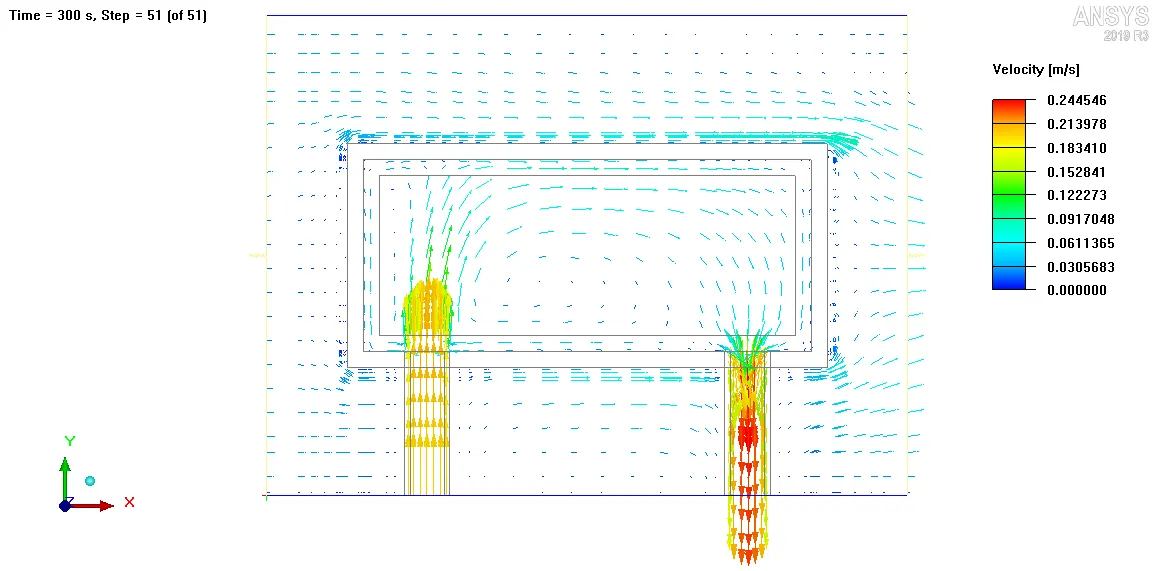
The vector plot clearly shows the flow directions of incoming fluid, outgoing fluid and air but is unable to capture the convection cells observed in the velocity contour plot. The animation attached below shows the velocity vectors plotted on the Z plane through the center, as a function of time.
5.2. Velocity vectors plotted on the Y plane through the center
The image attached below shows the velocity vectors plotted on the cut-plane passing through the center of the cabinet and perpendicular to T-axis.
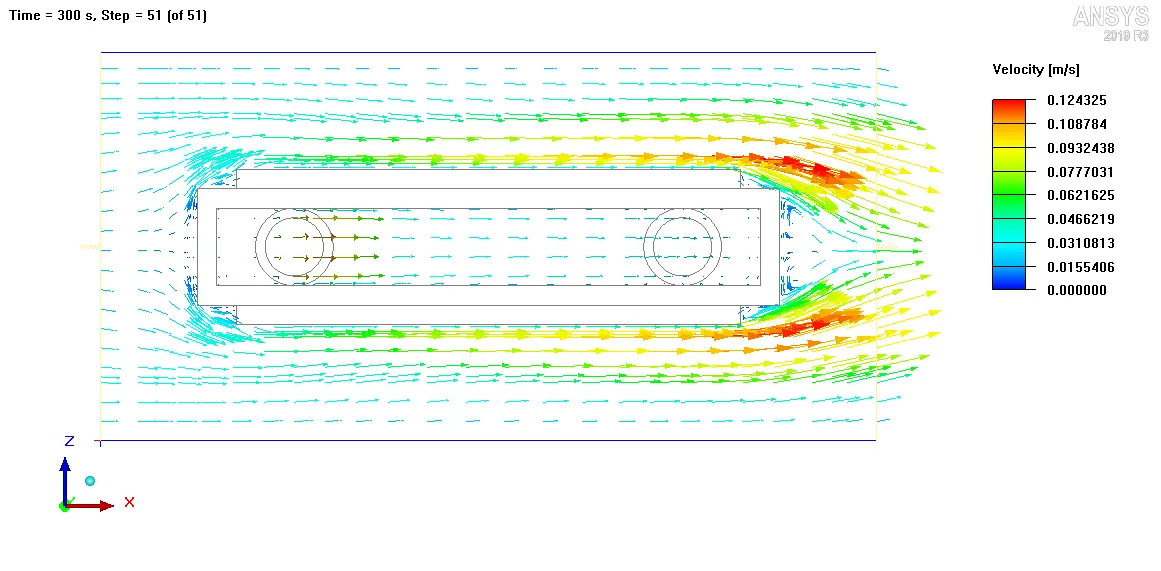
The vector plot shows that air accelerates as it moves up against gravity due to natural convection. The vector plot successfully captures the recirculation zone behind Solid_block but is unable to capture the convection cells observed in the velocity contour plot. The animation attached below shows the velocity vectors plotted on the Y plane through the center, as a function of time.
VII. Conclusion
In the current project, transient CFD simulation of cold-plate cavity was performed using ANSYS Icepak. The model was created using the given design specifications. Non-conformal meshing was employed with local mesh refinement using object parameters. Zero equation turbulence model was employed to capture turbulence. The gravity vector was defined along -X direction. Four surface probes were defined to monitor average temperature over four surfaces in the computational domain. A time step of 1 s was used for trasient simulation. The discretized governing equations were solved on the computational mesh for flow and temperature using Fluent solver engine. The following conclusions were drawn based on the simulation results:
1. Both the residual plot and the monitor plot showed that steady state is achieved after 6000 iterations equivalent to 300 s of physical time.
2. The average temperature of air leaving the cabinet was measured as 20.47 deg. C and the average temperature of water leaving the cabinet was measured as 20.75 deg. C.
3. The temperature contour plots showed the presence of thermal boundary layers on the outer surfaces of the heated plates and Solid_block as a result of heat transfer between them and the ambient air by natural convection under the presence of gravitational field.
4. The velocity contour plots showed the presence of convection cells established in the ambient air as a result of heat transfer by natural convection.
5. According to the fluid face temperature contours, the maximum temperature (25.71 deg. C) is observed beneath the heated plates.
6. According to the solid face temperature contours, the maximum temperature (26.10 deg. C) is observed over the heated plates.
7. Calculations showed that 99.79% of the total heat generated within the plates at steady state was carried away by the circulating water (forced caonvection) and only 0.21% of it was carried away by air (natural convection).