Week 4: Project - Transient simulation of flow over a throttle body
Aim
To simulate a transient state case of fluid flow over a throttle body
- Objective
To set up and run the transient state simulation for flow over throttle body and post process for the following:
- Mesh profile (i.e surface with edges)
- Plots for pressure, velocity, mass flow rate and total cell count
- Animation capturing the throttle movement
Throttle profile info:
- From 0 to 2 ms the valve should rotate by 25 degrees
- From 2 to 4ms it should stay at 25 degrees
- After which by 8ms the valve should get back to its original position
- End time calculation for the simulation
For the flow characteristics to be fully developed, it is necessary that the simulation time captures flow of fluid particles from inlet to the outlet. As a good practice, we consider 4 times the flow time. The end time calculation is shown below:
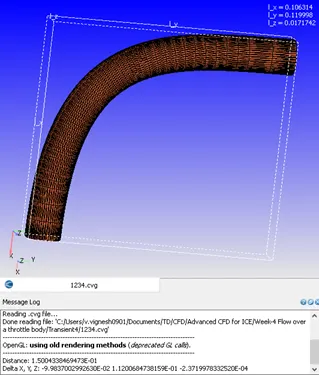
Fig 1: Characteristics length of elbow tube as calculated using converge
Characteristic length = 0.15 m ~0.2 m
Average velocity observed for steady state case = 80 m/s
Flow time from inlet to outlet = 0.2/80 = 0.0025 s
Simulation end time= 4 x flow time = 0.01 s
Using the total simulation time to be 10 ms, we introduce three cases- throttle completely open, partially closed and then returning to initial position.
- Procedure
Using the same geometry and boundary flags created for the steady state case, we proceed for the case setup.
3.1 Case Setup
Application typeà Time-based
Materialsà Predefined mixture- Air & Gas simulation
Speciesà N2 & O2
Run parametersà Solver: Transient
Simulation time parametersà Start time = 0.00 sec, End time=0.01 sec; Time step: 1e-9 to 1 second; Max. CFL for convection =1.0
Boundary conditions:
|
Boundary |
Type |
Property |
Value |
|
Inlet |
Inflow |
Pressure |
150000Pa |
|
Outlet |
Outflow |
Pressure |
100000Pa |
|
Elbow wall |
Wall |
No slip |
- |
|
Throttle |
Wall |
Rotating |
- |
Region creationà Assign all boundaries
Region initializationà O2 mass fraction=0.23 , N2 mass fraction = 0.77
Physical modelà RNG k-Ɛ turbulence model
Grid controlà Fixed embedding (To refine mesh near the throttle)
Base grid: dx= 0.002 m, dy= 0.002 m, dz= 0.002 m
Fixed embeddingà Boundary ID: Throttle, Mode: Permanent, Scale: 2
3.2 Throttle boundary rotation rate
The boundary type for the throttle is set as Wall type with wall motion type- Rotating. The surface movement is marked as Moving. For defining the rotation rate, we determine the rotation axis and the centre of the throttle.
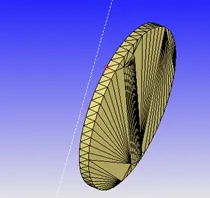
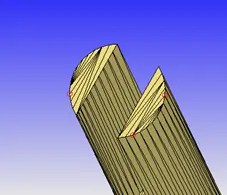
Fig 2: Arc center and axis measurement for the throttle body
The extruded cylinder in the throttle body is viewed at and using the Measure command à Direction àTwo vertices , the rotation center and the normal is determine by marking three vertices.
Using this, the boundary condition for the throttle body is set and the rotation rate is assigned using an input file as shown below:
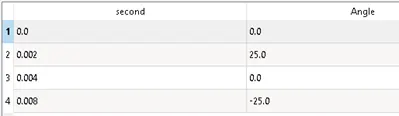
Fig 3: Throttle boundary condition input file
3.3. Final validation and export
After completing the setup, a final validation is performed to check for errors and if no issues are found, the input files are exported to the directory.
3.4. Performing simulation
The simulation is performed using the cgywin command prompt terminal and the output files are generated.
- Results and discussion
4.1 Total cell count
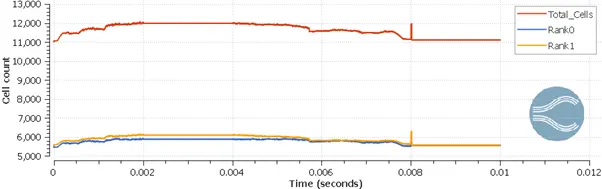
Fig 4: Total cell count vs time plot
It can be seen that the cell count varies with time. This is due to the fixed embedding meshing method which adapts with the throttle rotation. After 8 ms, there is no rotation of the throttle and we can see a constant cell count for the time range upto end time.
4.2 Mesh (surface with edges)
The below animation shows the surface with edges view post processed using Paraview. It can be noted that the fixed embedding is re-meshed in real time based on the position of the throttle body.
4.3 Mass flow rate
The mass flow rate plot shows the growth of the fluid flow upto 2 ms. The throttle rotation from 2ms to 4 ms results in oscillations which reduce the mass flow across the outlet surface. This trend is reversed as the throttle returns to its original position.
Also, the sum of mass inflow and outflow remains constant over the time steps indicating the stability of solver used.
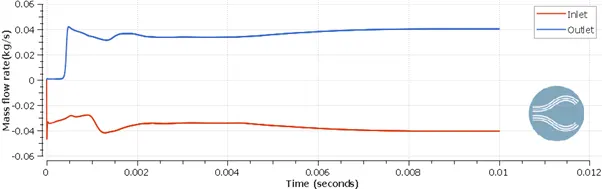
Fig 5: Mass flow rate plot
4.4 Velocity profile
The effect of the throttle movement on the velocity characteristics can be studied by plotting the streamlines. As shown in the animation below, we observe oscillations in the streamlines as they encounter the throttle body. The fluid flow separates at the throttle wall and reattaches after a certain distance towards the outlet.
According to the continuity equation, the discharge through the outlet remains constant. Thus, at regions in between the throttle wall and the elbow wall where is reduction in the area due to throttle movement, the velocity is found to increase significantly. The velocity obtained is in the range of 210 m/s and this velocity streamlines intermix with the mainstream at the reattachment region.
The velocity contour at the slice created along the z-axis shows that the flow development from the inflow towards the outflow. As the throttle rotates, there is a drop in the outlet velocity as the flow is restricted. After returning of the throttle valve to its original position , the velocity profile regains the lost characteristics and similar velocity magnitude is obtained at the outlet.
4.5 Pressure
In accordance with the Bernoulli’s principle, the increase in velocity as the fluid flows in the elbow is compensated by a drop in the pressure. Thus, we see a reduction in the outlet pressure as the throttle valve is opened.
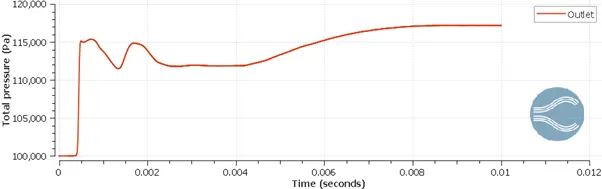
Fig 6: Total pressure at outlet plot
At the throttle wall where the flow separation occurs, we observe distinct characteristics. The surface of throttle with normal vector against the fluid flow experiences an increase in the pressure where the opposite surface experiences an drop in pressure. This can be explained by the drop in velocity on encountering the throttle wall. As the flow separates, a wake region is created in the opposite side resulting in increased fluid flow and recirculation. This results in low pressure contours at this region.
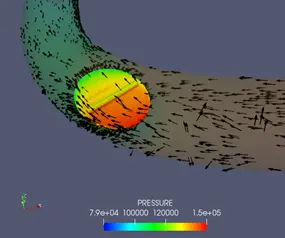
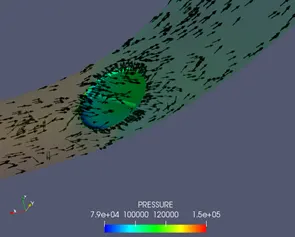
Fig 7: Pressure contours at the throttle wall
- Conclusion
Thus, the transient state case of flow over throttle body is successfully simulated.