Week 4: Project - Steady state simulation of flow over a throttle body
Aim
To simulate a steady state case of fluid flow over a throttle body
- Introduction
Throttle body finds its application in mechanical devices where the fluid flow is to be controlled by constriction or obstruction. The most common application is in the internal combustion engines where a butterfly valve is used to control the air inflow into the intake manifold of the engine. By controlling the amount of air flow, the fuel intake is determined using sensors and the power output is controlled. Thus, when a driver pushes the accelerator pedal, the throttle valve is forced open allowing air flow.
In the given study, we study the throttle body with a scaled down geometry to simulate the fluid flow for a steady state case where the throttle is completely open.
- Objective
To set up and run the steady state simulation for flow over throttle body and post process for the following:
- Mesh profile (i.e surface with edges)
- Plots for pressure, velocity, mass flow rate and total cell count
- Procedure
3.1 Geometry
The .stl file of the throttle body geometry is imported into the converge studio. Using the transform command the dimensions are scaled down to SI units (metres). As shown the figure, the geometry consists of an elbow wall fitted with a throttle.
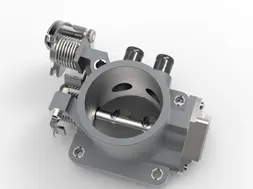
Fig 1: Geometry
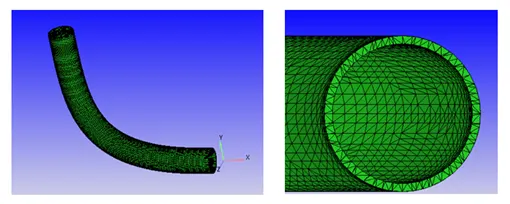
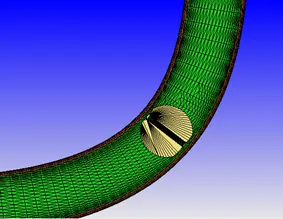
Fig 2: Sectional view with throttle
3.1 Surface preparation
As we are simulating the fluid flow inside the elbow wall, the first step is to clean the surface. This involves removing the surface thickness of the elbow wall.
In order to complete the fluid volume, the open edges at the inlet and outlet are patched using the Patch command in converge.
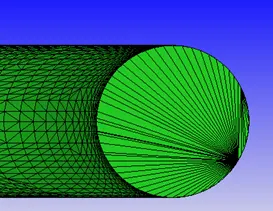
Fig 3: Geometry after surface preparation
3.3 Boundary flag
We define the boundaries with a boundary flag and for the given case, the following flag are generated:
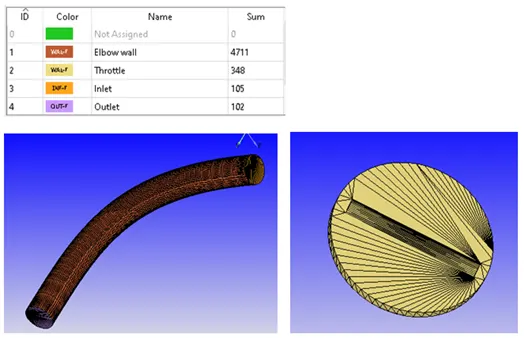
Fig 4: Boundary flag
3.4 Case Setup
Application typeà Time-based
Materialsà Predefined mixture- Air & Gas simulation
Speciesà N2 & O2
Run parametersà Solver: Steady state solver
Simulation time parametersà 0 to 15000 cycles ; Time step : 1e-9 to 1 second ; Max. CFL for convection =1.0
Boundary conditions:
|
Boundary |
Type |
Property |
Value |
|
Inlet |
Inflow |
Pressure |
150000Pa |
|
Outlet |
Outflow |
Pressure |
100000Pa |
|
Elbow wall |
Wall |
No slip |
- |
|
Throttle |
Wall |
No slip |
- |
Region creationà Assign all boundaries
Region initializationà O2 mass fraction=0.23 , N2 mass fraction = 0.77
Physical modelà RNG k-Ɛ turbulence model
Grid controlà Fixed embedding (To refine mesh near the throttle)
Base grid: dx= 0.002 m, dy= 0.002 m, dz= 0.002 m
Fixed embeddingà Boundary ID: Throttle, Mode: Permanent, Scale: 2
- Final validation and export
After completing the setup, a final validation is performed to check for errors and if no issues are found, the input files are exported to the directory.
- Performing simulation
The simulation is performed using the cgywin command prompt terminal and the output files are generated.
The commands used are:
- Command for running converge solver
mpiexec.exe -n 4 "C:\Program Files\Convergent_Science\CONVERGE\3.0.16\bin\intelmpi\converge.exe" restricted </dev/null> logfile &
- Command for tailing progress
Tail -10 logfile
- Command for post converting output files to Paraview compatible binary extension
mpiexec.exe –n 4 post_convert_30_mpmpi_64.exe
- Results and discussion
6.1 Mass flow rate and convergence
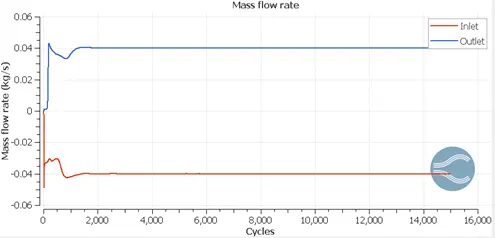
Fig 5: Mass flow rate for inlet and outlet
Using the line plot for mass flow rate at the inlet and outlet boundaries, we can note the convergence of the solution at about 4000 cycles. Also, it can be seen that the sum of mass flow across inlet and outlet is zero for the entire range of simulation. This validates the solver used for simulating the fluid flow.
6.2 Total cell count
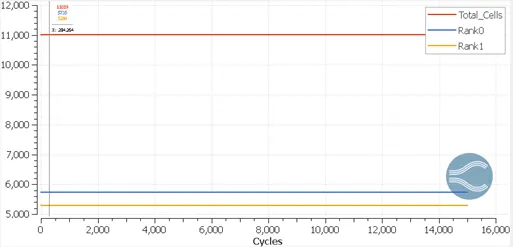
Fig 6: Plot of total cell count
The simulation is run using two processor in parallel and the total cell count is found to be 11,000 cells.
6.3 Mesh (Surface with edges)
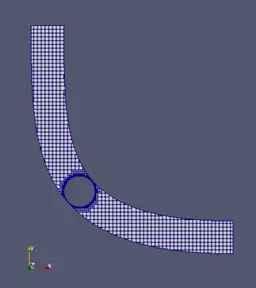
Fig 7: Surface with edges
The post converted output files are imported into Paraview and slice is made along the z-direction. The above figure shows the mesh generated. It can be seen that a fixed embedding mesh grid is generated around the throttle. An accepted convention is to include at least two cells between the walls and the fixed embedding is able to achieve that. The below figure shows a detailed view of the fixed embedding
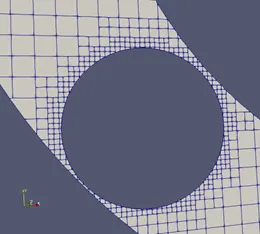
Fig 8: Fixed embedding at the throttle
6.4 Velocity contour
The fluid flow can be explained by studying the velocity profile generated about the slice plane generated. The below figure describes the contour plot generated for the velocity characteristic when the system has reached a steady state. It can be noted that the velocity profile is in accordance with the boundary layer theory with the maximum velocity observed near the central axis of the elbow.
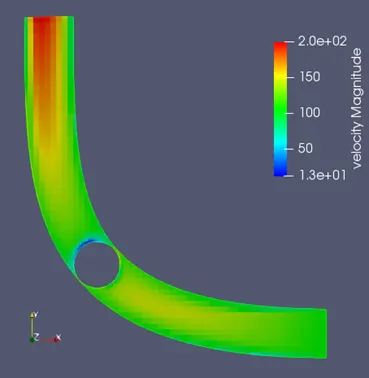
Fig 9: Velocity contour
The fluid inflow is uniform upto the throttle. As the throttle is open, the fluid flows through the elbow. However, along the plane of the throttle valve, we can see a low velocity region at the wake region of the throttle. This is due to the noslip condition at the walls of the throttle which restricts the fluid flow and causes the streamlines to separate from the mainstream flow. As we move away from this region towards the outlet, the separated flow re-attaches with the mainstream flow and the steady fluid outflow can be seen at the outlet boundary.
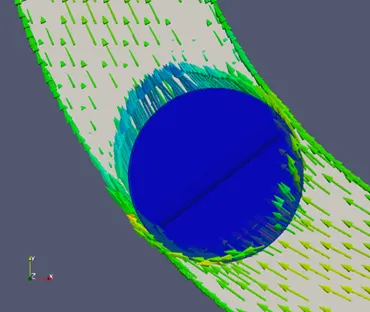
Fig 10: Velocity vector plot
The vector plot shows the flow restriction at the wall of the throttle. The flow separation can be explained using the streamlines. In paraview, the Stream Tracer with point-based seeding technique is used to generate the streamlines of the fluid flow.
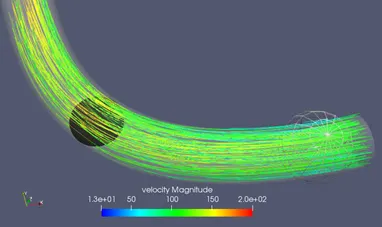
Fig 11: Velocity streamlines along the elbow
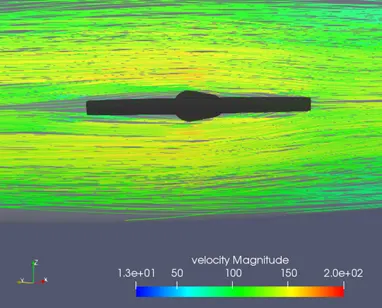
Fig 12: Flow separation at the throttle
Fig 11 shows the streamlines which flow past the open throttle valve. It can be seen that due to the oscillations developed in the fluid flow after encountering the throttle, the velocity magnitude changes as we move towards the outlet. As the thickness of the wall is small, the impact of the no slip throttle wall is less and a uniform profile is developed at the outlet.
The flow separation is depicted clearly in Fig 12 where the streamlines separate upon contact with the throttle wall and a wake region is generated. However, due to the small thickness of throttle valve, the fluid recirculation is not significant and the flow re-attaches with the mainstream after a small distance along the flow direction.
6.5 Pressure contour
As the fluid flows across the elbow, the drop in velocity results in the increase in the pressure of the fluid as the kinetic energy is converted to pressure energy (and the total energy of the system remains constant). This explains the low pressure near the outlet as there is a significant increase in the velocity of the fluid when compared to the inlet region.
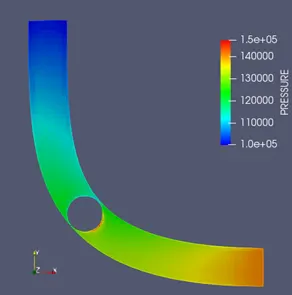
Fig 13: Pressure contour
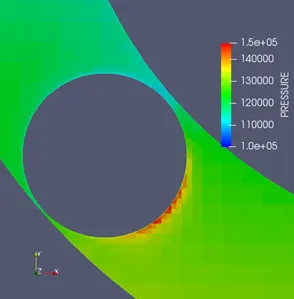
Fig 14: Pressure contour at the throttle
Also, we can see the pressure magnitude is the highest at the throttle walls as this is the region where flow separation occurs and the velocity is found to drop significantly. As the fluid re-attaches the pressure drops and this can be validated from the pressure contour plot shown in the figures.
- Conclusion
Thus, the steady state case of an open throttle body is simulated using converge CFD and post processing is done using Paraview.