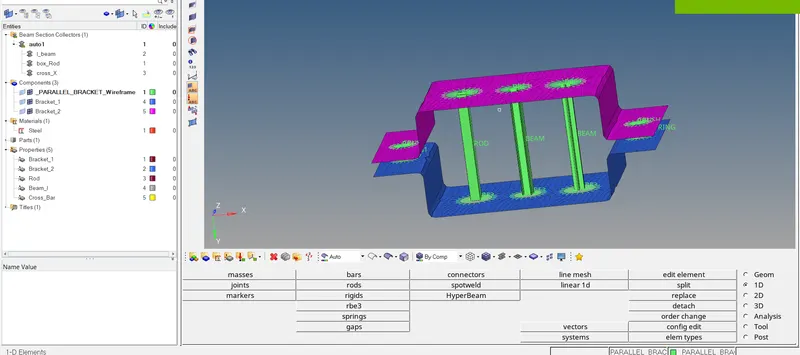
Week 4-1D Element Creation Challenge
Mesh the Given component with the Size of 5 Units. Create 1D elements on the following component with given cross-section and DOF
a. Rod element:- Translational DOF should be Constrained with RBE2 link
Cross-Section: BOX- Dimension a= 12 mm
dimension b=10 mm
Thickness t= 0.75 mm
b. Beam element:- All DOF should be constrained with RBE3 link
Cross-Section: I Section- Dimension a= 8 mm
Dimension b= 10 mm
Dimension c= 8.5 mm
Thickness t1= 0.75 mm
Thickness t2= .6 mm
Thickness t3= .6 mm
c. Bar element:- Constrain only x and y DOFs With RBE3 link
Cross-section: X section- Dimension DIM1= 5 mm
Thickness DIM2= 1.2 mm
Dimension DIM3= 10 mm
Thickness DIM4= 1.2mm
d. & e. Apply the mass of magnitude 10 with the RBE2 link
f. Join the two components with Spring elements
The procedure to mesh and apply connections is as follows:
1. Import the model into the hyper mesh environment.
2. Create mid-surfaces using the mid-surface command.
3. Using auto mesh, mesh the surfaces with a size of 5 units.
4. Create a property for both brackets to divide both mid surfaces assigned in the same property and assign the material as steel.
5. Create property for box-section,cross(X) section, and I section.
6. Open the hyper beam environment and create the sections.
7. Assign the designed hyper-beam section to the properties created.
8. Assign Rbe connections to the respective holes.
9. Assign Rbe2 to the lower bracket holes and Rbe3 connection to the upper bracket holes.
10. Select the central nodes and assign the respective section to the nodes.
11. Assign spring connection between f and d, e connection.