Week 4-1D Element Creation Challenge
Week-4 Challenge
AIM:-
Mesh the Given component with the Size of 5 Units. Create 1D elements on the following component with the given cross-section and DOF.
The procedure that has been modelled:-
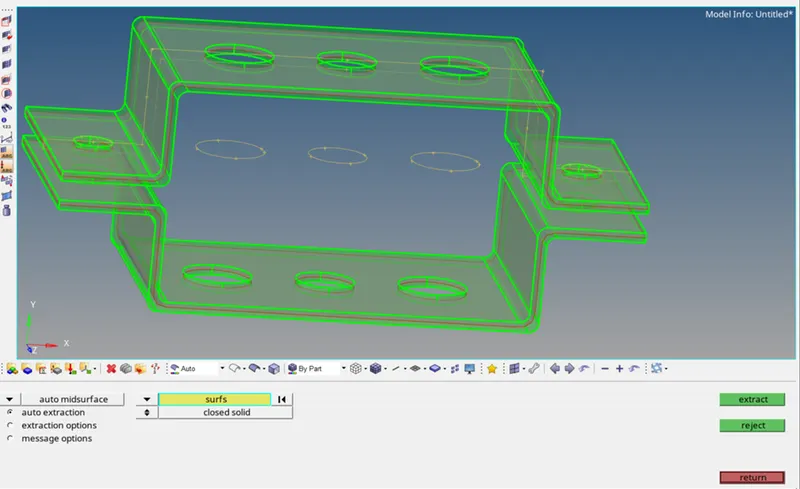
1) The below capture represents the whole geometry that has assigned for the model.
2) creating mid-surface, material, properties.
i)create a mid-surface by using auto mid-surface in mid surface extraction & create separate names such as bracke1 & bracket 2 under components.
ii) assign material as steel by using the right mouse click in the tree window.
iii) create properties for assigning the thickness for the individual brackets such as bracke1 & bracket 2 shown below capture under properties.
iv) assign Thickness=2.5 & give material as steel.
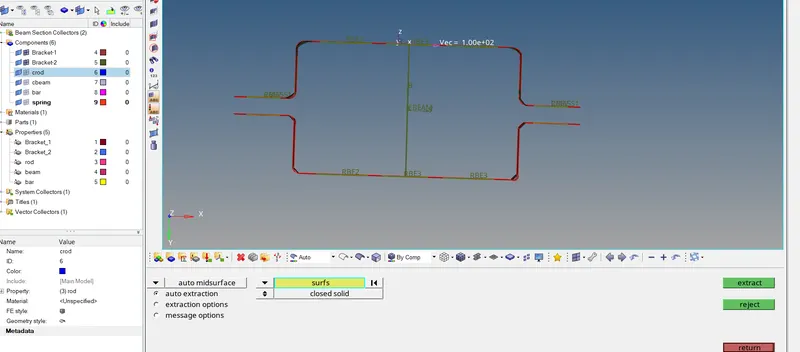
3) creation of mesh
i) in 2d mode select automesh>select surfaces>element size=5>mesh type =mixed>mesh
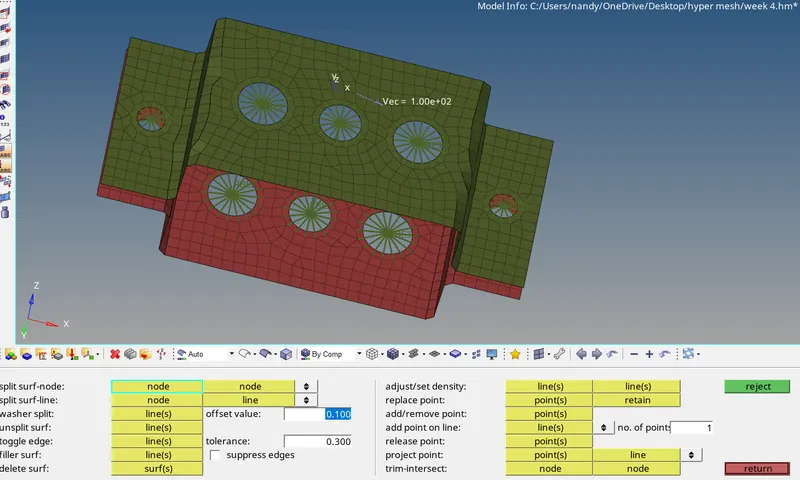
Note:- make sure that before meshing Wascher-type cuts need to perform where ever present on the surfaces by using quick edit>wascher split=5.
4) creation of RBE2 & RBE3 as specified in the requirement & creation of element types.
i) creation of RBE2 , 1d>rigids>element type=RBE2>multi nodes>selection type path>select all DOF>create.
ii) creation of RBE3> 1d>RBE3>calculate node>selection type by path>diable DOF1,DOF2>create.
The below capture represents the 3,4 points.
5) creation of 1d elements rod,beam,bar.
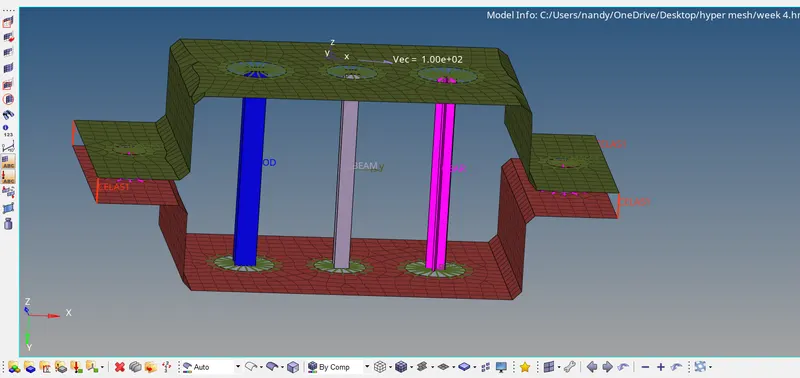
i) creation of beam,1d>bars>element type=cbeam>select node1,node2 & direction>assign property=cbeam.
ii) creation of rod,1d>select node1,node2 & direction>assign property=rod.
iii) creation of bar,1d>bars>element type=cbar>select node1,node2 & direction>assign property=bar.
6)we need to create new properties for the bar& new components, cross sections for the rod, beam, bar.
i) creation of cross-sections,1d>hyper beam>standard section>hyper beam>solid rectangle ( assign values as specified in req)=rod,in entries menu create other cross-section,create>
ii)create properties rod, beam, bar in tree window by using the right mouse click of mouse & assign the card images for rod=prod, for beam=pbeam, for bar=pbar then after assign cross session individual accordingly.
iii) now create individual components for bar, red,beam & organise according to their property in tool module.
7) creation of masses & springs
i) creation of masses,1D>masses>nodes(before selection need to create RBE2 for all faces)>mass=10>create.
ii)springs,1D>springs)select upper & lower edge where ever required.
The below capture represents 5,6,7 explanation results.
Conclusion:-
Hence conclude that the given model is modelled as specified in the requirement accordingly.
--
Thanks & Regards,
Praveen Kumar Reddy.