Week 4.1 - Solving second order ODEs
Aim:- Solve ODE Simple Pendulum Equation and animate the pendulum motion.
This report in shown in.
1. Simple Pendulum equation.
2. Matlab Function Programe code.
3. Matlab main programe code.
i. First three line.
ii. Initilizing the variable (input data).
iii. Printing the intilizing variable.
iv. Solve ODE Equation.
v. Plot diagrame time vs displacement and velocity.
vi. Animate the pendulum motion.
vii. Save Animation file.
4. Plot Diagrame time vs angular displacement & velocity.
5. Output in command window (copy and paste).
This report in also attach file.
1. ODE Function matlab file.
2. ODE equation matlab file.
3. Animation video file.
1. Simple Pendulum equation.
This equation of motion of a simple pendulum with damping. `theta` is angular displacement, d(`theta`)/dt is angular velocity, d(`theta`)^2/dt^2 is angular accelaration, b is damping co-efficient, m is mass of the ball, g is gravity and L is length of pendulum.
2. Matlab Function Programe code.
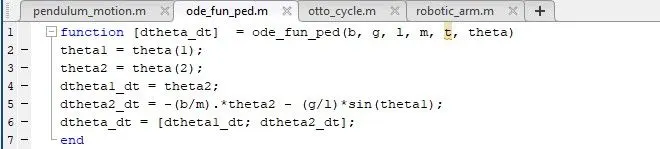
The matlab in any derivative equation solve first convert equation is function form and then after use in matlab main programme code.
3. Matlab main programe code.
i. First three line.

This is matlab basic first three line. its general purpose to run programe first stage is clean programe output data and run new output.
ii. Initilizing the variable (input data).
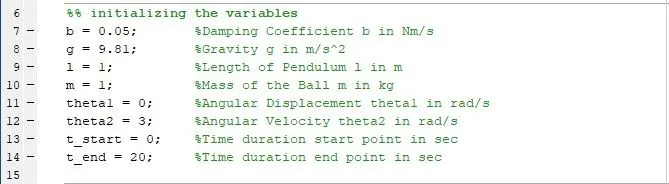
Initilizing the variable means define the input parameter as well as enter the vlaues. The all line complete after use semi colone(;) because run the programme values is do not show in command window all value store in workspace.
iii. Printing the intilizing variable.
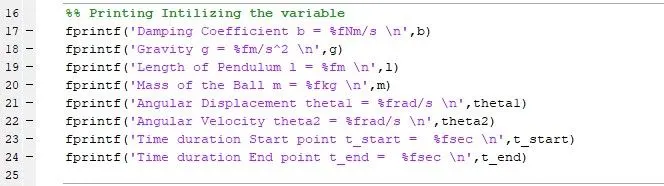
This code is printing the values define in matlab (input data). This code is shown output in command window.
iv. Solve ODE Equation.

This code is define parameter and condition. After use function code file and solve it.
v. Plot diagrame time vs displacement and velocity.
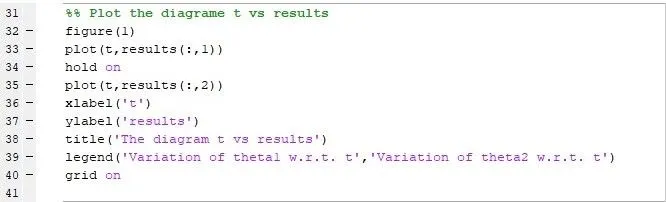
This code is Plotting time vs angular displacement as well as angular velocity and also formating plot diagrame.
vi. Animate the pendulum motion.
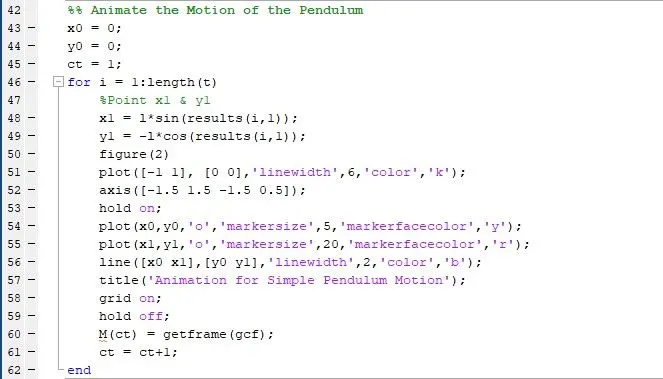
This code is simply find the point for pendulum x0, y0 as well as x1, y1 different values and then animate plot diagrame. Also formating the animate video.
vii. Save Animation file.

This code is save animate video file.
4. Plot Diagrame time vs angular displacement & velocity.
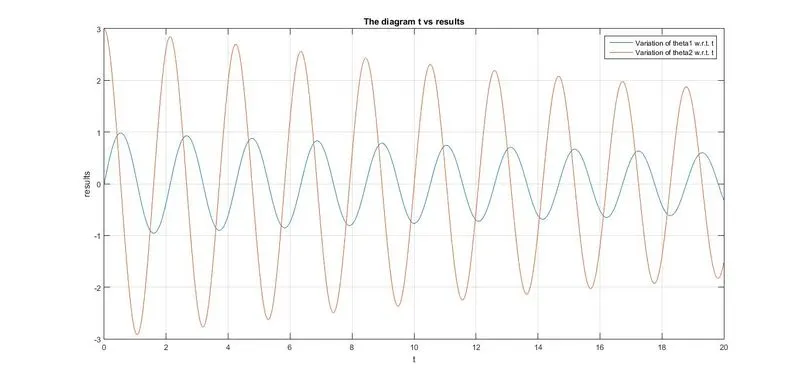
This plot diagrame in showm two graph one is time vs angular displacement it is blue line and second is time vs angular velocity it is red line.
5. Output in command window (copy and paste).
Damping Coefficient b = 0.050000Nm/s
Gravity g = 9.810000m/s^2
Length of Pendulum l = 1.000000m
Mass of the Ball m = 1.000000kg
Angular Displacement theta1 = 0.000000rad/s
Angular Velocity theta2 = 3.000000rad/s
Time duration Start point t_start = 0.000000sec
Time duration End point t_end = 20.000000sec
This report in attach function code, matlab programe code & animation video file.