Week 4.1 - Solving second order ODEs
In this challenge, the motion of a simple pendulum is traced.
This was one of the hardest challenge I faced in this course. There was so many errors,
1. The interpretation of angle value was too difficult. Then the displacement was took as angle value.
2. Plotting the pendulum was the most difficult. I got the resuly correctly. But the pendulum was leaving was leaving traces of the previous loop behind and thus forming a solid quarter circle as the plot. With some changes in and out of the for loop this problem was solved.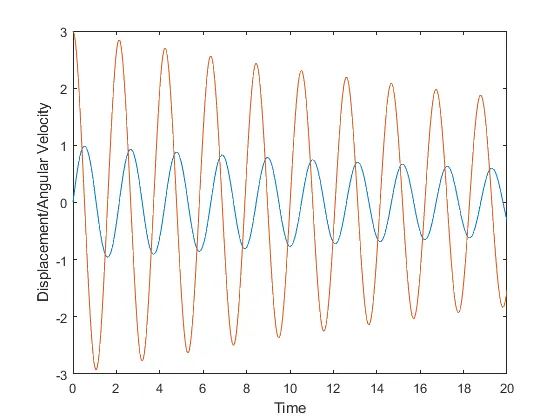
%Solving 2nd order ODE using MATLAB

clear all
close all
clc

% Defining the parameters
b=0.05;
g=9.81;
l=1;
m=1;

%intial condition

theta_0=[0,3];


%time points
t_span=linspace(0,20,500);

%solving ODE

[t, results]=ode45(@(t,theta) ode_func(t,theta,b,g,l,m),t_span,theta_0);

%Plotting the Displacement and Angular Velocity vs Time
figure(1)
plot(t,results(:,1))
hold on
plot(t,results(:,2))
ylabel('Displacement/Angular Velocity')
xlabel('Time')

%Animation of the pendulum

displacement=results(:,1);     %Extracting the Displacement parameter

ct=1;    %intializing the counter


for i=1:length(displacement)
    theta=displacement(i);  %Defining theta for calculating the postion of the string

    figure(2)
    %intial conditions
    x0=0;
    y0=0;

    %Position of the pendulum at angle theta
    x1 = l*sin(theta);
    y1 = -l*cos(theta);

    %Plotting the base on top
    plot([-1 1], [0 0],'linewidth', 2,'color','b');
    hold on
    %Plotting the string
    plot([x0,x1], [y0,y1],'color','g', 'linewidth', 2);
    hold on
    %Plotting the pendulum bob
    plot(x1,y1,"o",'MarkerSize',20,MarkerFaceColor='Red')
    %Fixing the axis
    axis([-1.5 1.5 -1.5 1.5])
    pause(0.03)  %Appropriate pause for the video
    hold off
    M(ct)=getframe(gcf);  % getframe() captures the current frame as it appears on the screen as a movie frame.
    ct=ct+1;
end

movie(M)  %creating a movie using the frames obtained in the for loop.
videofile=VideoWriter('Pendulum.avi','Uncompressed AVI'); %a videofile is created

open (videofile) %opening the videofile
writeVideo(videofile,M)  %writing the captured frames to the videofile
close (videofile)   %closing the videofile