Week 4.1 - Solving second order ODEs
Aim: To describe the transient behavior of a simple pendulum using ODE.
EQUATION:
-(b/m)*theta2 - (g/1)*sin(theta1)
OBSERVATION:
In the above equation,
g = gravity in m/s2,
L = length of the pendulum in m,
m = mass of the ball in kg,
b=damping coefficient.
where,
L=1 metre,
m=1 kg,
b=0.05.
g=9.81 m/s2.
CODE:
clear all
close all
clc
%input

b=0.05;
g=9.81;
l=1;
m=1;


% initail conditiion
theta_0 = [0;5];

% time points
t_span = linspace(0,10,500);

% solve ode

[t, results] = ode45(@(t,theta) ode_func(t,theta, b,g,l,m),t_span, theta_0);


plot(t,results(:,1))
hold on
plot(t,results(:,2))
ylabel('plot')
xlabel('time')

 %ANIMATION
 X0=0;
 Y0=0;

ct=1;%counter actually represents each and every frame

 for i=1:length(t_span)
     X1=l*sin(results(i,1));
     Y1=-l*cos(results(i,1));


   plot([-1 1],[0 0],'linewidth',6,'color','g');
   hold on
   plot(X1,Y1,'O','markersize',20,'markerfacecolor','r');
   plot([X0 X1],[Y0 Y1]);

    axis([-2 2 -2 2]);
grid on

     title ('Damping of simple Pendulum');
     legend ('Support rod','bob','Fixed point');

     hold off;

    M(ct)=getframe(gcf);
     ct=ct+1;
 end


 movie(M);
 videofile=VideoWriter('simple_ pendulum.avi','Uncompressed AVI');
 open (videofile);
 writeVideo (videofile, M);
 close (videofile);
function [dtheta_dt] = ode_func(t,theta,b,g,l,m)

theta1 = theta(1)
theta2 = theta(2)
dtheta1_dt = theta2;
dtheta2_dt = -(b/m)*theta2 - (g/1)*sin(theta1);
dtheta_dt = [dtheta1_dt; dtheta2_dt];
end
CODE EXPLAINATION:
1) write the input data such as
b=0.05;
g=9.81;
l=1;
m=1;
2) initial condition
theta_0 = [0;5];
where the inital displacement of pendulum is zero
and the initial velocity of pendulum is 5 m/s
time array
t_span = linspace(0,10,500);
it goes on 0 to 10 second in which 500 values in between.
3)solve ode
[t, results] = ode45(@(t,theta) ode_func(t,theta, b,g,l,m),t_span, theta_0);
main inputs are t and theta
input parameter passing b,g,l,m.
then adding iinitial condition. t span
ode function is defined separatly
4) ploting the the animation in graph
5) using for loop comand for animation
creating a lenth bar with width and lenght in horizontal
from middle adding a string vertically downward.
add a bob or ball at bottom tip of the string.
6) creating a movie effect avi 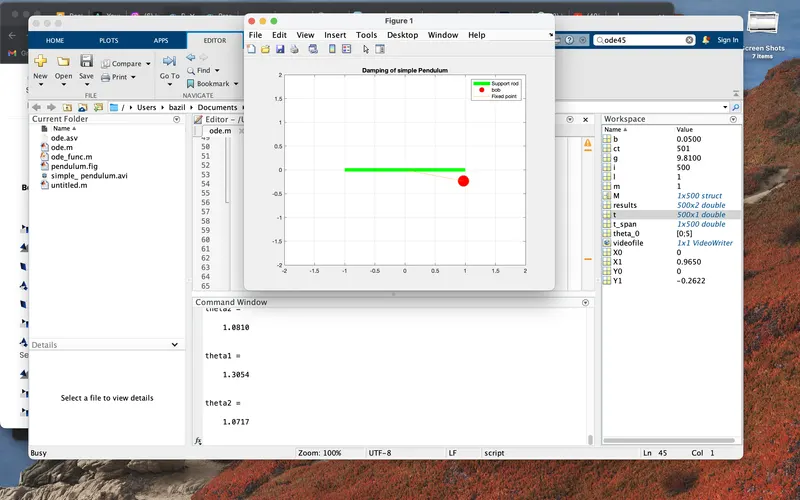
video writting command.
the simple pendulum link youtube: