Week 3 - Solving second order ODEs
AIM:
To solve the program in MATLAB & want to simulate the simple pendulum motion.
OBJECTIVE:
- Write a program and simulate the simple pendulum motion.
- To create a movie of the simple pendulum using matlab.
ODE EXPLANATION:
The Ordinary Differential Equation (ODE) solvers in MATLAB solve initial value problems with a variety of properties. The solvers can work on stiff or nonstiff problems, problems with a mass matrix, differential algebraic equations or fully implicit problems. For more information, see Choose an ODE Solver.
SIMPLE PENDULUM:
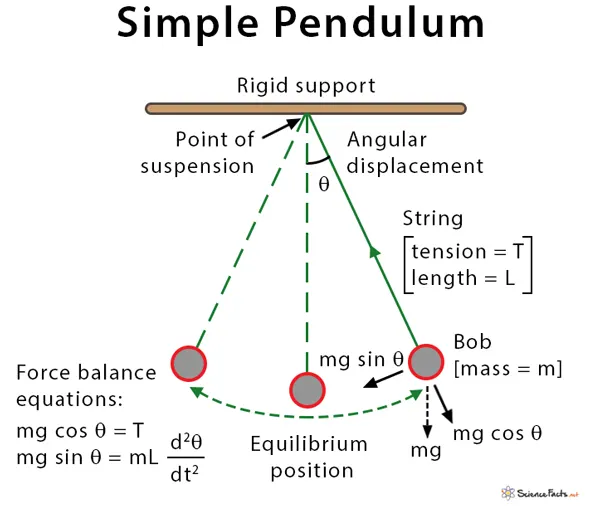
- A simple pendulum is defined as an object that has a small mass, also known as the pendulum bob.
- Which is suspended from a wire or string of negligible mass. When displaced, a pendulum will oscillate around its equilibrium point due to momentum in balance with the restoring force of gravity.
- A simple pendulum consists of a metal bob hung by a string connected to a pivot point.
- The bob oscillates in to and fro motion because of its mass and momentum.
- The number of oscillation the pendulum completed in one second is its frequency and the time required for one complete oscillation is called the time period.
ODE EQUATION:
- Angular displacement = Angular velocity
`theta1=theta2`....equn1
`d theta / dt =d theta1/dt =theta2`
`d^2 theta/dt^2 = d^2 theta1/dt^2 = d/dt (d theta1/ dt )= d theta^2/dt`
- Second order differential equation with damping:
`d^2 theta/ dt^2 +b/m d theta/dt +g/L sin theta^1 = 0`
`d^2 theta/ dt^2= -b/m d theta/dt -g/L sin theta^1 = 0` ....equn2
Matrix:
`d/dt [ theta^1 /theta^2] = [ theta/-b/m theta^2 -g/L sin theta]`
CODE EXPLAINATION:
- First want to start clear all,close all,clc.
- And want to given the input values for the inital condition
- Total span of 20sec with 400 interval by using a linspasce comment
- Then we want to call ODE function to define 2nd order ODE by using 'ode 45'.
- And it give the output of [t,result]
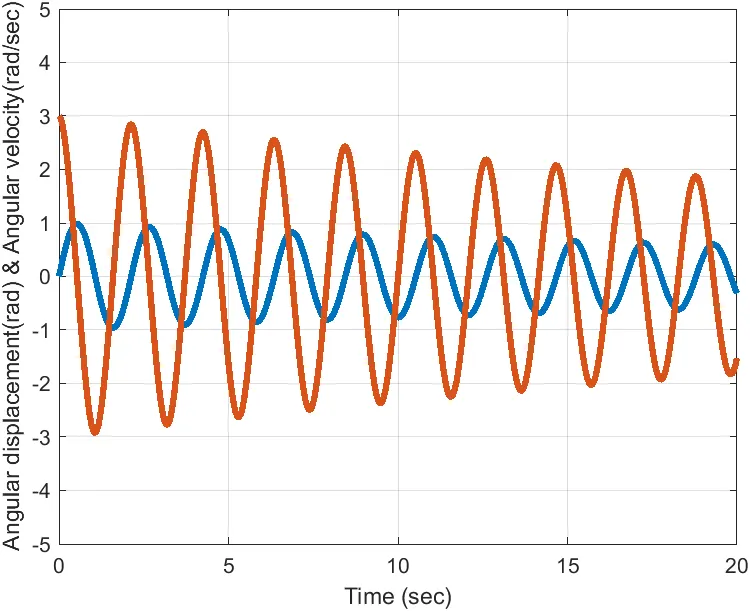
- Next plot the angular displacement & angular velocity first as 'plot (t,result(:,1)' to hold on and plot the velocity as'plot (t,result(:,2)' to hold off.
- Then give the proper axis.
- Using the for-loop command foe plotting the plotting the simple pendulum.
-
x0 = 0;y0 = 0;x1 = l*sin(THETA(i));y1 = -l*cos(THETA(i));
- Here the plotting the line with co-ordinates.
- And give the command plot(x1,y1,'marker','o','markersize',30,'markerfacecolor','g')%plot bob shape and size.
- Provide the proper line roof top hanaging by using the axis.
- Using pause command for number of second for continuing
- And capture a figure movie frame M(ct). to change the getframe(gcf).
- (ct-counter ) before beginning and ending of the for-loop
- To create the videofile to convert to videowriter with proper file name.
- Finally the video created by videowriter to get the video file
1. CALLING FUNCTION:
function [dtheta_dt] = ode_func(t,theta,b,g,l,m)

theta1 = theta(1)
theta2 = theta(2)
dtheta1_dt = theta2;
dtheta2_dt = -(b/m)*theta2-(g/l)*sin(theta1);
dtheta_dt = [dtheta1_dt;dtheta2_dt];

end
2. MAIN PROGRAM:
clear all
close all
clc

b =0.05;
g = 9.81;
m =1;
l = 1;

%initial condition

t_span = linspace(0,20,400);

theta_0 = [0;3];

%solve ODE
[t,result] = ode45(@(t,theta) ode_func(t, theta, b, g, l, m),t_span,theta_0);

%plotting angular displacement&angular velocity

figure(1)

plot(t,result(:,1),'linewidth',3)
hold on
plot(t,result(:,2),'linewidth',3)
hold off
axis([0 20 -5 5])
grid on
xlabel('Time (sec)')
ylabel ('Angular displacement(rad) & Angular velocity(rad/sec)')

ct=1;
for i = 1:length(t_span)
    THETA(i) = result(i,1);

    x0 = 0;
    y0 = 0;

x1 = l*sin(THETA(i));
y1 = -l*cos(THETA(i));

%plotting
figure(2)

plot([x0 x1],[y0 y1],'linewidth',3)
hold on
plot(x1,y1,'marker','o','markersize',30,'markerfacecolor','g')%plot bob
hold off
line([-1 1],[0 0],'color','r','linewidth',3)
axis([-1.5 1.5 -1.5 1.5])
pause(0.05)
M(ct) = getframe(gcf);
ct=ct+1;
end

%Movie Making
movie(M)
videofile = VideoWriter('ode_main.avi','uncompressed AVI');
open(videofile)
writeVideo(videofile,M)
close(videofile)
PLOT DIAGRAM:
CONCLUSION:
Thus the program is simulated simple pendulum program is calculted by using MATLAB.
VIDEO LINK: