Week 3 - Solving second order ODEs
AIM :
to solve an ordinary differential equation (ODE) and use the calculated information to animate the motion of the pendulum with MATLAB
INTRODUCTION:
a simple example is a pendulum the way the pendulum moves depends on newton second law .if the pendulum weight is pulled to a relatively small angle from the vertical and let go it will swing back and forth at a regular period and frequency
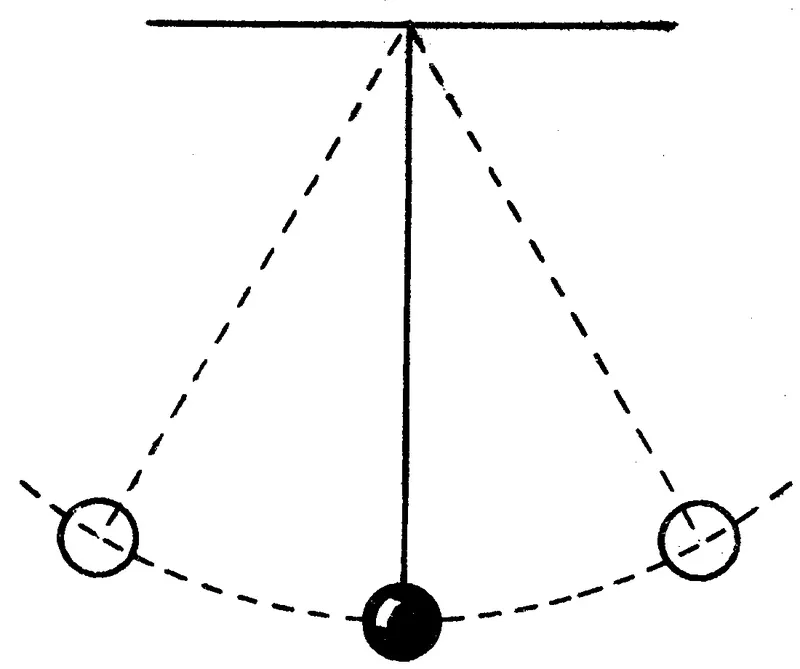
an ordinary differential equation (ODE) is a differential equation containing one or more of functions of one independent variable and the derivatives of those function the ode equation and calculation shown below
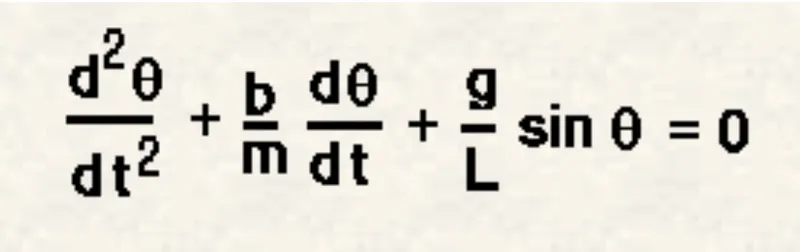
GIVEN PARAMETERS:
g (m/s2)	 (gravity)	        =          9.81 m/s2
m (kg)	         (mass of the ball)	=         1 kg
b	         (damping coefficient)	=          0.05
L (meter)        (The length of the pendulum) =      1 meter
Time Interval	 (Simulation motion)	       =   0-20 sec
CODE:
clear all
close all
clc

b = 0.05;
g = 9.81;
l =  1;
m = 0.1;

%inital condition
theta_0 = [0;5];
% time points
t_span = linspace(0,10,500);
%solve ODE
[t,results] = ode45(@(t,theta) ode_func(t,theta,b,g,l,m),t_span,theta_0);
hold on
plot(t,results(:,1))

plot(t,results(:,2))
legend('angular dispacement','angular velocity')
title('damped harmonic motion of a pendulum')

xlabel('plot')
ylabel('time')
%for loop
%before starting the for loop a counter value was defind

ct = 1;
for i = 1:length(t)
    x_start = 0;
    y_start = 0;
    x_end = 1*sin(results(i,1));
    y_end = -1*cos(results(i,1));
    %ploting the animation
    figure(2)
    plot([-1 1],[0 0],'linewidth',5)
    hold on
    plot([x_start x_end],[y_start y_end],'linewidth',3)
    hold on
    plot(x_end,y_end,'o','markersize',30,'markerfacecolor','b')
    title('animation of transient behaviour of a pendulum')
    axis([ -0.1 1.5 0 1.5])
    pause(0.03)
    hold off
    M(ct) = getframe(gcf);
    ct = ct+1;
end
movie(M)
videofile = VideoWriter('animation of the pendulum.avi','uncompressed AVI');
open(videofile)
writeVideo(videofile,M)
close(videofile)
CODE FOR ODE_FUNC
function [dtheta_dt] = ode_func(t,theta,b,g,L,m)
theta1 = theta(1);
theta2 = theta(2);
dtheta1_dt = theta2;
dtheta2_dt = -(b/m)*theta2-(g/L)*sin(theta1);
dtheta_dt = [dtheta1_dt;dtheta2_dt];
end
CODE EXPLANTION
before writting the code its important to start with clear all and close all clc command
- clear all - remove data from the workspace and freeing up system memory
- close all - delete all the current figure or the specified memory
- clc - clear all the input and output variables
- next is define the input and variables the damping coefficient gravity length of yhe spring and mass of bob have all been defined
- next is to define the initial conditions the angular displacement have been defined timespan has also defined
- next to solve the ODE ode45 was used it is function in matlab that solves ordinary equation using numerical method.the function ODE45 need 3 inputs the 3 inputs are the fuction to be integrated the time span and the initial condition [t,result] which is defined as the result is calculated with respect to time
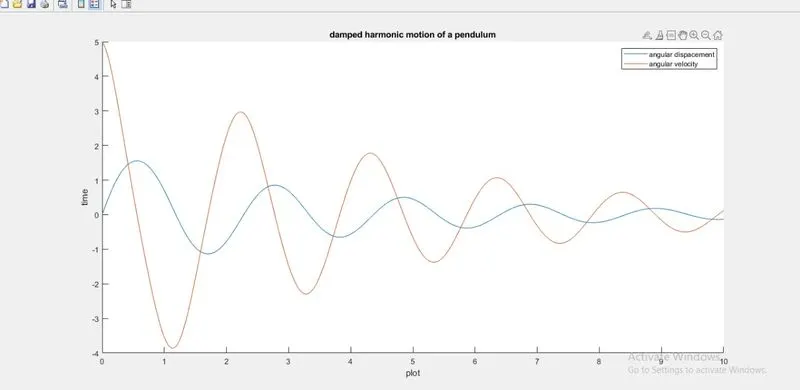
- next is to plot the calculated results .the graph has two plots one for angular displacement and angular velocity the legend for the graph and the axis lables have been defined shown below
THE NEXT PART OF THE CODE IS FOR LOOP :
- a for loop is a repetition control structure that allows you to use efficently write loop that needs to execute a specific number of time .
- a countour loop was added before the for loop the start and endpoint for x and y axis have been defined
- the loop is used where the values of the time span are assigned to a variable 'i'
- the coordinates of [x0 x1 y0 y1] and their corresponging relation are entered to form a string of the pendulum
- markersize command was used to form the bob of the pendulum
- pause command was used for pausing the command for a certain time for 0.03 s
- the m command was used to capture the current frame every time the loop runs
- the final step of the loop is to add a+1 the ct variable this will increment the frame every time the for loop run
- end command was used for the plot and for the for loop to stop the code
TO CREATE ANIMATION MOVIE OF THE PENDULUM :
- movie command was used
- the videowriter command was used to assign the video format for this project .avi format is used
- the open command was used to open the video
- the writevideo command was used to write the video with the plot frames
- the close command is used to close the video file
OUTPUT:
"the animation video of the project link"