Week 3 - Solving second order ODEs
AIM:
Write a program in Matlab that will simulate the pendulum motion.
OBJECTIVE:
Write a program that solves the ODE.
Create an animation of how pendulum swings and come to rest because of damping coefficient.
ODE DAMPING FOR A SIMPLE PENDULUM:
Damping in Pendulum:
When the motion of an oscillator reduces due to an external force, the oscillator and its motion are damped. These periodic motions of gradually decreasing amplitude are damped simple harmonic motion. An example of a damped simple harmonic motion is a simple pendulum.
Second order ODE differential equation
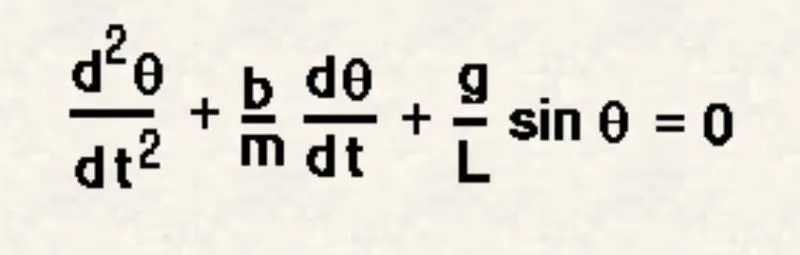
θ = Angular displacement (radians)
b = Damping coefficient
m = Mass of the ball
g = Acceleration due to gravity (m/s^2)
l = Length of pendulum (m)
t = Time (s)
Fundamental idea behind solving ODE is when we have a higher order ODE then we break it out into set of first order ODEs.
MATLAB CODE:
clear all
close all
clc

%inputs
b=0.05; %damping co-efficient
g=9.81; %acceleration due to gravity
l=1;    %length of pendulum
m=1;    %mass of ball

%intial condition
theta_0 = [0;5];

%time points
t_span = linspace(0,15,500);  %time 0 to 10 sec with 500 intervals

[t,results]=ode45(@(t,theta) odefunc(t, theta, b,g,l,m),t_span,theta_0);%ode45 to solve differential equation

%hold on
%plot(t,results(:,2))
%xlabel('PLOT')
%xlabel('TIME')

c=1; %intialation of counter
for i=1:length(results(:,1))  %calling points form array result


 x=0;
 y=0;
 x1=l*sin(results(i,1));  %x co-ordinates of ball postion
 y1=-l*cos(results(i,1)); %y co-ordinates of ball postion


 plot([x,x1],[y,y1],'linewidth',4,'color','b') %plot of pendulum link
 hold on;

 plot(x,y,'o','markers',6,'markerfacecolor','g'); %plot of fix point
 hold on;

 plot(x1,y1,'o','markers',25,'markerfacecolor','g'); %plot of pendulum ball
 hold on;


 axis([-2 2 -1.5 1.5]); % scale for graph for ploting
 pause(0.001);          % pause between result ploting
 hold off;


  M(c)=getframe(gcf);   %geting graphics frames in array M
  c=c+1;                %counter increment


end

movie(M) %create movie of array M
videofile= VideoWriter('pendulm.avi','Uncompressed AVI') %file name and format
open(videofile)
writeVideo(videofile,M)
close(videofile)
MATLAB CODE EXPLANATION:
Step 1
Define inputs for pendulum.i.e
Damping co-efficient ‘b’.
Acceleration due to gravity 'g'=9.81.
Length of pendulum.
Mass of ball.
Initial condition of theta_0 is a column array of [0; 5].
Step2
For getting results at different time between an time span an row array is taken
Ranging from 0 to 15 with 500 intervals.
So in a row array [time, result] is stored.
ode45 function is used to solve differential equation by calling odefunc made to solve differential equation -(b/m)*theta2-(g/l)*sin(theta1).
We get array of time and results.
Function body:
function [dtheta_dt] = odefunc(t,theta,b,g,l,m)

theta1=theta(1);
theta2=theta(2);
dtheta1_dt=theta2;
dtheta2_dt=-(b/m)*theta2-(g/l)*sin(theta1);
dtheta_dt=[dtheta1_dt;dtheta2_dt];
end
Step3
Now set a counter to get array of time and result at different time from time range span.
For i=1
To get co-ordinates for pendulum ball, results from time result array is used.
This result is substituted in
l*sin (results(i,1)) and -l*cos (results(i,1))
To get x1 and y1 co-ordinates respectively.
Plot ([x, x1], [y, y1]) to get pendulum link.
Plot (x, y) for fix point and plot (x1, y1) with marker for pendulum ball.
Axis for graph ranges from -2 to 2 on x axis and -1.5 to 1.5 on y axis.
In array m get graphics.
Increment the counter.
Step 4
Movie function is used to create movie from array M.
Syntax:
movie(M)
videofile= VideoWriter('pendulm.avi','Uncompressed AVI')
open(videofile)
writeVideo(videofile,M)
close(videofile)
Output:
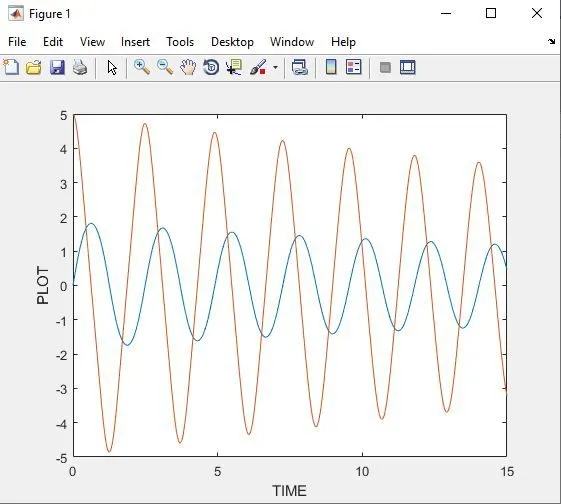
Variation of Angular Displacement & Angular Velocity w.r.t. time
The link to the Animated Output: