Week 3 - Solving second order ODEs
SOLVING SECOND ORDER ODEs USING MATLAB
- What is Pendulum?
Ans:- A Pendulum is a weight suspended from a pivot so that it can swing freely. When a pendulum is displaced sideways from its resting, equilibrium position, it is subject to a restoring force due to gravity that will accelerate it back toward the equilibrium position. When released, the restoring force acting on the pendulum's mass causes it to oscillate about the equilibrium position, swinging back and forth. The time for one complete cycle, a left swing, and a right swing is called the period. The period depends on the length of the pendulum and also to a slight degree on the amplitude, the width of the pendulum's swing.
OBJECTIVE:
- Calculate angular displacement and angular velocity by using MATLAB.
- Visualizing the simple pendulums oscillatory motion.
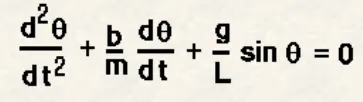
The objective is to write a program that solves the following ODE. This ODE represents the equation of motion of a simple pendulum with damping. First, we break the second-order equation into the first-order equations to find the position of (theta).
where
b= damping coefficient,
m= mass of the ball in kg,
g = gravity in m/s^2,
L = length of the pendulum in m.
- BREAK THE SECOND ORDER EQUATION INTO FIRST ORDER EQUATION:
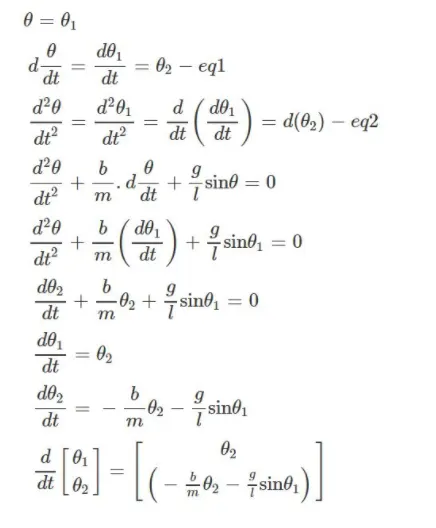
By solving the above equation we will get the theta1 and theta2 values of the Simple Pendulum.
- FUNCTION CODE:
The function used to solve our second order ODEs:
function [dtheta_dt]=ode_func(t,theta,b,g,l,m);
theta1 = theta(1)
theta2 = theta(2)
dtheta1_dt = theta2;
dtheta2_dt = -(b/m)*theta2-(g/l)*sin(theta1);
dtheta_dt = [dtheta1_dt;dtheta2_dt]
end- MATLAB CODE FOR PLOTTING:
%Simple Pendulum challenge solving using MATLAB
close all
clear all
clc
%inputs for the equation

%Damping Coeffiecient
b=0.5;

%Acceleration due to the gravity
g=9.81;

%Length of the pendulum
l=1;

%Mass of the ball hanging in kg
m=1;

%Initial conditions
theta=[0;3];

%time Span
t_span=linspace(0,20,300);

%Ordinary differential Equation
[t,results]=ode45(@(t,theta) ode_func(t,theta,b,g,l,m),t_span,theta);
x0=0;
y0=0;
theta_1 = results(:,1);
ct=1

figure(1)
plot(t,results(:,1));
hold on
plot(t,results(:,2));
xlabel('TIME');
ylabel('PLOT');
legend('displacement','velocity');

%Simulation of Pendulum motion
%Inputs Coordinates

for i = 1:length(t_span)
    r = theta_1(i)
    x1 = 1*sin(r);
    y1 = -1*cos(r);

    figure(2)
    plot([x0 x1],[y0 y1]);
    viscircles([x1 y1],0.05,'color','r');
    title('Simple Pendulum');
    line([0,0],[-5 0],'color','blue');
    axis([-1 1 -1.4 0.2]);
    M(ct)=getframe(gcf)
    ct=ct+1

end

movie(M)
videofile = VideoWriter('Simple_Pendulum_Animation','Uncompressed AVI')
open(videofile);
writeVideo(videofile,M);
close(videofile);- PLOT:
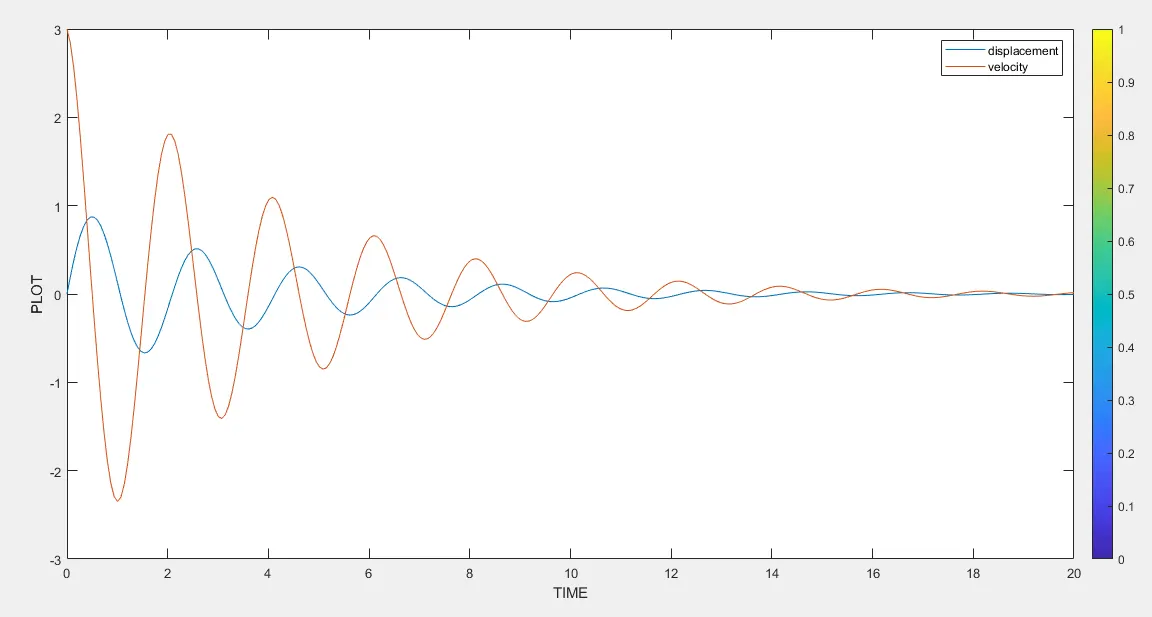
Angular Displacement and Angular Velocity against time:
- ERRORS WHILE CODING AND NECESSARY ACTION TAKEN TO CORRECT THEM:

This was corrected by giving uppercase 'V' in the code.
The following video link shows the oscillatory motion of Simple Pendulums under given conditions:
DRIVE LINK- https://drive.google.com/file/d/1jh2bC_anlsBn_gWMFh7ZY9zDo7QpEI5Y/view?usp=sharing