Week 3 - Solving second order ODEs
Code For pendulum motion
% the system parameters
m = 1; b = 0.05; L = 1; g = 9.81;
% For simplification
r = g/L;
k = b/ (m*L);

% for the pendulum ode
f = @(t,x) [x(2);-k*x(2) - r*sin(x(1))];

%Initial conditions
init = [pi/2; 0];

%solve ode. the time interval is set from 0 to 20 seconds
[t,x] = ode45(f,[0 20],init);

%plot of the solution
plot(t,x(:,1));
grid on; hold on;
plot(t,x(:,2),'k');
xlabel('Time (s)');
ylabel('Amplitude');
legend({'Angle (rad)','Angular speed (rad/s)'});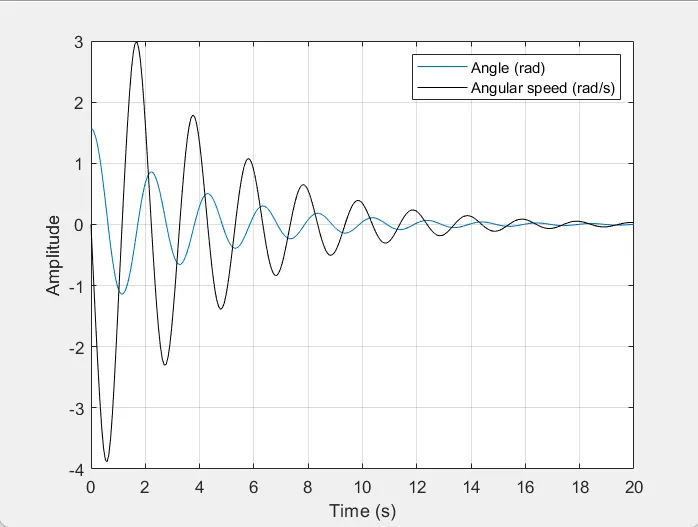
Animation Code
% Animates the motion of a simple pendulum as a function of time.
clear all; close all; clc;

% All units in the SI system
m=1; % pendulum bob mass
l=1; % pendulum rod length
g=9.81; % acceleration due to gravity
t=20; % simulation time
c=0.05; % damping coefficient
tStep=0.01; % simulation time step
iterations=t/tStep; % total number of iterations
% pre-allocation of variables for speed
theta=zeros(iterations,1);
omega=zeros(iterations,1);
alpha=zeros(iterations,1);
T=zeros(iterations,1);
theta(1,:)=pi/2; % initial angular position
omega(1,:)=0; % initial angular velocity
alpha(1,:)=0; % initial angular acceleration

% Set up video
v=VideoWriter('pendulum.avi');
v.FrameRate=60;
open(v);

for n=1:iterations
    % Iteratively solve equations of motion using Euler's Method
    theta(n+1,:)=theta(n,:)+omega(n,:)*tStep; % new angular position
    omega(n+1,:)=omega(n,:)+alpha(n,:)*tStep; % new angular velocity
    alpha(n+1,:)=(-g*sin(theta(n+1,:)))/l-c*omega(n+1,:); % new angular acceleration

    % Plot everything for the video
    hold on;
    fill([-l-0.2*l l+0.2*l l+0.2*l -l-0.2*l],[-l-0.2*l -l-0.2*l l+0.2*l l+0.2*l],'w'); % clears background
    plot([0 l*sin(theta(n,:))],[0 -l*cos(theta(n,:))],'b','LineWidth',3); % plots rod
    plot(l*sin(theta(n,:)),-l*cos(theta(n,:)),'Marker','o','MarkerSize',20,'MarkerFaceColor','r','MarkerEdgeColor','r'); % plots bob
    %plot(0,0,'Marker','0','MarkerSize',5,'MarkerFaceColor','k','MarkerEdgeColor','k'); % plots pin
    xlim([-l-0.2*l l+0.2*l]);
    ylim([-l-0.2*l l+0.2*l]);
    title('Simple Pendulum');
    frame=getframe(gcf);
    writeVideo(v,frame);
end

close(v);
1. In the first step has a regular Practise started the program with clear all, close all and clc commands which will help in clearing temporary memory, closing current plots which are opened and clearing the command prompt respectively.
2. Next initial conditions for angular displacement and angular velocity have defined has 0 and 3 respectively.
3. In the next line ode45 function has defined which is assigned to the array [t, results].Here in the above array results again has 2 columns in which column 1 defines angular displacement and column 2 defines angular velocity.
4. Once execution reaches to ode45 function the which is defined as ode45(@ode_func,t_span,theta_O) which has another inbuilt function ode_func will be called and then by using initial conditions MATLAB integrates time and with respect to that result, an array will be calculated.
ode_func has the function which calculates two first-order equations of simple pendulum equation.
5. Now once after generating the result array which has 2 columns one has displacement and other has velocities by utilising these values individual plots are generated. Here 2 plots are generated which are in turn shown under a single figure by using subplot command.
6. Now in the figure(2), it is shown how angular displacement and angular velocity variates over a period of the time.
7. Now once after generating angular displacement value with respect to this angular displacement values simple pendulum need to generate having length 1m and mass 1 kg.
8.capturing the frame for every value of counter getframe command is used and obtained frame is assigned to M and after the value of a counter is incremented by 1
M(ct)=getframe(gcf);
ct=ct+1;
9.After above for loop a movie is generated using the function movie which has the frame obtained by using M.
movie(M)
10. Now creating the video file of avi format using vediowriter function having ode_pendulum_task.avi as the file name which is an uncompressed avi file.
videofile=VideoWriter(\'ode_pendulum_task.avi\',\'uncompressed AVI\')
11. Once vediofile is created that particular file is opened by using open function and by using writeVedio function particular video file is written by using Frames of M and then once all the frames are written file is closed using close function.
open(videofile)
writeVideo(videofile,M)
close(videofile)
Video Link for animation of Simple pendulum:
https://drive.google.com/file/d/1NabTqvh9fpW9K-4dMYytodxhWS3ZxUO1/view