Project 2 - MATLAB - second order ODE - Simple Pendulum.
AIM: Make a Mat Lab code to solve and generate plot for Simple Pendulum.
OBJECTIVE:
Make a Mat Lab code to solve and generate plot for Simple Pendulum. The code should create to simulate the motion of a pendulum by solving the equation that represent
The damping pendulum.
SOLUTION:
A Mat Lab code was written for Simple Pendulum. To find the velocity and displacement at the different state points. Further, the code generates a plot for it. With respect to the input variables given and also we generate the output video.
Explanation:
The aim of the program is to solve and generate plot for Simple Pendulum.
ODE is used for transits the equation of behaviour of simple system, the simple example is the pendulum. The way the pendulum is moves it depend on the newton’s low. When we wright the low the second order ODE (ordinary differential equation) it define the position of ball w.r.t. time. The ODE represent the equation of motion of a simple pendulum damping,
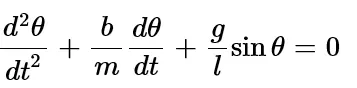
Here in above equation,
g = 9.81 - gravity in m/s^2
l = 1 - length of the pendulum in meter
m =1 - mass of ball in kg
b =0.05 - damping coefficient in kg
Now we simulate the motion between 0 – 20 sec, for angular displacement is = 0.
Angular velocity – 2 rad/sec^2 at time = 0.
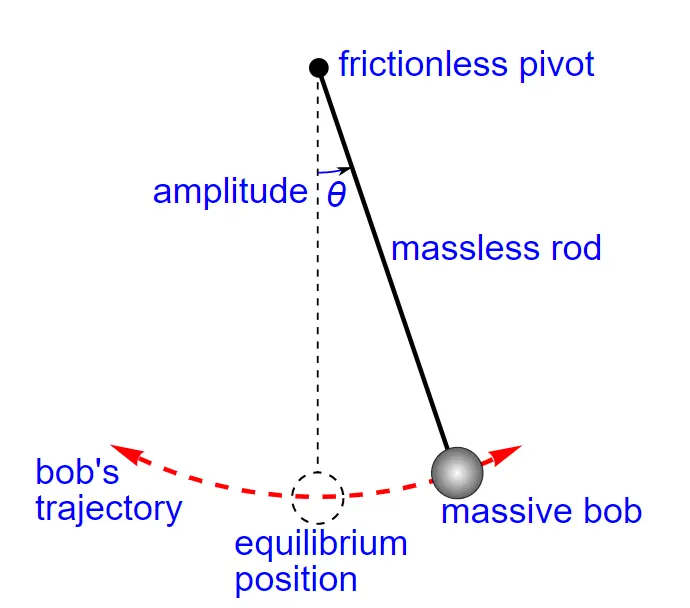
Fig: SIMPLE PENDULUM
By solving this eq., we get value of theta 1 & 2 for simple pendulum. Using the ode45 function in the Mat-Lab to solve this ODE’s.
Procedure –
%ODE represent the equation of motion of simple pendulum with damping
%the given teams
%damping coefficient in kg
b = 0.05;
%gravity in m/s^2
g = 9.81;
%Length of pendulum in m
l = 1;
%Mass of ball in kg
M = 1;
%Input conditions
theta_0 = [0;2.5];
% time
t_span = linspace(0,20,250);
above parameters are the input parameters for pendulum condition
For calculating ODE equation using function ode45 -
The matlab allows to solution of first order ODE’s using the inbuilt function called ‘ode45’.
So the given second order ODE will reduce to two first order ODE in order to be solver using MATLAB. The given ODEE represent the variation of the position of pendulum w.r.t. time.
function[dtheta_dt] = ode_func(t,theta,b,g,l,m)
theta1 = theta(1)
theta2 = theta(2)
dtheta1_dt = theta2;
dtheta2_dt = -(b/m)*theta2 - (g/l)*sin(theta1);
dtheta_dt = [dtheta1_dt; dtheta2_dt];
end
To find out ODE & plot –
%to solve ODE
[t, results] = ode45(@(t,theta) ode_func(t, theta, b,g,l,M),t_span, theta_0);
plot(t,results(:,1))
hold on
grid on
plot(t,results(:,2));
ylabel('time in second')
xlabel('plot')
To make animation –
%to make the animation we have to use for looping
%counter variable for tracking the counter variable
ct = 1;
for i = 1 : length(results(:,1))
x0 = 0;
y0 = 0;
x1 = 1*sin(results(i,1));
y1 = -1*cos(results(i,1));
figure(2)
%to make dead fix support
plot([-1 1], [0 0], 'linewidth',15, 'color','b')
axis([-2 2 -2 2])
hold on
%for plotting string possition
line([x0 x1], [y0 y1], 'linewidth', 5,'color','r')
%plot ball position
plot(x1, y1, 'o','markersize', 25, 'markerfacecolor', 'y')
hold off
m(ct) = getframe(gcf)
%store current frame
ct = ct+1;
end
To make movie output –
To save the animation of pendulum moment while time period will be saved by following program
%to create video output
movie(m)
videofile = VideoWriter('pendulum_simulation.avi', 'Uncompressed AVI');
%to open video
open(videofile);
%write frame to video file
writeVideo(videofile, m)
%close video file
close(videofile)
THE MAIN PROGRAM -
%THE SIMPLE PROGRAM TO DEFINE THE SECOND ORFER ODE FOR PENDuLUM.
%ODE - ORDNARY DIFFRENTIAL EQUATION

close all
clear all
clc

%ODE represent the equation of motion of simple pendulum with damping
%the given tearms
%damping coefficient in kg
b = 0.05;
%gravity in m/s^2
g = 9.81;
%Length of pendumum in m
l = 1;
%Mass of ball in kg
M = 1;
%Input conditions
theta_0 = [0;2.5];
% time
t_span = linspace(0,20,250);

%to solve ODE
[t, results] = ode45(@(t,theta) ode_func(t, theta, b,g,l,M),t_span, theta_0);
plot(t,results(:,1))
hold on
grid on
plot(t,results(:,2));
ylabel('time in second')
xlabel('plot')


%to make the animation

%counter variable for tracking the counter variable
ct = 1;

for i = 1 : length(results(:,1))

    x0 = 0;
    y0 = 0;
    x1 = 1*sin(results(i,1));
    y1 = -1*cos(results(i,1));
    figure(2)
    %to make dead fix support
    plot([-1 1], [0 0], 'linewidth',15, 'color','b')
    axis([-2 2 -2 2])
    hold on
    %for plotting string possition
    line([x0 x1], [y0 y1], 'linewidth', 5,'color','r')
    %plot ball position
    plot(x1, y1, 'o','markersize', 25, 'markerfacecolor', 'y')
    hold off
    m(ct) = getframe(gcf)
    %store current frame
    ct = ct+1;

end


%to creat video output
movie(m)
videofile = VideoWriter('pendulum_simulation.avi', 'Uncompressed AVI');
%to open video
open(videofile);
%write frame to video file
writeVideo(videofile, m)
%close video file
close(videofile)


function


function[dtheta_dt] = ode_func(t,theta,b,g,l,m)

theta1 = theta(1)
theta2 = theta(2)
dtheta1_dt = theta2;
dtheta2_dt =  -(b/m)*theta2 - (g/l)*sin(theta1);
dtheta_dt = [dtheta1_dt; dtheta2_dt];

end
YOUTUBE LINK FOR VIDEO -
Conclusion –
The effect of dampings on pendulum.
The displacement of the pendulum keep reduced while progressing thiem due to effect of damper the velocity of pendulum keep decrese with time.
The program has successfully run. The plot time w.r.t the velocity & displacement.
There are so many errors occurs wile programming, are attached in attachments & the most of errors are occurs while typing program. Its only reducing by practising for typing the program.
YOUTUBE LINK FOR VIDEO -
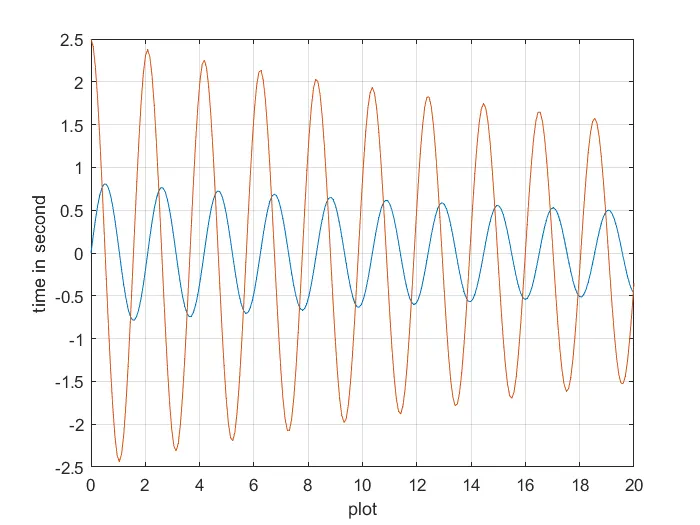
fig; the final plot.