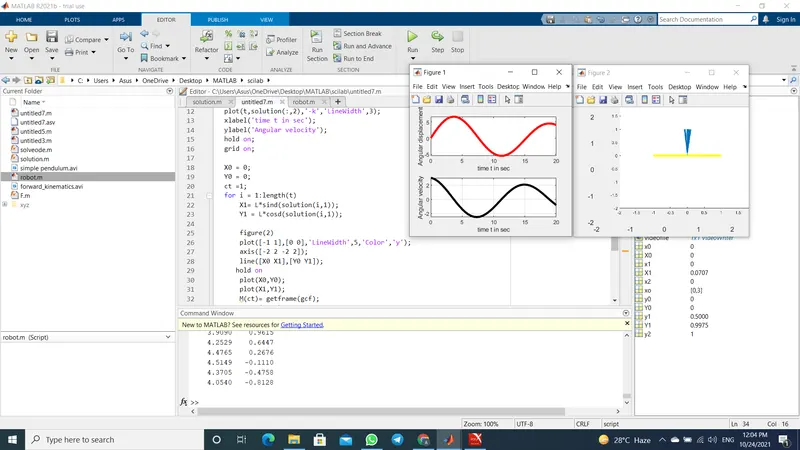
Week 3 - Solving second order ODEs
https://www.youtube.com/watch?v=FPkj8gp38Xw
function dxdy = solution(t,theta)  % creating function solution for solving ode.

b = 0.05;l=1;m=1;g=9.81;  % b is damping coefficient l is length m is mass and g is
                          % acceleration due to gravity

dxdy = zeros(2,1);    % creating zero matrix of size 2*1

dxdy(1) = theta(2);   % putting the value in respective
                      % element of zero matrix

dxdy(2) = (-b/m)*theta(2) - (g/l)*sind(theta(1));
end
L = 1;                           % defining length of of pendulum in m
t = linspace(0,20,40);          % defining time interval

[t,solution] = ode45('solution',[0,20],[0,3])  % calling function name as solution
subplot(2,1,1);
plot(t,solution(:,1),'r','LineWidth',3);   %plotting graph for angular displacement VS t
xlabel('time t in sec');
ylabel('Angular displacement');
subplot(2,1,2);
plot(t,solution(:,2),'-k','LineWidth',3); % plotting graph for angular velocity vs time
xlabel('time t in sec');
ylabel('Angular velocity');
hold on;
grid on;

X0 = 0;                   %defining fixed coordinated of
Y0 = 0;                   % pendulumn
ct =1;                     % counter
for i = 1:length(t)           % for each value of t X1 and Y1 will change X1 Y1 will change
    X1= L*sind(solution(i,1));
    Y1 = L*cosd(solution(i,1));

    figure(2)


    plot([X0 X1],[Y0 Y1]);
    axis([-0.5 0.5 0 1.2]);
    xlabel('theta');
    ylabel('position');
    pause(0.6)

    M(ct)= getframe(gcf);

    ct = ct +1;
end
movie(M);                                                    % creating movie
videofile = VideoWriter('simple pendulum','Uncompressed AVI');
open(videofile);
writeVideo(videofile,M);
close(videofile)
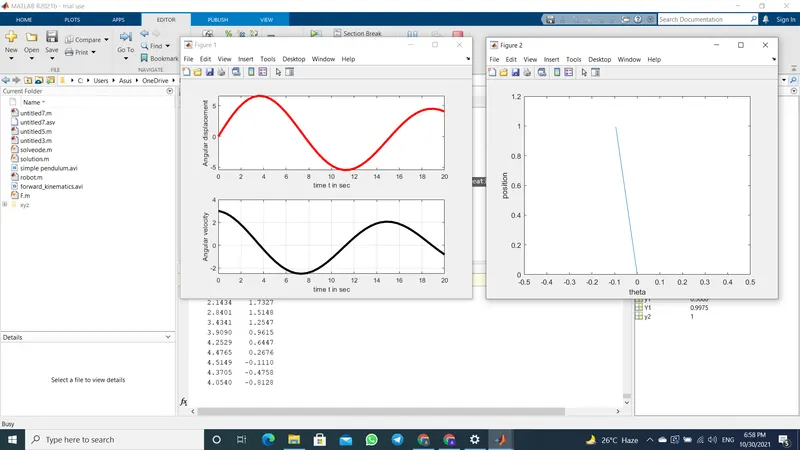
1 youtube link of video has been provided in top.
2 To solve ODE (2nd order differential equation) function named solution is created in MATLAB and its code with comments is provided above. than i have provided code for calling that function to solve ode and code to make video/animation is given with comments.
3 screenshots of output is provided after the codes.
4 As for error : 1st due to using sin instead of sind in above coding i was getting wrong output 2nd i was using hold on in command line so i was not getting the desire animation.