Week 3-Meshing of Hood Challenge
MESHING OF HOOD USING HYPERMESH
Objective : Extract the mid-surface and generate mesh on Hood using Hypermesh.
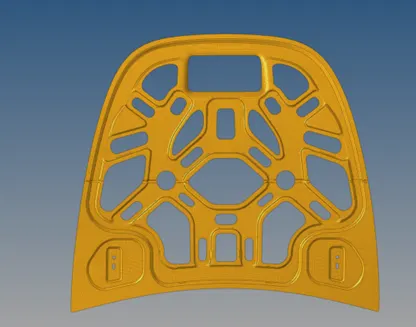
Given Model:
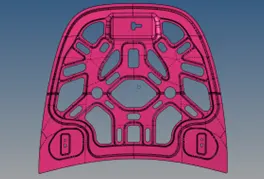
<!--[endif]-->
Steps:
1.Import geometry and cleanup
2. Mid-surface extraction and property assignment.
3. Surface meshing within the specified quality criteria
Quality Criterion:
|
S. No |
Quality criteria |
Value |
|
1. |
Aspect ratio |
5 |
|
2. |
Skewness |
45 |
|
3. |
Warping |
15 |
|
4. |
Taper |
0.5 |
|
5. |
Min. Length |
2 |
|
6. |
Max. Length |
8 |
|
7. |
Min Quad Angle |
45 |
|
8. |
Max Quad Angle |
135 |
|
9. |
Min angle Tria |
20 |
|
10. |
Max angle Tria |
120 |
|
11. |
Tria % |
10 |
Procedure:
Step 1: Importing geometry and cleanup:
<!-- [if !supportLists]-->· <!--[endif]-->To import the geometry, go to file >> Import >> select the file >> Import.
<!-- [if !supportLists]-->· <!--[endif]-->After importing the geometry is examined for any missing surfaces . The geometry is prepared for the mid-surface extraction if there are no defects in it.
Step 2: Extraction of the mid-surface and property assignment
Mid-surface can be extracted by any of the 4 methods below.
<!-- [if !supportLists]-->1. <!--[endif]-->Offset + plane + sweep
<!-- [if !supportLists]-->2. <!--[endif]-->Offset + plane.
<!-- [if !supportLists]-->3. <!--[endif]-->offset
<!-- [if !supportLists]-->4. <!--[endif]-->Skin Offset.
<!-- [if !supportLists]-->· <!--[endif]-->To extract the mid-surface, go to geometry >> mid-surface >> select any extraction option >> select the surface >> extract. In this challenge offset + plane + sweep is used.
<!-- [if !supportLists]-->· <!--[endif]-->After extracting the mid-surface, it is checked for any geometrical errors like needle faces, missing surfaces, and triple cons. If any of the errors present, then it should be rectified immediately.
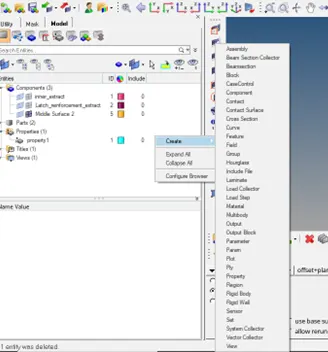
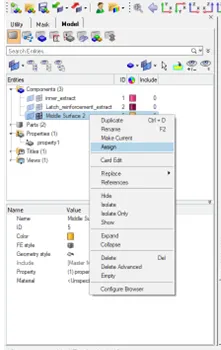
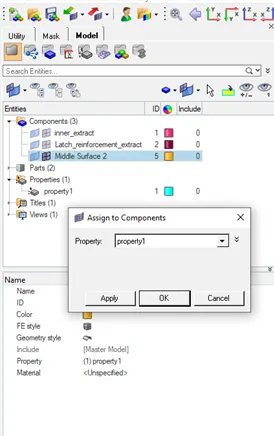
<!-- [if !supportLists]-->· <!--[endif]-->Now the properties like thickness, material etc. need to be assigned to the mid-surface. To assign the properties, select model in database and right click and choose to create and then property.
<!-- [if !supportLists]-->· <!--[endif]-->Now all the properties are entered in the property tab and the properties are assigned to the respective mid-surfaces.
<!--[endif]-->
Step 3: Generating mesh within the given quality criteria:
<!-- [if !supportLists]-->· <!--[endif]-->Before generating mesh, the geometry is split into smaller sections for good mesh flow.
<!-- [if !supportLists]-->· <!--[endif]-->To generate mesh, go to 2D >> auto mesh >> select the surface >> mesh. To edit the mesh for proper flow, the elements are selected and meshed again.
<!-- [if !supportLists]-->· <!--[endif]-->If any elements are failing for quality, then cleanup tools option which is present in quality index can be used.
<!--[endif]-->
Conclusion: a mesh that meets the specified quality standards is generated for the supplied hood panel's midsurface.