Week 3.2 - 2R Robotic Arm Challenge
Aim: Simulate the forward kinematic of a 2R robotic arm using Matlab.
Theory: Sir, in kinematics basically velocity and acceleration comes into consideration and forces are neglected.So we are going to simulate basic arms of robot dealing with forward kinematics of 2R robot, where 2R means 2 rotating links i.e number of links are 2 and R is rotation.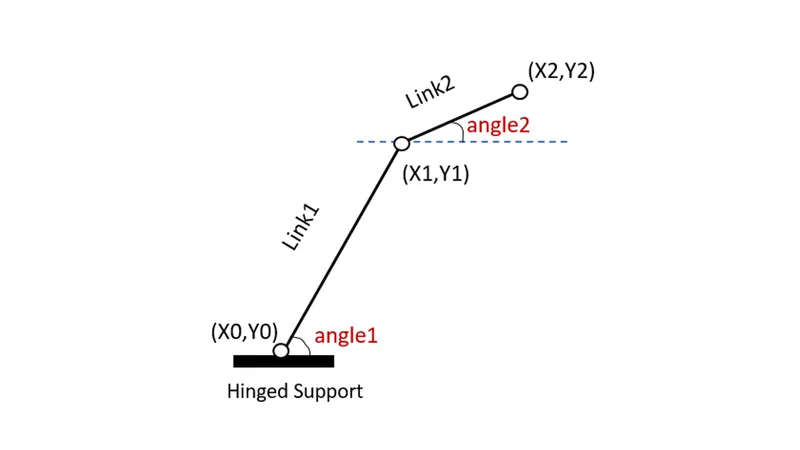
Calculation for link 1
x0=0
y0=0
x1=l1*cosd(theta1)
y1=l1*sind(theta1)
Calculation for link 2
x2=x1+l2*cosd(theta2)
y2=y1+l2*sind(theta2)
where,
x0,y0=starting point of link 1
x1,y1=ending point of link 1 & starting point of link 2
x2,y2=ending point of link 2
theta1=angle 1 with respect to x-axis
theta2=angle 2 with respect to x-axis
1] Basic program of forward kinematics of 2R robotic arm
clear all
close all
clc
%forward kinematics of 2R robotic arm
%Inputs
l1=1.5;
l2=1;
theta1=60;
theta2=30;
%co-ordinate
x0=0;
y0=0;
x1=l1*cosd(theta1);
y1=l1*sind(theta1);
x2=x1+l2*cosd(theta2);
y2=y1+l2*sind(theta2);
%plotting
line([x0 x1],[y0 y1],'linewidth',3,'color','r')
line([x1 x2],[y1 y2],'linewidth',3,'color','g')
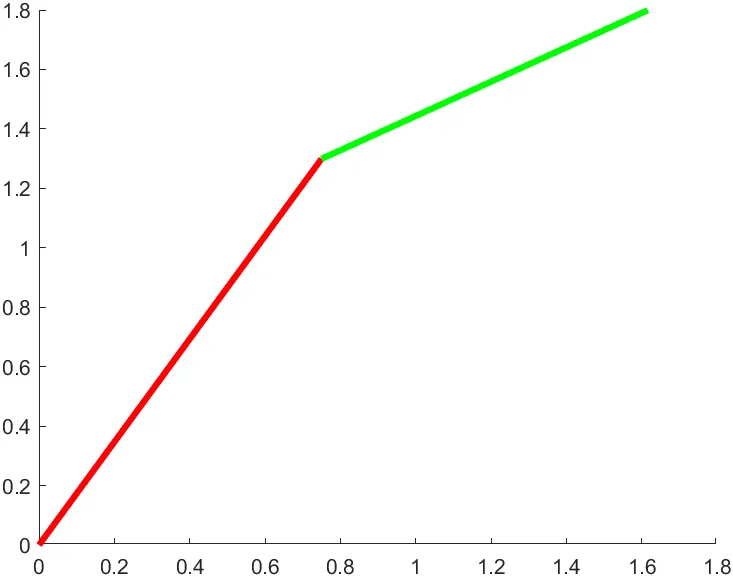
Above graph is the solution to program writtem above.
2] Program for arm animation
Consider a different angle and different value of x and y so that we can simulate an arm.
with the help of linspace command we can provide different angle
theta1=linspace(0,90,10)
theta2=linspace(0.90.10)
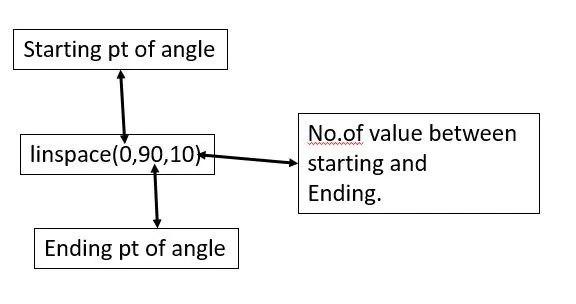
for changing the value of angle use for loop command as follows:
for i=1:length(theta1)
THETA1=theta1(i);
for j=1:length(theta2)
THETA2=theta2(j);
end
Here we are using two time for loop because we have two angle for two links for each angle we need for loop command to assign the value of different angles.
For forward kinematics copying my above program
now i am explaining my errors and solution slide wise given below
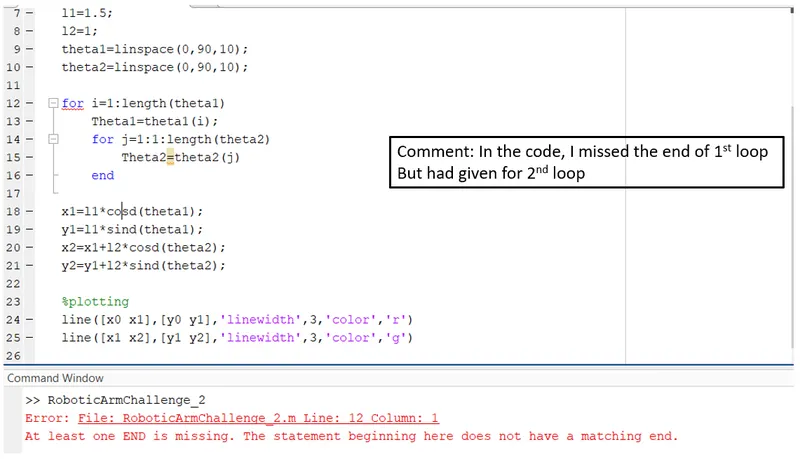
Solving the above error
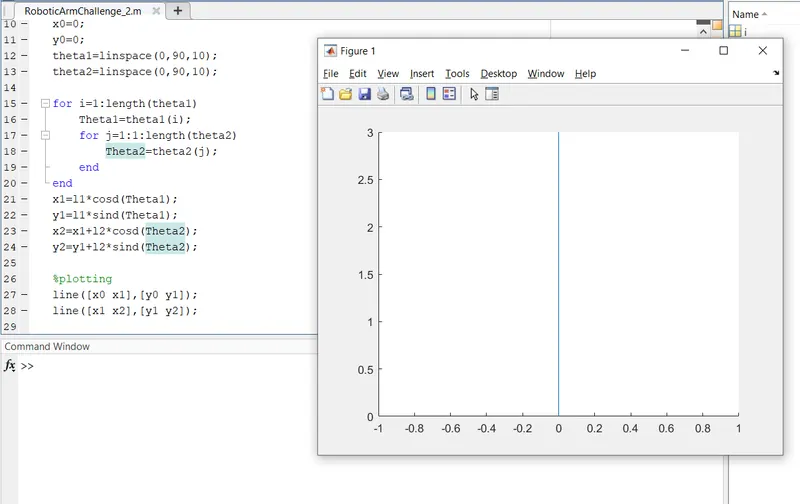
Now resolving further error, we also getting error because we want robotic arm simulation angle wise graph but this is not done yet because my for loop start at angle1 and end at angle2 and the length of link is not calculated because end operator is used above the link calculation.
Now after resolving some error and changing a bit in program
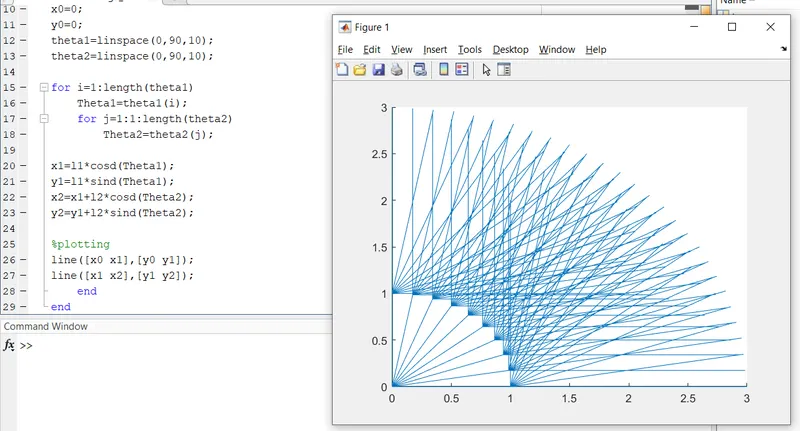
We got our required first plot but its not animated.
To eliminate this we will be using figure ct
where, ct=counter
ct is used before the for loop and define ct=1,
after the plot command type ct=1 and after executing the program we get 100 independent plot because angle1 value is 10 and angle 2 value is 10.
So to get rid of this line plot instead of using
line([x0 x1],[y0 y1])
line([x1 x2],[y1 y2])
We will use
plot([x0 x1],[y0 y1],[x1 x2],[y1 y2],'linewidth',3)
And after that we use
axis([-0.1 2.5 0 2.5])
This axis command logic varies with respect to length of link for example
l1=3
l2=2.5
For plotting the graph, value should be greater than length of link
axis([-0.1 3.5 0 3.5])
Below is the code is for animation :-
clear all
close all
clc

%inputs
l1=2;
l2=1;
%co-ordinate
x0=0;
y0=0;
theta1=linspace(0,90,10);
theta2=linspace(0,90,10);
ct=1

for i=1:length(theta1)
    Theta1=theta1(i);
    for j=1:1:length(theta2)
        Theta2=theta2(j);


x1=l1*cosd(Theta1);
y1=l1*sind(Theta1);
x2=x1+l2*cosd(Theta2);
y2=y1+l2*sind(Theta2);


%plotting
plot([x0 x1],[y0 y1],[x1 x2],[y1 y2],'linewidth',3)
axis([-0.1 2.5 0 2.5])
pause(0.1)
ct=ct+1;
    end
end
3] Final step creating a movie
For creating movie we use
M(ct)=getframe(gcf);
movie(M)
videofile = VideoWriter('forward_kinematic2.avi');
open(videofile)
writeVideo(videofile,M)
close(videofile)
clear all
close all
clc
%inputs
l1=2;
l2=1;
%co-ordinate
x0=0;
y0=0;
theta1=linspace(0,90,10);
theta2=linspace(0,90,10);
ct=1
for i=1:length(theta1)
Theta1=theta1(i);
for j=1:1:length(theta2)
Theta2=theta2(j);
x1=l1*cosd(Theta1);
y1=l1*sind(Theta1);
x2=x1+l2*cosd(Theta2);
y2=y1+l2*sind(Theta2);
%plotting
plot([x0 x1],[y0 y1],[x1 x2],[y1 y2],'linewidth',3)
axis([-0.1 2.5 0 2.5])
pause(0.1)
M(ct)=getframe(gcf);
ct=ct+1;
end
end
movie(M)
videofile = VideoWriter('forward_kinematic2.avi');
open(videofile)
writeVideo(videofile,M)
close(videofile)
Hence, we have achieved our result.
Please find the animation of link in the given onedrive link below:-
https://drive.google.com/drive/folders/10u0-XFLyphw6YgRNJhIWtRYcVzwUCMSj?usp=sharing