Week 3.2 - 2R Robotic Arm Challenge
Aim:
To Write a program in Matlab to simulate the forward kinematics of a 2R Robotic Arm
Objective:
To solve the forward kinematics of a 2-axis Robotic arm
And upload the animation on YouTube.
Theory:
A robotic arm is a robot manipulator, usually programmable, with similar functions to a human arm. The links of such a manipulator are connected by joints allowing either rotational motion (such as in an articulated robot) or translational or prismatic (linear) displacement. The links of the manipulator can be considered to form a kinematic chain. The lins decide the Degree Of freedom(DOF) of the manipulator.
CODE:
% Program for 2R Robotic Arm Challenge
clear all
close all
clc

%Inputs
 l1=1;
 l2=0.5;
 t1=linspace(0,90,15);
 t2=linspace(0,90,15);
 ct=1;

for i=1:length(t1)
T1=t1(i);

 for j=1:length(t2)
 T2=t2(j);

 x0=0;
 y0=0;

 x1=l1*cosd(T1);
 y1=l1*sind(T1);

 x2=x1+l2*cosd(T2);
 y2=y1+l2*sind(T2);

 %Plotting
 plot([x0,x1],[y0,y1],[x1,x2],[y1,y2],'Linewidth',1)
 axis([-0.1 2 0 1.5])
 pause(0.01)
 M(ct)=getframe(gcf);
 ct=ct+1;
 end

end

movie(M)
Videofile=VideoWriter('Robo_a.avi','Uncompressed AVI');
open(Videofile)
writeVideo(Videofile,M)
close(Videofile)
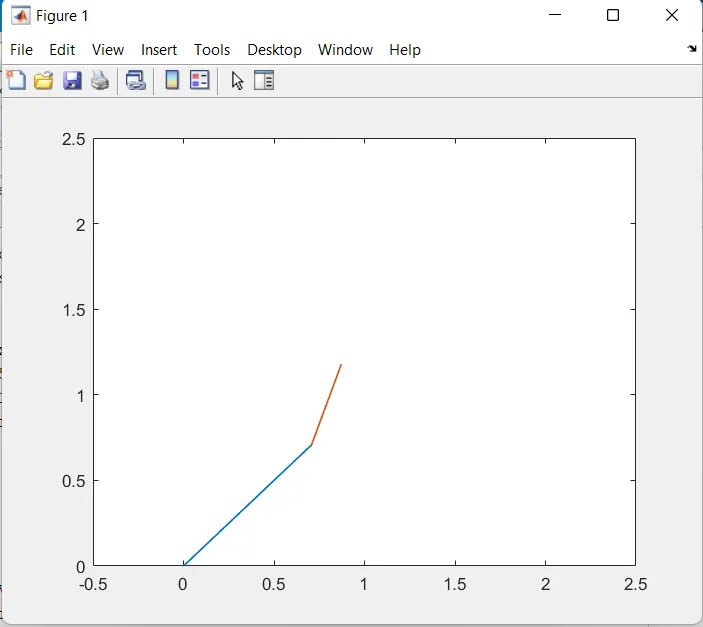
OUTPUT:
Explanation:
*The lengths of two links are fixed and assigned
*The angles for two links with respect to their bases are also assigned using the linspace(start,end,values btw them) command(T1 and T2)
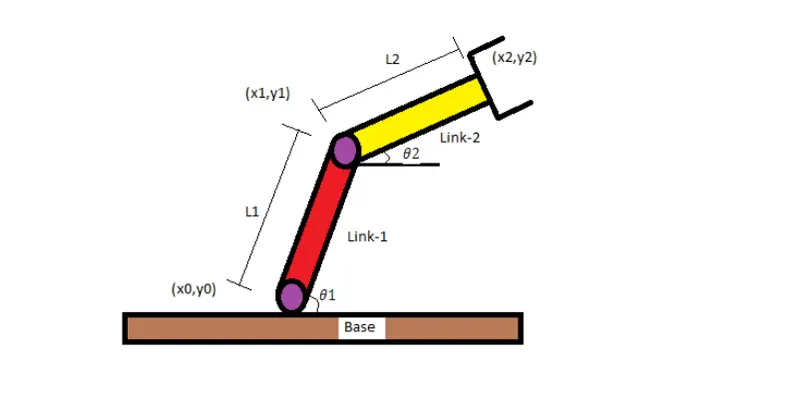
*Always first coordinate or base coordinate is fixed as 0,0(X0, Y0) and the remaining coordinates are created using the formula
x1=l1*cosd(T1)
y1=l1*sind(T1)
and
x2=x1+cosd(T2)
y2=y1+sind(T2)
NOTE: x1,y1 is the ending coordinate for link1 and it is also starting coordinate for link2, x2,y2 is the ending coordinate for link2
*This is all done inside two for loops since for 1st iteration of the link there are n number of iterations in the second loop (or link2)
*plot is done and axis is fixed for graph
VIDEO CREATION:
*w.k.t the video is a collection of frames and if the frames are made to run with a specific speed it becomes a video. So the code snippet collects the frame using getframe and stores it in array M and updates the array variable so it can have the next frame to be uploaded.
*Movie(M) makes the collected frames into video
*Videowriter is an object to create a videofile with a filename and the desired quality(uncompressed.avi)
*open(videofile) is used to open the file and writevideo is used to write the Movie(M) into the file Videofile
*close(videofile) is used to close the operation.
*Now the video filename- robo_a.avi contains the animation or video
Result:
The program in Matlab to simulate the forward kinematics of a 2R Robotic Arm is done successfully.
Youtube link: