Week 3.2 - 2R Robotic Arm Challenge
code for the following -
clc
clear all
close all
%anles of two links with repect to x axis
theta1=linspace(0,90,10);
theta2=linspace(0,90,10);
%starting point of link 1
x0=0;
y0=0;
%lenght of links l1 and l2
l1=10;
l2=5;
ct=1;
for i=1:length(theta1);
THETA1=theta1(i);
for j=1:length(theta2);
THETA2=theta2(j);
x1=(l1)*cosd(THETA1);
y1=(l1)*sind(THETA1);
x2=x1+(l2)*cosd(THETA2);
y2=y1+(l2)*sind(THETA2);
plot([x0 x1],[y0 y1],[x1 x2],[y1 y2],'linewidth',3)
axis([0 15 0 15])
pause(0.1)
M(ct)=getframe(gcf);
ct=ct+1;
end
end
movie(M)
videofile=VideoWriter('3_2b.avi','uncompressed AVI');
open(videofile)
WriteVideo(videofile,M)
close(videofile)
explanation -
first give different values for theta1 and theta2 by linspace command.there will be 10 varibale from 0 to 90.
secondly define the origin of limb x0 and y0 as(0,0) and lenght of links l1=10 and l2 =5.
create a varibale "ct" which denote the size of the array "M" and it starts from 1.
then start the nested for loop for finding link position.first we arrange for loop for moving link 1.then in that for loop;we create another for loop to start movement of link 2.so one movement of link 1;the link 2 moves its entire position.then link1 move to next position and link 2 moves full movement and it continue for entire movement of link1.
plot the graph for each movement of link 1 and 2.gave axis start and end intervals for both x and y axis. pause the graph for .3 second.
store each graph frames in a variable M.for each for loop a size of the array M increases due to increase in position of ct.
after closing the loop;create a movie file which will have all frames of the graph.
create a videofile.define it by giving name and format that the video file should be.
open the file and write the video file from frames of M array and finally close the video file.
result-
the ploted graph is stored as animated video and uploaded in file uploading tab.
errors during coding-
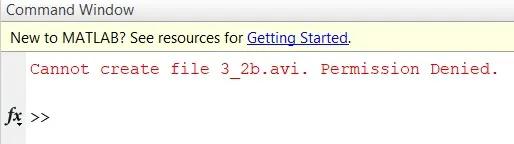
the error faced during coding is shown above.the problem was the graph by each frames are showing but the video file is not creating.during mentoring session; they told me that this may be due to the software iam using is cracked version.so i copy this code and run in matlab online and downloaded the video file.