Week 3.2 - 2R Robotic Arm Challenge
AIM :-
The aim of the project is to develop a MATLAB program that simulates the forward kinematics of a 2R Robotic arm. The simulation will involve modeling the arms movements based on the joint angles and lengths of the links. Additionally, an animation will be generated to visually reprsent the robotic arms motion.
INTRODUCTION :-
Robotic arms are vital components in various industries, including manufacturing, healthcare, and automation. Understanding and simulating the motion of these robotic arms is essential for designing efficients control strategies. Forward kinematics is a crucial aspects of robotic arm simulation, as it allows us to determine the end-effectors position based on the joint angles.
In this project, we will focus on a 2R robotic arm, which comprises two rotational joints (R) and two links. The forward kinematics problem involves finding the end-effectors coordinates (x,y) in a 2D plane given the joint angles and link lengths.
OBJECTIVES :-
1. Implement a MATLAB program to calculate the Forward kinematics of a 2R robotic arm.
2. Define the kinematic equation to compute the end-effectors position using given joint angles and link lengths.
3. Develop a graphical representation of the 2R robotic arm using MATLAB's plotting capabilities.
4. Create an animation to visually depict the robotic arms movement as the joint angles vary.
5. Save the animation as a video file for further analysis and documentation.
CODE AND EXPLANATION OF CODE :-
clear all
close all
clc

%Inputs
l1 = 1;
l2 = 0.5;
theta1 = linspace(0,90,10);
theta2 = linspace(0,90,10);

ct=1
for i = 1:length(theta1)
    THETA1 = theta1(i);
    for j = 1:length(theta2)
        THETA2 = theta2(j);
        x0 = 0;
        y0 = 0;

        x1 = l1*cosd(THETA1);
        y1 = l1*sind(THETA1);

        x2 = x1+l2*cosd(THETA2);
        y2 = y1+l2*sind(THETA2);

        %Plotting


        plot([x0 x1],[y0 y1],[x1 x2],[y1 y2],'linewidth',3)
        axis([-0.1 1.5 0 1.5])
        pause(0.1)
        M(ct) = getframe(gcf);
        ct=ct+1;

    end
end

%movie(M)
videofile = VideoWriter('forward_kinematics.avi','Uncompressed AVI');
open(videofile)
writeVideo(videofile,M)
close(videofile)
The videofile of 2R robotic arm is attached below;
RESULT :-
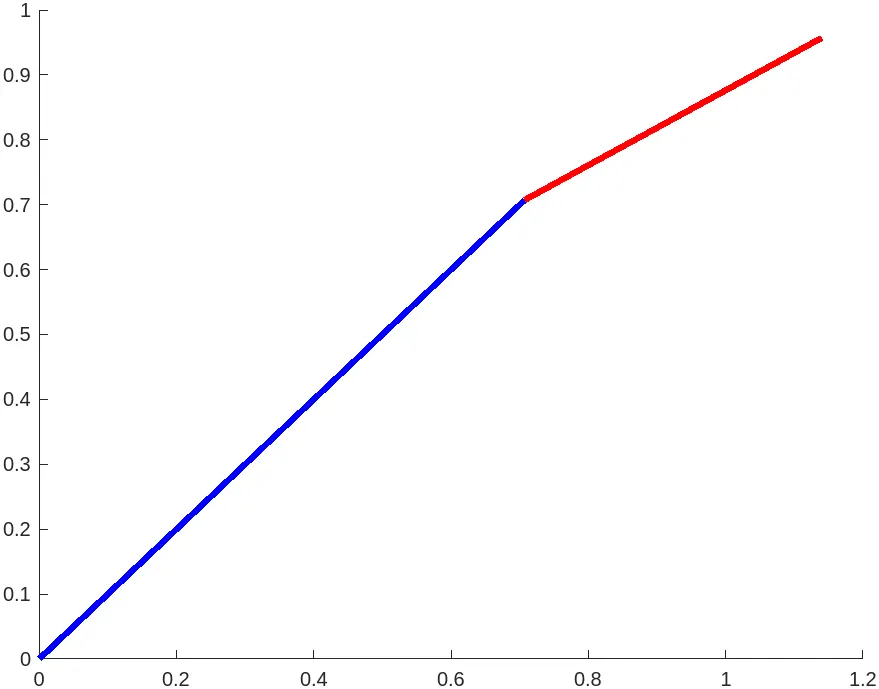
In this task we successfully developed a MATLAB program to simulate the forward kinematics of a 2R robotic arm, as demonstated in the accompanying video. The program accurately computed the end effectors position in a 2D plane based on the given joint angles and link lengths.
The final videofile of 2R robotic arm is attached below.