Week 3.2 - 2R Robotic Arm Challenge
AIM :- A forward kinematic of a 2r robotic arm manipulator.
A mechanical linkage is an assembly of bodies connected to manage forces and movement. The movement of a body, or link, is studied using geometry so the link is considered to be rigid. The connections between links are modeled as providing ideal movement, pure rotation, or sliding for example, and are called joints. A linkage modeled as a network of rigid links and ideal joints is called a Kinematic chain.
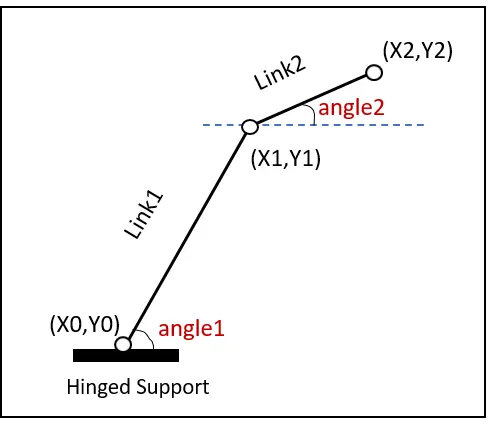
Code for forward kinematic of a 2r robotic arm manipulator
%forward_kinematic_of_a_2r_robotic_arm

close all
clc

%Input
%angle of the robotic arm
theta1= linspace(0,90,50);
theta2= linspace(0,90,50);

%length of links
l1=1;
l2=0.5;

%for end loop
ct=1;

for i=1:length(theta1)
    THETA1=theta1(i);

    for j=1:length(theta2)
        THETA2=theta2(j);


x0=0;
y0=0;

x1=l1*cosd(THETA1);
y1=l2*sind(THETA1);

x2=x1+l2*cosd(THETA2);
y2=y1+l2*sind(THETA2);

%Plotting

plot([x0 x1],[y0 y1],[x1 x2],[y1 y2],'linewidth',3)
axis([-0.1 1.5  0 1.5])
pause(0.03)
M(ct) = getframe(gcf);
ct=ct+1;
    end
end

%convert plot into video
movie(M)
videofile= VideoWriter('forward_kinematics.avi','uncompressed AVI');
open(videofile)
writeVideo(videofile,M)
close(videofile)
Code explanation
- In line 1 command or comment is given of the topic.
- In line 3 close all command is use to close all figure handle.
- In line4 clc is used to clear all things from command window
- In line 7 input is given angle of the robotic arm
- In line 8and9 consider the value of θ1 and θ2 respectively.
- In line 12 and 13 consider the value of l1 and l2 respectively.
- In line 16 we are taking counter represented as ct and having value 1.
- From line 18 we had started for loop because it for statements loop a specific number of times, and keep track of each iteration with an incrementing index variable.
- From line 25 to 32 coordinates value are given like [x0,y0],[x1,y1],[x2,y2].
- In line 36 plotting coordinate [x0,y0],[x1,y1],[x2,y2] are given to plot all coordinate.
- In line 37 axis command is use to give limits to axis.
- In line 38 we given command pause, this command is use to pause the animation for millisecond.
- In line 39 frame is given to structure to data or set in animation frame.
- In line 41 and 42 end of for loop command.
- From line 24 we are starting to convert plot data into video.
- In line 45 movie command is use to make up a list of frames to play consecutively in the movie.
- In line 46 video filecommand is use to specifying the time or frame interval.
- In line 48 writevideo is used to writes data from an array to the video file.
Result
watch upload file
sorry sir due to internet issue i can't able to upload file om youtube or google drive.