Week 2 Challenge
1. 1. How will you assign Circular section to column?
2. How will you assign Unit system to a .std model file?
3. What are the parameters to be specified while using “Bay Frame” option?
4. Name few codal standards incorporated in STAAD Pro software.
5. How will you specify the design compressive strength for a RCC section?
2. 1. State the “Input” steps involved in RCC design.
2. Explain the difference between Fixed and Enforced support condition in STAADPro.
3. 1. Explain the steps involved in analysis of a model using STAAD Pro sequentially.
2. Explain the two ways in which a structural framework/model can be created in STAAD Pro software.
3. Elaborate the different support conditions in STAAD Pro.
4. How will you extract the stress distribution for a staircase slab?
5. Explain the different ways to view SFD & BMD in STAAD Pro.
Practical
1. Analyze the following structural elements and validate the results
A. Simply Supported Beam
a. A Simply supported beam with two point loads symmetrically placed
b. Span L = 20m
c. Load P = 50kN each
d. Both P located at 5m from each support
B.Fixed Beam
a. Span L = 16m
b. Uniformly Distributed Load w=9kN/m
1. 1. How will you assign Circular section to column?
properties tab - Define - Circular section - enter section dim YD
2. How will you assign Unit system to a .std model file?
First while opening the model enter Metric unit
after opening the model - in geometry - click input unit
3. What are the parameters to be specified while using “Bay Frame” option?
NO of BAYS in X dir and Z dir
NO of Stories in Y dir
4. Name few codal standards incorporated in STAAD Pro software.
IS 456 IS 800 2007 and all international codes
5. How will you specify the design compressive strength for a RCC section?
define grade of concrete in properties tab Fcu is design compressive strength .
2. 1. State the “Input” steps involved in RCC design.
goto design tab - select code - design parameters - enter design parameter values
2. Explain the difference between Fixed and Enforced support condition in STAADPro.
All degrees of freedom is restrained but in enforced but some of the DOF is released .
3. 1. Explain the steps involved in analysis of a model using STAAD Pro sequentially.
create model using node system - Add beams - choose properties - add supports
- add specificaton if any- add loadings - apply perform analysis - Run the MODEL
- Goto post processing - note DISPLACEMENT SHEAR FORCE AND BENDING MOMENT
2. Explain the two ways in which a structural framework/model can be created in STAAD Pro software.
NODE SYSTEM and BAY frame option
3. Elaborate the different support conditions in STAAD Pro.
FIXED PINNED fixed but elastic mat plastic mat enforced enforced but spring support etc
4. How will you extract the stress distribution for a staircase slab?
post processing mode - plate results - note max plate stresses moment and forces
5. Explain the different ways to view SFD & BMD in STAAD Pro.
Isometric views - top views front views etc
Practical
1. Analyze the following structural elements and validate the results
A. Simply Supported Beam
a. A Simply supported beam with two point loads symmetrically placed
b. Span L = 20m
c. Load P = 50kN each
d. Both P located at 5m from each support
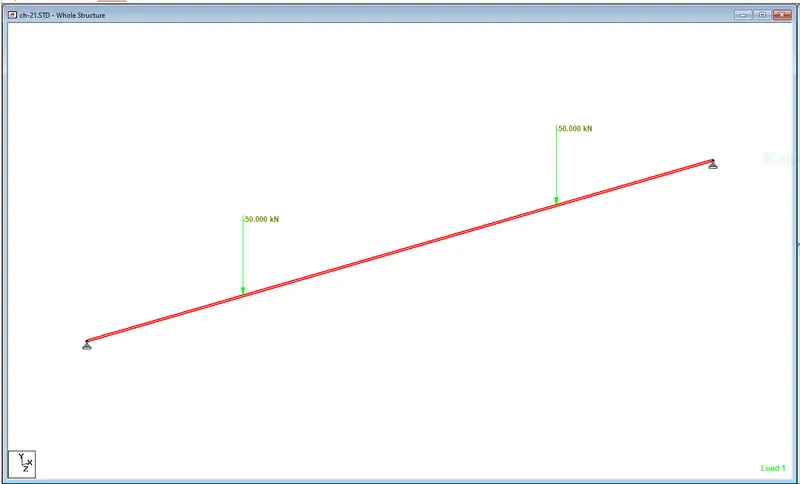
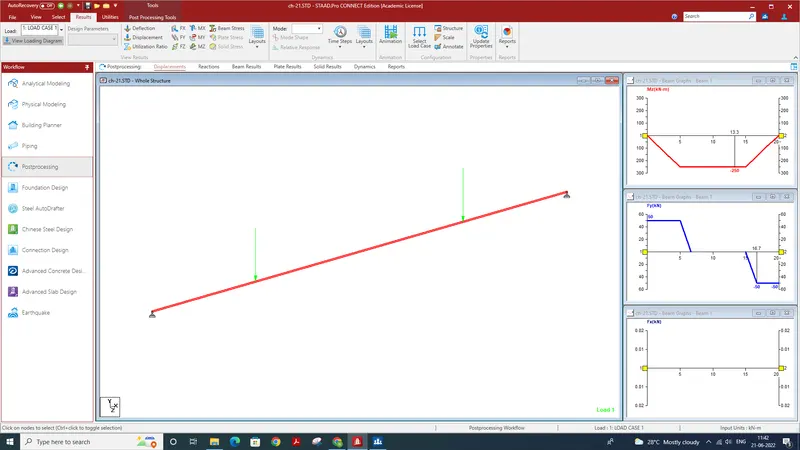
RESULTS - SHEAR FORCE DIAGRAM AND BENDING MOMENT DIAGRAM IS SHOWN IN FORM OF GRAPHS
locationn of max and mini moment and shear force can be noted .
STAAD FILE IS ATTACHED BELOW
B. Fixed Beam
a. Span L = 16m
b. Uniformly Distributed Load w=9kN/m
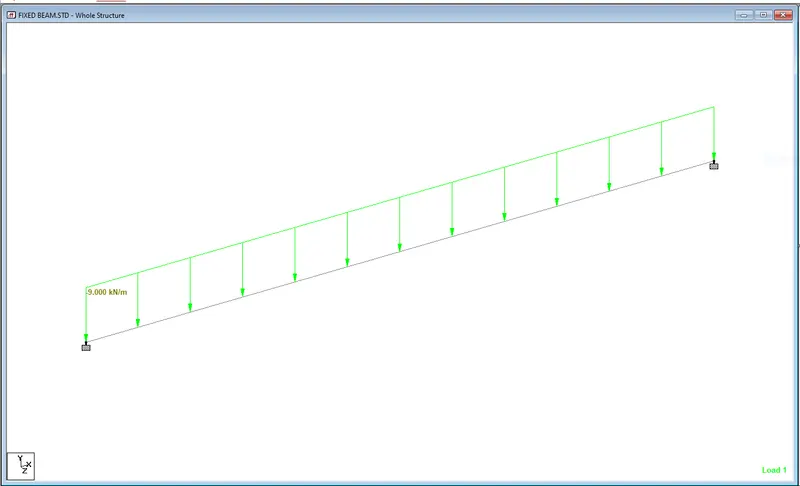
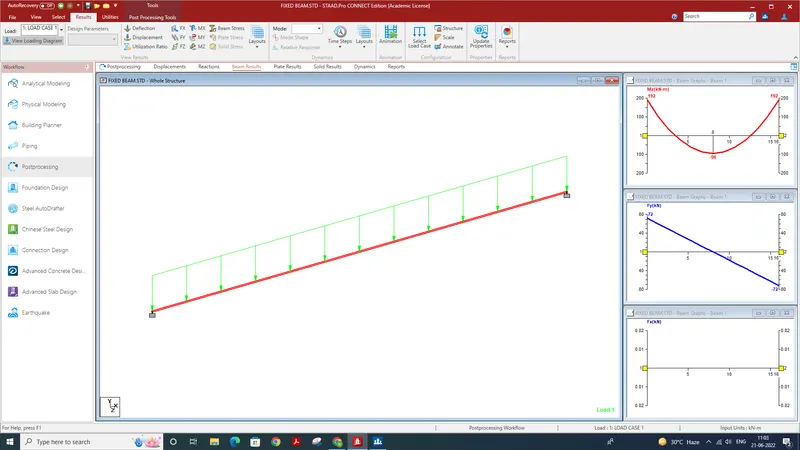
RESULTS - SHEAR FORCE DIAGRAM AND BENDING MOMENT DIAGRAM IS SHOWN IN FORM OF GRAPHS
locationn of max and mini moment and shear force can be noted .
STAAD FILE IS ATTACHED BELOW