Week 2- 2R Robotic Arm Challenge
clear all
close all
clc

% Inputs
l1=1;
l2=0.5;
theta1= linspace(0,90,10);
theta2= linspace(0,90,10);

ct=1;
for i = 1:length(theta1)
    THETA1= theta1(i);
    for j= 1:length(theta2)
        THETA2= theta2(j);
        x0=0;
        y0=0;

        x1= l1*cosd(THETA1);
        y1= l1*sind(THETA1);

        x2=x1+l2*cosd(THETA2);
        y2=y1+l2*sind(THETA2);

        % plotting


        plot([x0 x1],[y0 y1],[x1 x2],[y1 y2],'linewidth',3)
        axis([-0.1 1.5 0 1.5])
        pause(0.03)
        M(ct)= getframe(gcf)
        ct=ct+1;
      end
   end

   movie(M)
   videofile=videowriter('forward_kinematics.avi','uncompressed AVI')
   open(videofile)
   writevideo(videofile,M)
   close(videofile)
 clear all
close all
clc

% Inputs
l1=1;
l2=0.5;
theta1= linspace(0,90,10);
theta2= linspace(0,90,10);

ct=1;
for i = 1:length(theta1)
    THETA1= theta1(i);
    for j= 1:length(theta2)
        THETA2= theta2(j);
        x0=0;
        y0=0;

        x1= l1*cosd(THETA1);
        y1= l1*sind(THETA1);

        x2=x1+l2*cosd(THETA2);
        y2=y1+l2*sind(THETA2);

        % plotting
        figure(ct)
        line([x0 x1],[y0 y1],'linewidth',3,'color','b')
        line([x1 x2],[y1 y2],'linewidth',3,'color','r')
        ct=ct=1;
      end
   end
: The animation file of the plot =
https://drive.google.com/file/d/1k6BtjsXqVTy-q9YEjZPe4V3LgWi7NHSz/view?usp=sharing
Details report for forward kinematics :
1) Aim :
Forward kinematics of a robotics arm
2) Equation for forward kinematics:
i = 1:length(theta1)
j= 1:length(theta2)
x1= l1*cosd(THETA1)
y1= l1*sind(THETA1)
3) Objectives of the project :
1) Create animation file of the plot.
2) Step wise explanation of the code.
3) Metion the errors faced while programing.
4) Screenshots showing errors thrown in command window.
Problem Statement :
Write a matlab program for the 2R robotics arm consisting of two links , link- 01 and link- 02.
Link -01 and link- 02 are of length 3 cm and 2 cm respectively. Where angles made by link-01 ansd link-02 with x-axis are 45 degrees and 75 degrees respectively .
Solution :
First let us understand , how to create a program for plotting the links in matlab.
Plotting links is as simple as plotting two different lines.
In order to draw a single line we require:
1. Length of line .
2. Angular position of the line
3. coordinates of the starting initial and final position of it.
We have lengths both links and the angles at which both the links are inclined are also given.
L1 = 3 cm
L2 = 2 cm
theta1 = 45
theta2 = 75
4) Calculation for the coordinated of the links :
We can calculate following coordinates:
X theta = 0
Y theta = 0
X1 = L1*cosd(theta1)
Y1 = L1*sind(theta1)
X2 = X1+ L2*cosd(theta2)
Y2 = Y1 + L2*sind(theta2)
5) Error :
1) Below are the error that were found while executing the code. 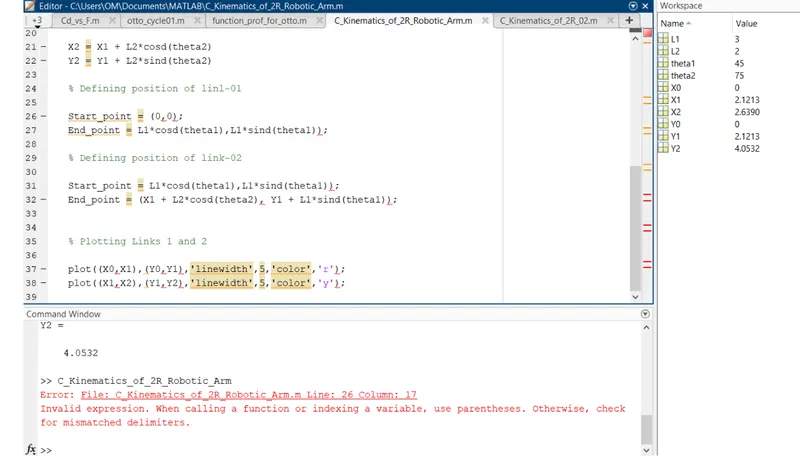
Figure 01: showing error in line - 26.
Correction :
Once we gave the trigonometric relations of the coordinates of the points, matlab will find the start point and end point of both links after the execution of plot command.
There is no need to specify the start point and end point of both links separately.
Deleted the extra and unwanted definition of the coordinates .
2) Error :
Wrong syntax of the for loop :
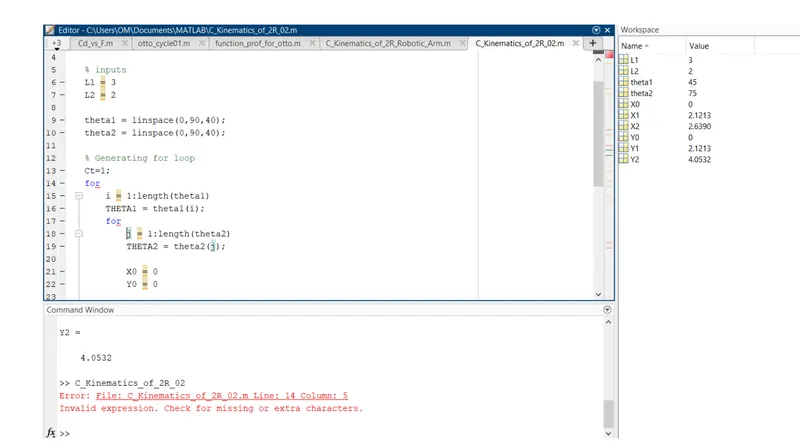
Correction :
Syntax:
for i = l : length(theta) ;
THETA = theta (i);
end
The first line of for loop was discontinued after 'for'. In sample words the for loop and loop counter variable must be in same line .
Hence place the curser before loop counter variable 'i' and press backspace to get the syntax right.
Conclusion :
As we can see in the animation video two links : link-01 and link-02 are moving .from 0 degrees to 90 degrees in counter clockwise direction. For each angular position of link -01 ,link -02 will change it's ten angular position . this is achieved by using for loop in for loop.so it's clear that here we are getting total 100 frames for the video.