Week 2- 2R Robotic Arm Challenge
%Robotic arm animation
l1 = 1;
l2 = 0.5;
theta1 = linspace(0,90,10);
theta2 = linspace(0,90,10);
x0 =0;
y0= 0;
c = 1; % loop counter for frames
for i = 1:length(theta1)
    for j = 1:length(theta2)
        x1 = l1*cosd(theta1(i));
        y1 = l1*sind(theta1(i));

        x2 = x1 + l2*cosd(theta2(j));
        y2 = y1 + l2*sind(theta2(j));
        %plotting
        plot([x0,x1],[y0,y1],[x1,x2],[y1,y2], 'linewidth',3);
        axis([-1 2 0 2]);
        pause(0.001)
        M(c) = getframe(gcf);
        c = c + 1;
    end
end
%creating a movie using the frames
movie(M)
videofile = VideoWriter('forward kinematics.avi', 'Uncompressed AVI');
open(videofile);
writeVideo(videofile,M);
close(videofile);
Explanation-
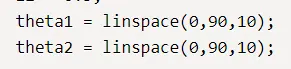
the values of theta1 and theta2 are stored as arrays

both the lines are printed in one command with this line
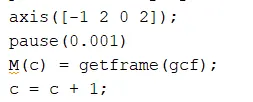
changing the x axis from -1 to 2 and y axis from 0 to 2
pausing the plots by 0.001s for visibility and presentation
M is an array that stores the frames. gcf - get current figure
the counter is increased in the end. This way all the frames will be stored.

creating a movie using the frames M and storing it as 'forward kinematics.avi.'