Week 2- 2R Robotic Arm Challenge
2R Robotic Arm Challenge
Aim :-
Objective :-
- write a program to simulate 2R Robotic arm.
- To create a movie/animation form the plot obtained.
Introduction :-
A robotic arm is a type of mechanical arm, usually programmable with simular function to a human arm. The arm may be the sum total of the mechanism or may be part of a more complex robot. The links of such a manipulator are connected by joints allowing eithernrotation motor(such in an articulated robot) or translational(linear) displacement. The links of the manipulator can be considered to from of a kinematic chain. The terminus of the kinematic chain of the manipulator called the end effector and it is analogous to the human hand. The end effector or robotic hand can be designed to perform any desired task suuch as welding, gripping, spinning etc., depending on the application. For example, robot arms in Automotive assembly lines perform a variety of tasks such as welding, part rotation and placementduring assembly.
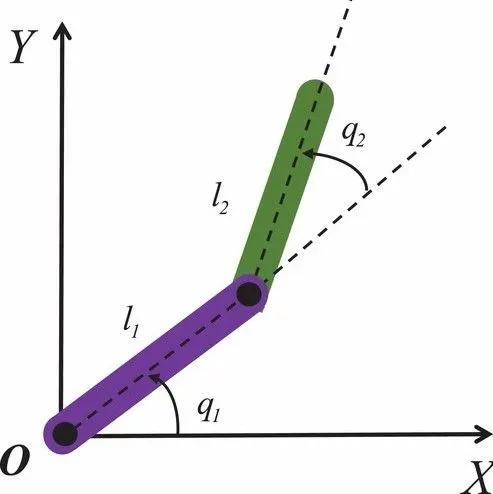
Formulas :-
- x1 = l1*cosdθ1
- y1 = l1*sindθ1
- x2 = x1+l2*cosdθ2
- y2 = y1+l2*sindθ2
let,
- l2 & l2 - the length of link 1 & 2.
- θ1 - Angle of link1 in horizontal.
- θ2 - Angle of link2 in horizontal.
- x,y - co-ordinates of the link 1 & 2.
Explanation of code :-
- Starting the program by using comments like 'clear all'.
- Providing the input variables.
- Perdefining the length/values of the arms.
- Providing the values of theta1 & 2 using linspace command of theta = 0 to 90 degrees for 15 values.
- Now using 'For' command for iteraiting values of the desired variables.
- Again using 'For' command for providing movement to the second robotic arm.
- Providing the equ for the x1 y1, x2 y2 definding the coordinates of both robotic arms.
- Plotting all the coordinates values and providing the axis no.
- Using the pause command to make the plot looks perfect.
- Controling the 'ct'(counter) values by +1 each time it accutes for loop.
- All the figure are assignedd to a variable'M', one at a time using ct.
- Ending the 'For' loop twice.
- Using movie command to creat the animation/movie.
- At tne end saving the movie in avi format.
MATLAB Code :-
% program fpr 2R Robotic Arm challenge

clear all
close all
clc

% inputs

l1 = 1;
l2 = 0.5;

theta1 = linspace(0,90,15);
theta2 = linspace(0,90,15);

ct = 1;

for i = 1:length(theta1)
THETA1 = theta1(i);

for j = 1:length(theta2)
THETA2 = theta2(j);

x0 = 0;
y0 = 0;

x1 = l1*cosd(THETA1);

y1 = l1*sind(THETA1);

x2 = x1+l2*cosd(THETA2);

y2 = y1+l2*sind(THETA2);

% plotting

plot((x0,x1),(y0,y1),(x1,x2),(y1,y2),'line width',3)

axis((-0.1 2 0 2)
pause(0.03)
M(ct) = get frame(gcf);
ct = ct+1;

end
end

movie(M0
videofile = videowriter ('robotic_arm avi' );
open(videofile)
writevideovide(videfile,M)
close (video file)
Conclusion :-
- Now we got simulated 2R robotic arm by using the matlab programming and also created a movie/animation from the plots obtained from the program.
- Below the link given for the program output for movie/animation of a 2R Robotic arm.
https://youtu.be/0rm5QiSMa7Q