Week 2- 2R Robotic Arm Challenge
AIM: To Write a program in Matlab to simulate the forward kinematics of a 2R Robotic Arm
Create an animation file of the output plot.
OBJECTIVE:
- To find the starting point & ending points of the 2 links of the arm of a robot
- Varying the angles of the two links to determine their end-effect at different angles to develop an animation of the plot obtained at various angles.
EXPLANATION:
Consider a 2R Robotic Arm as shown in fig(1.1), the position of the robot arm is obtained from the known value at various θ of the respective arms of the robot. This phenomenon is known as Forward kinematics, in other words, it is referred as the use of a kinematic equation to determine the possible position of the two links with respect to their angular difference. This phenomenon is used to test the working and movements of the robotic arm which leads to the workspace of the robot.
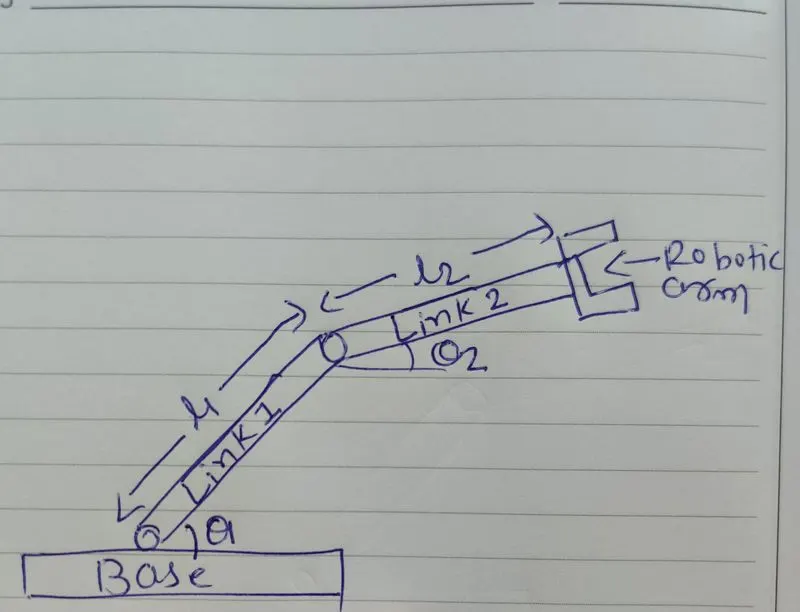
Fig (1.1) Schematic Diagram of 2R ROBOTIC ARM
PROCEDURE:
STEP 1:
- Determine the starting point and the ending point of the link 1 Let us consider the length of the link 1 is L1 as shown in the fig (1.1)
- consider the starting points of link 1 is [x,y]. As the starting point of link 1 is at the base, the value is [0,0].
- Consider the endpoints of link 1 is [x1,y1] as the link makes an angle of θ1 with respect to the base so the co-ordinates are
- `x_1 = l1 **cos(theta1)`
- `y_1 = l1 **sin(theta1)`
STEP 2: Determine the starting point and the ending point of the link 2
- As shown in link the starting point of link to is [x1,y1] and end points are [x2,y2]
- `x_2 = x_1+ l2 **cos(theta2)`
- `y_1 = y_1+ l2 **sin(theta2)`
clear all
close all
clc

%assinging the inut values
l1=1;
l2=0.5;

%varyeing the theta value from 0-90 theta1=linspace(0,90,10);
theta1=linspace(0,90,10);
theta2=linspace(0,90,10);


ct=1;

%create a loop

for i=1:length(theta1)
THETA1=theta1(i);
    for j=1:length(theta2)
    THETA2=theta2(j);
%coordinaes
x=0;
y=0;

x1=l1*cosd(THETA1);
y1=l1*sind(THETA1);

x2=x1+l2*cosd(THETA2);
y2=y1+l2*sind(THETA2);

plot([x x1],[y y1],[x1 x2],[y1 y2],'LineWidth',4)
axis([-0.1 1.5 0 1.5]);
title('simulation of forward kinematics of a 2R Robotic Arm');
xlabel('x-axis');
ylabel('y-axis');
 pause(0.003)

%combining all the frames
M(ct)=getframe(gcf);
ct=ct+1;

end
end
%creating animation movie(M)
videofile=VideoWriter('kamanamatics_plot.avi','uncompressed AVI');
open(videofile)
writeVideo(videofile,M)
close(videofile)
OUTPUT:
Video Link:- https://drive.google.com/file/d/1RqXze1b-mMHgeSINpoeUrngzNjmfD7rI/view?usp=sharing
The above-given video shows the simulation of forwarding kinematics of a 2R Robotic Arm, it shows the angle made by link 1 with respect to link2. For one angle made by link1,links2 makes 10 differ
CONCLUSION:
simulation of forward kinematics of a 2R Robotic Arm was obtained from Matlab. The total workspace of the robotic arm was determined.