Week 2- 2R Robotic Arm Challenge
YOUTUBE LINK OF THE OUTPUT:
%Forward Kinematics of a 2R robotics arm manipulator

%Aim: To write a program to solve the forward kinematics of 2R robotic Arm
%manipulator

close all
clear all
clc

%Inputs
l1 = 1;
l2 = 0.5;

theta1 = linspace(0,90,20);
theta2 = linspace(0,90,20);

%looping

ct=1
for i= 1:length(theta1);
    THETA1 = theta1(i);

    for j = 1:length(theta2);
        THETA2 = theta2(j);

%co-ordinates

x0 = 0;
y0 = 0;

x1 = l1*cosd(THETA1);
y1 = l1*sind(THETA1);

x2 = x1 + l2*cosd(THETA2);
y2 = y1 + l2*sind(THETA2);

%plotting

plot([x0,x1],[y0,y1],[x1 x2],[y1 y2],'linewidth',3);
axis([-0.1 1.5 0 1.5])
pause(0.03);
M(ct) = getframe(gcf);
ct = ct+1;

    end
end

movie(M)
videofile = VideoWriter('forward_kinematics.avi','Uncompressed AVI');
open(videofile)
writeVideo(videofile,M)
close(videofile)
Codes Explanation:
L6 - Closes all open matlab figure windows
L7 - Clears all data stored to the variable
L8 - clears the command window
(L10-L15 Inputs)
L11 - Length of 1st link
L12 - length of 2nd link
L14 - theta1 & theta 2 represents the angle of both arms
wheareas, values of theta1 & theta2 is defined using the "linspace" command.
Ex: linspace(0,90,20) is going to assign 20 values from 0 to 90 degree for theta.
(L17-L24 - looping)
The concept of "for loop" is used to automatically change the value of thetas one by one for execution.
L20 - "i" in the for loop is called "loop counter" which determines the number of times loop is going to be executed.
Ex: as i=length(theta1) & theta1=linspace(0,90,20) the loop will be executed 20 times here.
L21 - As value of 'i' changes, theta1 is taken from the original array and assigned to the variable called THETA1.
L23 - For each position of link 1, link 2 needs to take different position (or) for each value of theta1, theta2 needs different values, hence for another angle another "for loop" is used.
L24 - As value of 'j' changes, theta2 is taken from the original array and assigned to the variable called THETA2.
(L26-L35 - Co-ordinates are determined)
L28-L29 - Base co-ordinates are fixed.
L31-L32 - x1 & y1 determines the end point of 1st link,
which is calculated by using the given formulae,
where l1 is length of 1st link & theta1 is angle of 1st link.
L34-L35 - x2 & y2 determines the end point of 2nd link or end manipulator.
which is calculated by using the given formulae,
where, l2 is the length of 2nd link & theta2 is the angle of 2nd link.
L39 - All the defined co-ordinates are plotted using the plot command
L40 - Axis for the plotting has been fixed
L41 - "Pause" command is used to deliver the output in single window with slow representation to see the execution one by one, hence it merges all the figure outputs of positions of links and executes it.
L42 - here "ct" represents evrey frame and "getframe" command is used to get current figure from gcf window to save in a array.
L43 - Counter- incrementing the value each time program gets executed.
L45 - L46 - End of for loop, as 2 "for loops" are created, 2 End commands to be used to close the loop.
L48 - here using the frames stored in array "M" movie is created.
L49 - Using the command, New "Avi" file is created with filename & profile is provided.
L50 - opens the videofile
L51 - All the captured video frames from array "M" are wrote in the created video file.
L52 - videofile is closed.
ERRORS ENCOUNTERED:
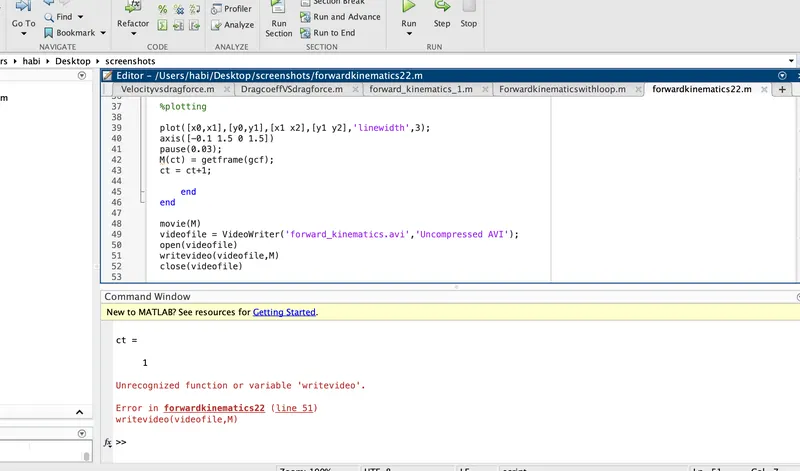
1. Unable to write the video file as the command had lowercase letter.
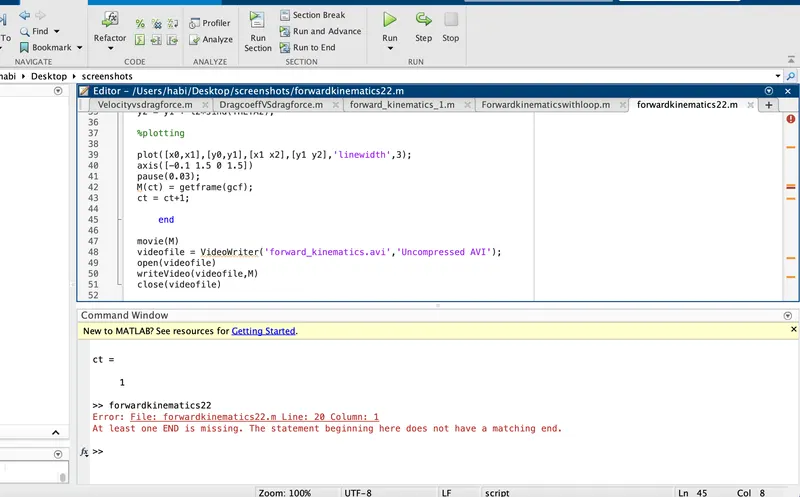
2. "End" missing for 2nd "for loop", only one for loop had end.
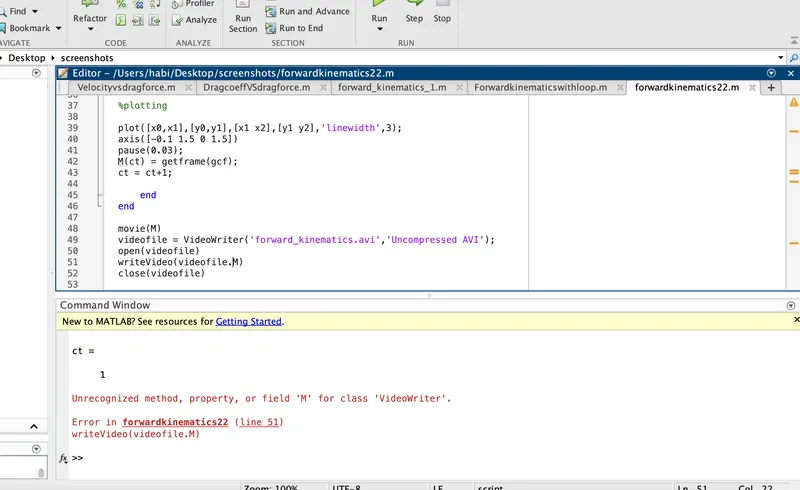
3. Encountered error as used "." instead of "," while mentioning target array variable "M".
STEPS TAKEN TO OVERCOME ERRORS:
1. Replaced the lowercase with uppercase for command Writevideo to writeVideo.
2. "End" command added, both the for loops are closed with 2 end commands.
3. "." replaced with "," to overcome the error faced while writing video. writeVideo(videofile.M) to writevideo(videofile,M).
SCREENSHOTS OF ERROR:
OUTPUT EXPLAINED:
Thus the program has been written and simulation of Forward kinematics of 2R robotic arm is done.
From the output, the movement of robotic arm of 2 rotating links & reach of manipulator is analysed with respect to the given length & angle of the arms.