Week 2- 2R Robotic Arm Challenge
AIM :
To write a program in matlab to simulate the forward kinematic of a 2R robotic arm
OBJECTIVE:
Animating and creating a movie from the plots obtained from the program.
THEORY:
A maipulator end effector movement determines the workspace where the roboic arm can be applicable our motive is animate the movement of robotic arm with the subseqent relative motion between the two comprising links.
INTRODUCTION:
- Kinematics is the relationships between the positions, velocities and accelerations of the links of a manipulator.
- The forward kinematics is when the kinematical data are known for the joint coordinator the variables of the end effector in a given cartesin space are to be computed
- robotic arms are machines that are programmed to exeute a specfic task or joint quickly , efficiently and extremely accuratly
- A robotic joint provides relative motion between two links of the robot each point or axis provides a certain degee-ofp freedom (DOF)
INPUTS:
(x0,y0) =starting point of link 1
(x1,y1) =end point of link 1 and starting point of link 2
(x2,y2)=end point of link 2
l1=length of the link between the first and the end effection
thetha 1= angle made by link 1 with x-axis
thetha 2 =angle made by link 2 with x-axis
CODE EXPLANATION:
- programming language used in matlab
- clear all-remove data from the workspace frecing up system memory
- close all -deletes the current figure or specific figure
- clc -clears all input and output from the command windows display giving you clean screen
- providing the inputs variables like
- predefining the length /values of robotic arms
- providing the valves for theta 1 and theta 2 using linspace command for theta 0 to 90 degree for l1 valves
- providing the cr(compression ratio ) valve specfic digit
OUTPUT:
The simulation of the forward kinematics of a 2R -robotic arm amnipulator is done and we observed that each 10 degree
of movement of the link 1 there is 90 degree of the link 2
FOR LOOP:for loop is used here for the iteration of the values from 0 to 90 degree I is used as outer loop and J is inner loop
COSD and SIND are used to coverd the radians into degrees because matlab by defult takes in radians
PAUSE : we have paused the code so that process can be visuslised more clearly
ct: ct is used for saving the frames in order to create a movies frames
GETFRAME: similarly getframe is used to capture the frame and then by fast movement of those frames it can be convert
into a movie
MOVIE :movie command is used to create the movie frames capture
VIDEO WRITTER: It is creater a video file of the movie created and save in pc hard disc
PLOT : The plot command is used to plot the graphs of the coordinates provided
AXIS : The axis command is used to create the axis upon which we are going to the plot the coordinates
LINSPACE :The linspace command is useful creating an arrays of values specified by the us
coding:
clear all
close all
clc
%Inputs
l1=1;
l2=0.5;
theta1=linspace(0,90,10);
theta2=linspace(0,90,10);
ct=1;
for i = 1:length(theta1)
    THETA1= theta1(i);
for j=1:length (theta2)
THETA2=theta2(j);
x0=0;
y0=0;
x1=l1*cosd(THETA1);
y1=l1*sind(THETA1);

x2 = x1+l2*cosd(THETA2);
y2 = y1+l2*sind(THETA2);

%plotting

plot([x0 x1],[y0 y1],[x1 x2],[y1 y2],'linewidth',3)
axis([-0.1 1.5 0 1.5])
pause (0.03)
M(ct)=getframe(gcf);
ct=ct+1;
end
end

movie (M)
Videofile= VideoWriter ('forward kinematics.avi','Uncompressed AVI');
open(Videofile)
writeVideo(Videofile,M)
close(Videofile)
DRAWING:
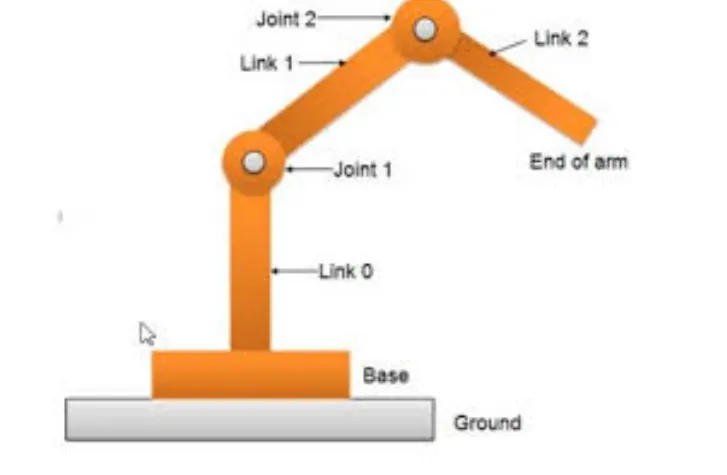
video file :
https://drive.google.com/file/d/1qNrYPCkCVt9t4wCVKFxjAqdgnARG2A2-/view?usp=sharing
CONCLUSION:
*A practical scenario regarding the functioning of the robotic arm and its workspace has been expernced by simulating the forward the forward kinematics with a program in mablat