Week 2- 2R Robotic Arm Challenge
AIM :
To writting a program in Matlab to simulate the forward kinematics of a 2R Robotic Arm.
Princeple :
Forward kinematics refers to the use of the kinematic equations of a robot to compute the position of the end-effector from specified values for the joint parameters.
EQUATION :
- to use the basic arms of the robot to do that we are dealing with the linkage known as Forward kinematics of a 2R Robotic arm (where 2R means 2-rotating Link i.e 2 is a number of link and R is rotation).
- taking two links as a representative of the Robotic arm in which Link-1 is Hinged at (X0, Y0) and making an angle theta1,
- while Link-2 is hinged at the end of the Link-1 and making angle theta2 with respect to Datum.
- starting cordinate point of link1 is (x0,y0)
- end cordinate point of link1 is (x1,y1)
- end cordinate point of link2 is (x2,y2)
- length of link 1 is l1
- length of link 2 is l2
there for
- calculating the starting point of the link 1
x0 is equal to zero.
y0 is equal to zero.
(x0,y0)
- calculating end points of the link1
x1 is equal to l1cosd(theta)
y1 is equal to l2sind(theta)
x1 = l1cosd(theta)
y1 = l1sind(theta)
- calculating end point of the link2
x2 is equal to the l2cosd(theta)
y2 is equal to the l2sind(theta)
x2 = x1 + l2cosd(theta)
y2 = y1 + l2sind(theta)
inputs:
- length of link 1 is l1
- length of link 2 is l2
- theta1
- theta2
OBJECTIVE:
- 2R arm robotics is a mechanical part.
- to change the possition of the links and manipulator whith the help of MATLAB program.
- compute the animited video
containt :
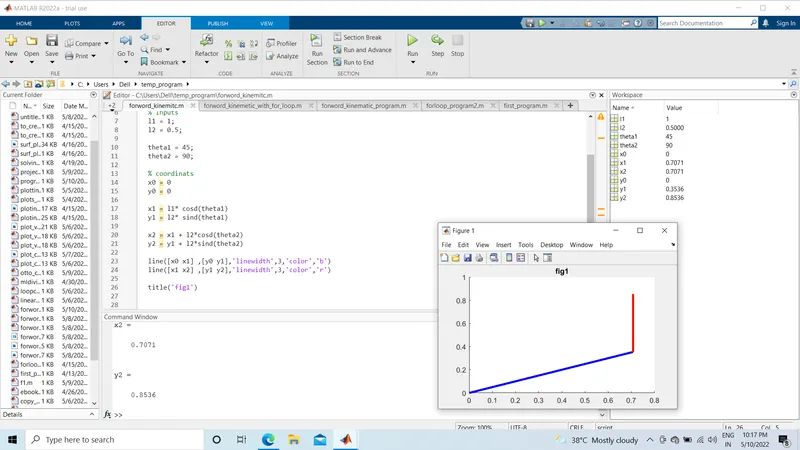
- Creating sample program to creating a plot.
- To creating a sample plot of length link1 is 1.
- link2 is 0.5 meter.
- angle is made by link1 consider theta1 45 degree.
- angle is made with link2 considering theta 90 degree.
- all value is save in workspace comand of the matlab.
- line command is used in a matlab to creating a program.
- genrate a plot with the help of coordinate points.
- linewidth parameter is taken as 3.
- color of link1, link2 is blue and red.
- as show the data in workspace of MATLAB in screenshot1
- Creating a animited video with the help of matlab program
- for loop is use.
- To use for command to iterate over a list of items and run commands on each of them.
- end command is use close the scripts in the for loop fuction.
- linespace command is used to change the value of theta1 and theta2.
- linespace (0,90,4)
- to creat arrey 0 to 90 which have 4 value.
- after the line comand the plotting command is used for to ccreating animitted video.
- as show in screenshot 2
- pause comand is used at 0.3 second
some movie comand is used for creating a video
- movie(M)
- videofile = VideoWriter('forword_kinematic.avi','uncompressed AVI')
- open(videofile)
- writeVideo(videofile,M)
- close(videofile)
conclucion
Get a animitted video of 2R(two rotation) of robotic arm which are have in AVI file.
in this video they show the links possition change with diffrent angle.
close allclear allclcl1 = 1l2 = 0.5theta1 = 45theta2= 30x0 = 0y0 = 0x1 =l1*cosd(theta1)y1 =l1*sind(theta1)x2 = x1+ l2*cosd(theta2)y2 = y1 + l2*sind(theta2)line([x0,x1],[y0,y1],'color','r','linewidth',3)line([x1,x2],[y1,y2],'color','b','linewidth',3)clear allclose allclcl1 = 1;l2 = 0.5;theta1 = linspace(0,90,10);theta2 = linspace(0,90,10);ct=1for i = 1:length(theta1)THETA1 = theta1(i);for j= 1:length(theta2);THETA2 = theta2(j);x0 = 0y0 = 0x1 =l1*cosd(THETA1);y1 =l1*sind(THETA1);x2 = x1+ l2*cosd(THETA2);y2 = y1 + l2*sind(THETA2);plot([x0 x1],[y0 y1],[x1 x2],[y1 y2],'linewidth',3)axis([-0.1 1.5 0 1.5])pause(0.03) M(ct) = getframe(gcf)ct = ct+1endendmovie(M)videofile = VideoWriter('forword_kinematic.avi','uncompressed AVI');open(videofile)writeVideo(videofile,M)close(videofile) The link is uplode video file is on you tube
htt<bottom>
https://youtu.be/ihtY38SFV_g