Week 2- 2R Robotic Arm Challenge
AIM: To Write a program in Matlab to simulate the forward kinematics of a 2R Robotic Arm
OBJECTIVES:
- To simulate the forward kinematics of a 2R robotic arm
- To produce animation of a robotic arm movements.
DIAGRAM OF FORWARD KINEMATICS ROBOTIC ARM:
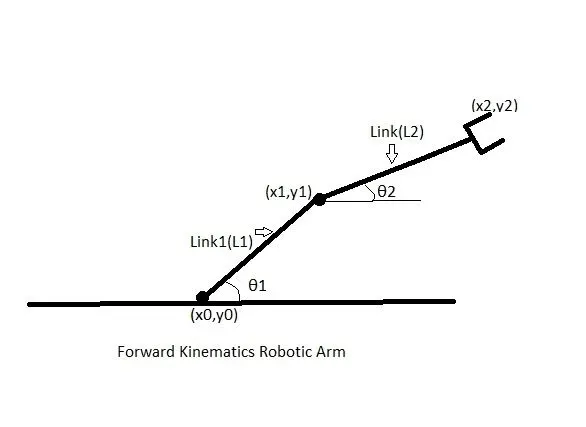
- Above diagram represents forward kinematics robotic arm consist of link 1 and link2
where,
`x0=0`
`y0=0`
`x1 = l1*cos(theta1)`
`y1 = l1*sin(theta1)`
`x2 = x1 + l2*cos(theta2)`
`y2 = y1 + l2*sin(theta2)`
Link1 = `l1`
Link2 = `l2`
PROGRAM TO SIMULATE FORWARD KINEMATICS OF 2R ROBOTIC ARM:
%program to make 2d arm movie

clear all
close all
clc

%inputs
l1 = 1;
l2 = 0.5;

theta1 = linspace(0,90,10);
theta2 = linspace(0,90,10);

ct = 1;
for i =1:length(theta1)
    THETA1 = theta1(i);
    for j = 1:length(theta2)
        THETA2 = theta2(j);
        x0 = 0;
        y0 = 0;

        x1 = l1*cosd(THETA1);
        y1 = l1*sind(THETA1);

        x2 = x1 + l2*cosd(THETA2);
        y2 = y1 + l2*sind(THETA2);

        %plotting
        plot([x0 x1],[y0 y1],[x1 x2],[y1 y2],'linewidth',3)
        axis([-0.1 1.5 0 1.5])
        pause(0.03)
        m(ct) = getframe(gcf);
        ct = ct+1;
    end
end

movie(m)
videofile = VideoWriter('forward_kinematics.avi','Uncompressed AVI');
open(videofile)
writeVideo(videofile,m)
close(videofile)
EXPLANATION:
- Program start with clear all,close all,clc
- Inputs taken for link 1(l1),link (l2) and `theta1` and `theta2`
- linspace command use in `theta1` and `theta2`. Linspace command generate n number of equally spaced elements between given inputs.
- before for loop counter (ct) use with starting value as 1
- Nested for loop use to program link 1 and link 2 angular movements. Primary for loop function for `theta1` and nested for loop function for `theta2`
- In nested for loop function all the cordinates define. Here, to get angular values in degree [cosd(x)] use and to avoid in radian
- ploting coordinates
- pause(n) to stop execution for n seconds
- To capture frames for movie getframe function use
- All figures assigned to variable m one by one using ct
- Termination of primary and nested for loop functions
- movie(m) plays frames in array m.
- videowriter function use to write data to avi file
- call open(videofile)
- writevideo function use to write all frames
- video file close by using close function
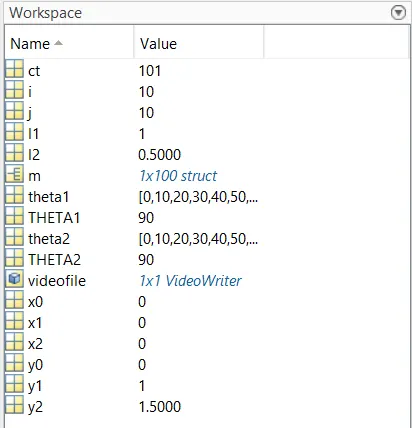
WORKSPACE:
ANIMATION OF 2R ROBOTIC ARM:
CONCLUSION: Practical and realastic experience of forward kinematics 2R robotic arm movements done by simulation in Matlab.