Week 2- 2R Robotic Arm Challenge
1. Aim :
To write a matlab program to simulate forward kinematics of a 2R robotic arm manipulator. The simulation of which is done by creating an animation video of the plots generated through the programming.
2. Commands used :
2.1. For-loops
2.2. linspace - to generate series of values to plot
2.3. plot command - to generate plots
2.4. Movie command - to create and store the animation videos
3. Objectives :
The main objectives of this challenge is to simulate the forwards kinematics motion of a 2R robotic arm manipulator.
This challenge involves the step of capturing each frame that is generated within this matlab program and to compile them
into a movie so that the end results is an animation of the plots with all the working planes of the end manipulator.
The animation can be arrived by generating the plots of the robotic arm which are arrived by specifying the arrays of the theta values within the working plane. An example for generating the array value is given below for reference.
E.g - "theta = linspace(0,90,10)"
0 - starting value
90 - ending value
10 - specifies the no. of values expected between 0 & 90
The next step that needs clarification is the dimensions of the links. This invloves the length of the 2 links & the co-ordinates of the plot points to fix the links based upon which the arms can be moved upon. For this we need the degrees of operations upon which the links can be moved upon. This is done through the example shown above.
The next set of inputs which needs to be given are explained below in detail.
1. l1 - length of the 1st link
2.l2 - length of the 2nd link
3. theta1 - the angle of actuation of the 1st link
4. theta2 - the angle of actuation of the 2nd link
5. (x0, y0) - base of robotic arm
6. (x1, y1) - the end co-ordinates of the robotic arm
7. (x2, y2) - the end co-ordinates of the robotic arm
For calculating the end co-ordinates, trignomentry concepts can be used which is
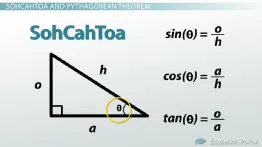
o - represents opposite side of the "theta"
a - adjacent side of the "theta"
h - hypotenuse side of the triangle
The Sin value gives the X-coordinates
The Cos value gives the Y-coordinates
8. Counter value "ct = 1"
For generating a continuously varying plot with differents values of co-ordinates "for-loop" commands are utilised for executing the same operations on differing values until the end result is achived.
The syntax for the program generating animation are as follows.
% Animation of forward kinematics with for loop
clear all
close all
clc

% Inputs
l1 = 2;
l2 = 1;
theta1 = linspace(0,90,10);
theta2 = linspace(0,90,10);

ct = 1;

for i = 1 : length(theta1)
    THETA1 = theta1(i)
    for j = 1 : length(theta2)
        THETA2 = theta2(j)
        x0 = 0;
        y0 = 0;

        x1 = l1*cosd(THETA1);
        y1 = l1*sind(THETA1);

        x2 = x1 + l2*cosd(THETA2);
        y2 = y1 + l2*sind(THETA2);

        % Plotting
        plot([x0 x1],[y0 y1],[x1 x2],[y1 y2],'linewidth',3)
        axis([-0.1 4 0 4])
        pause(0.03)
        M(ct) = getframe(gcf);
        ct = ct+1;
    end
end

movie(M)
videofile = VideoWriter('Forward_kinematics.avi','Uncompressed AVI')
open(videofile)
writeVideo(videofile,M)
close(videofile)
The resulting animation for the program code is shared in the link below.
https://drive.google.com/file/d/14qDYGgBoRhtBuSqJmSZG7AZx1QBG_h8R/view?usp=sharing
The errors encountered during the execution are as follows
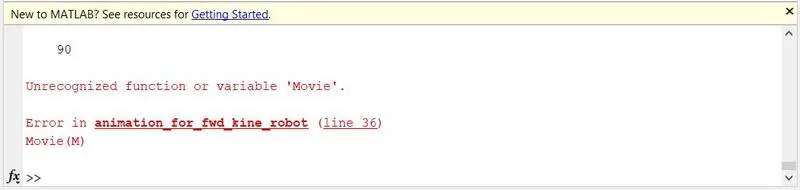
Error 1 : The word movie was typed with uppercase "M"
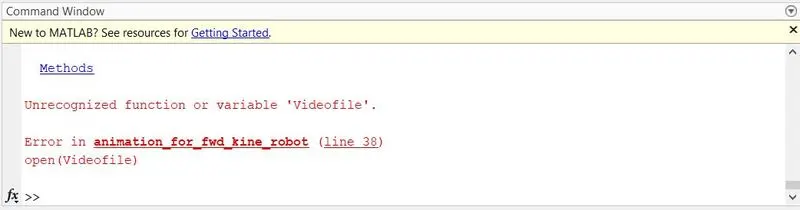
Error 2 : The word videofile was typed with uppercase "V"
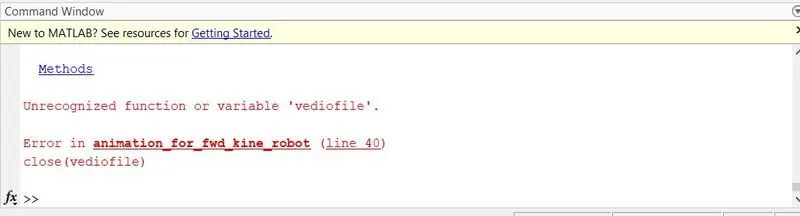
Error 3 : In line 40 of the code the word videofile had a typo.
Error 4 : The axis limits of the plot was lesser than the total length of the arm. Hence the video was showing only the lower part.

4. Conclusion :
Thus the matlab program for used succefully used for better visualising the results of the forward kinematic motion of a 2R robotic arm manipulator.