Week 2- 2R Robotic Arm Challenge
The Code Explanation:
- Initially we’ll have to give the close all and clear all clc commands to clear the workspace and previously stored values.
Then we give the inputs for the following program, here, the basic inputs are the length of the 2 links as l1 and l2 - The angle made by these links l1 and l2 are denoted theta1 and theta2 respectively.
- In order to find the manipulators workspace, we’ll have to vary the thetas from degrees to ninety degrees at each time. So for that we can use the linpsace command to generate our desired number of theta values between 0 to 90 degrees. So, here theta 1 and theta 2 are arrays.
- Basically, in order to display the position of Link1 at each theta in the same graph we’ll have to create a for loop for this where we bring in a loop counter ‘n’ and give a length for these value as the same as theta1 in this it is 10. Which means the counter loop value is 10.
Here, we introduce the THETA1 a variable which varies at each value of the theta1 array in the loop. - We know that the position of the link2 varies with respect to the position of link 1 so in order to find the position of link2 with respect to link1 we’ll have to introduce another for loop function here.
- Similar to the theta1 program we’ll have to bring in a loop counter ‘m’ and give a length for these value as the same as theta2 in this it is 10 which means the counter loop value is 10.
- Here, we introduce the THETA2 a variable which varies at each value of the theta2 array in the loop.
- Now we feed in the coordinates of the this system into the program. We know that we have 3 coordinates as x0,y0 ; x1,y1;x2y2. The first coordinate is the orgin and are represented 0.
- Once we feed in the coordinates with their respective values and formulas. Its time for us to plot these points and create an animation.
- We’ll have to plot all these points in one graph in order view their characteristics . Plot command is used for the same and the linewidth of 3 is been set.
- Then to make the plot efficient and easy to understand let’s set our axis limits by using the axis command.
- Next to save all these plots in an array lets introduce an array M where all these frames of these plots are recorded at each counter.
- To perform the for loop efficiently we’ll have to introduce the counter which gets incremented each time at the end of each loop. We initially set the ct values as 1. Before the for loop function.
- After this we’ll have to end the for loop function by adding end command.
- To create a video for this lets create a movie with the array M where all the frames of the plots are recorded.
- To create a videofile we’ll have to use the VideooWriter command where we’ll have to give the filename and the profile of the video file.
- Then we’ll have to open the particular video file to view the movie.
- After that we’ll have to write the videofile and ultimately close the videofile.
Errors faced while programming:
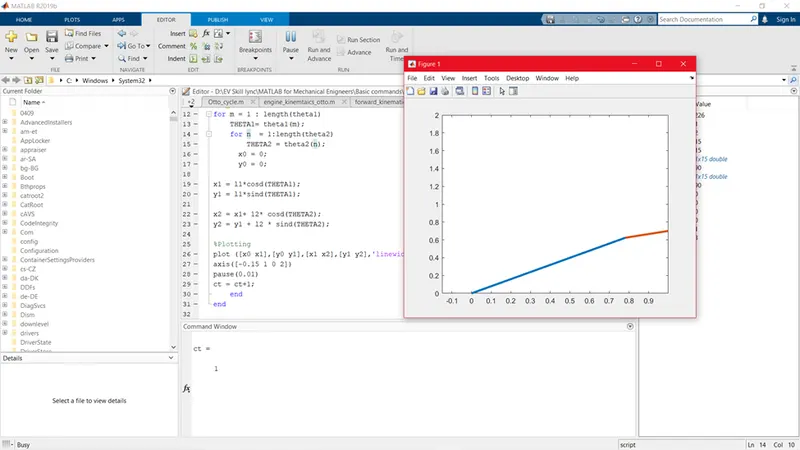
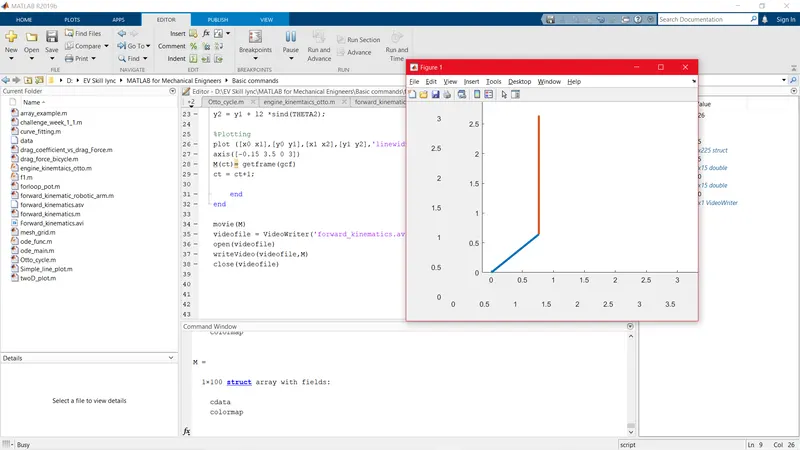
- The limits of the axis were very small initially and had to rearrange the axis limits to bigger limits.
The small limits:
Corrected Limits:
- Got an error regarding the movie(M) command where I used the upper case M for the commad M.
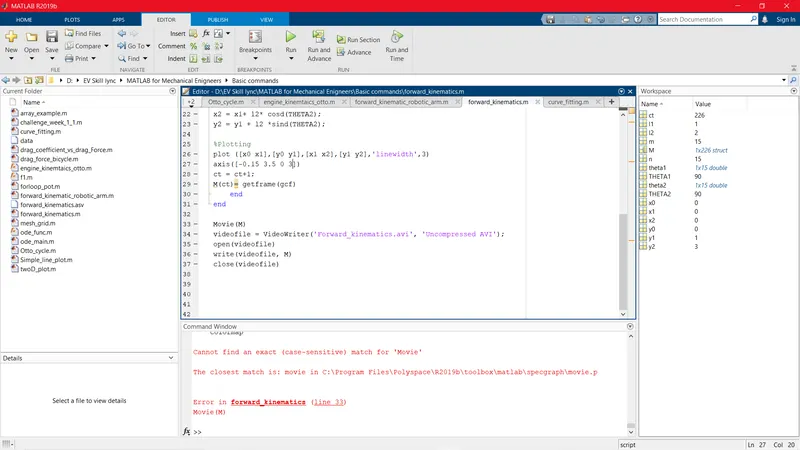
- It was corrected by using the small case for the letter M in the movie(M) command.
- Got an error at line 37 for the write command where I typed in the wrong syntax for that particular command.
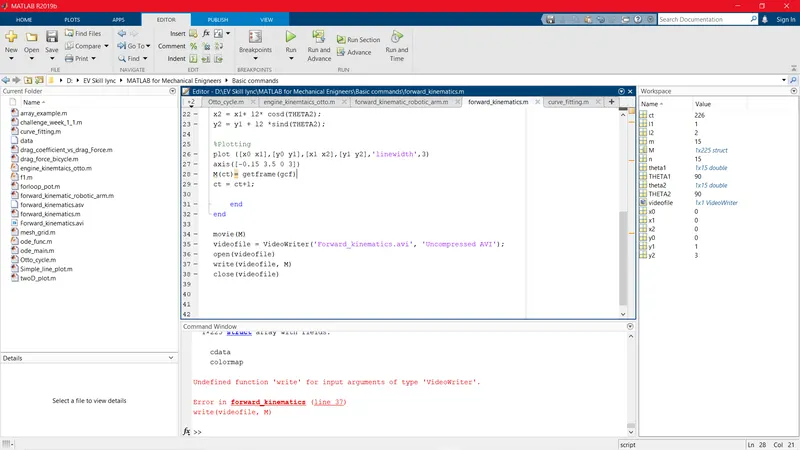
- This error was then rectified by giving the correct command of "writeVideo" for the write action of the videofile.
THE FINAL PROGRAMME FOR THE FORWARD KINEMATICS OF ROBOTIC ARM:
close all
clear all
clc

%Inputs
l1 = 1;
l2 = 2;
theta1 =linspace(0,90,10);
theta2 = linspace(0,90,10);

ct = 1
for m = 1 : length(theta1)
    THETA1= theta1(m);
    for n  = 1:length(theta2)
        THETA2 = theta2(n);
      x0 = 0;
      y0 = 0;

x1 = l1*cosd(THETA1);
y1 = l1*sind(THETA1);

x2 = x1+ l2* cosd(THETA2);
y2 = y1 + l2 *sind(THETA2);

%Plotting
plot ([x0 x1],[y0 y1],[x1 x2],[y1 y2],'linewidth',3)
axis([-0.15 3.5 0 3])
M(ct)= getframe(gcf)
ct = ct+1;

    end
end

movie(M)
videofile = VideoWriter('forward_kinematics.avi', 'Uncompressed AVI');
open(videofile)
writeVideo(videofile,M)
close(videofile)
LINK FOR THE ANIMATION: https://youtu.be/E_C7K0DP_FU