Week 2- 2R Robotic Arm Challenge
OBJECTIVE :
- Write a program to simulate forward kinematics of a 2R robotic arm.
- Animating and creating movie from the plots obtained from the program.
THEORY : A manipulator movement determines workspace where the robotic arm can be applicable. Our motive is to animate the movement of robotic arm with the subsequent relative motion between the two comprising links.
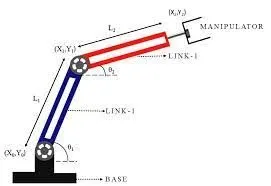
INPUTS :
(x0,y0) = starting point of link1
(x1,y1)= end point of link1 / starting point of link2
(x2,y2)= end point of link2
l1= length of the link attached to the base
l2= length of the link between link1 and manipulator
theta1= angle made by link1 with x-axis
theta2= angle made by link2 with x-axis
PROGRAM :
%inputs length of link1 and link2
l1=1;
l2=0.5;
theta1=linspace(0,90,10);
theta2=linspace(0,90,10);
ct=1;
for i=1:length(theta1);
THETA1= theta1(i);
for j=1:length(theta2);
THETA2= theta2(j);
% starting points of first arm
x0=0;
y0=0;
% end points of first arm
x1= l1*cosd(THETA1);
y1= l1*sind(THETA1);
% starting points of arm2
x2= x1+l2*cosd(THETA2);
y2= y1+l2*sind(THETA2);
%plotting
plot([x0 x1],[y0 y1],[x1 x2],[y1 y2],'linewidth',3)
%limits of x-axis and y-axis
axis([-0.1 1.5 0 1.5]);
pause(0.03)
M(ct)=getframe(gcf);
ct=ct+1;
end
end
movie(M)
videofile = VideoWriter('forward_kinematics.avi','uncompressed AVI')
open(videofile)
writeVideo(videofile,M)
close(videofile)
%inputs length of link1 and link2
l1=1;
l2=0.5;
theta1=linspace(0,90,10);
theta2=linspace(0,90,10);
ct=1;
for i=1:length(theta1);
THETA1= theta1(i);
for j=1:length(theta2);
THETA2= theta2(j);
% starting points of first arm
x0=0;
y0=0;
% end points of first arm
x1= l1*cosd(THETA1);
y1= l1*sind(THETA1);
% starting points of arm2
x2= x1+l2*cosd(THETA2);
y2= y1+l2*sind(THETA2);
%plotting
plot([x0 x1],[y0 y1],[x1 x2],[y1 y2],'linewidth',3)
%limits of x-axis and y-axis
axis([-0.1 1.5 0 1.5]);
pause(0.03)
M(ct)=getframe(gcf);
ct=ct+1;
end
end
movie(M)
videofile = VideoWriter('forward_kinematics.avi','uncompressed AVI')
open(videofile)
writeVideo(videofile,M)
close(videofile)
EXPLANITION OF PROGRAM :
- Initially we define the length of robot arms (i.e. l1 and l2). Set of values for 'theta1' and 'theta2' are assigned in array with the help of linspace command.
- Use of 'For command' for iterating values of desired variable.
- Again using 'For command' provide the movement to second robotic arm.
- Defined the coordinates of both the robotic arms.
- PLotting all the coordinate values and writing commands for changing the appearance of the contours.
- All figures assigned to variable 'M'. One at a time using 'ct' followed by termination of the loop.
- Lastly, 'movie command' is used to combine all the figures saved in the 'M' file to make an annimation/movie. Thereafter saving it in '.avi' format.
MOVIE/ANNIMATION LINK :
https://drive.google.com/file/d/1iwzqvDqpVIdq14tD9fcWeih5_fz2T-CS/view?usp=sharing