Week 2- 2R Robotic Arm Challenge
AIM: To Write a program in Matlab to simulate the forward kinematics of a 2R Robotic Arm.
Assumptions:
`L_1` - Length of the arm from 1st link ( l1=01)
`L_2` - Length of the arm from 2nd link (l2=0.5)
`theta_1` - Angle of arm1 with X-axis (varied from 0-90 degree)
`theta_2` - Angle of arm2 with X-axis (varied from 0-90 degree)
Explanations :
The robotic arm consists of base, two arms or kinematic links and two rotational joints. These links will have motion in them when they are programmed. The link one will make make an angle theta1 with respect to base / X-axis , similarly link two will make an angle theta2 with X-axis . For this we need to findout the coordinates involved at the joints , so by finding the coordinates for those two links we can plot and make the animation for the same by varyibg the theta1 and theta2 and keeping the length 1 and 2 as a constant.
starting coordinates will be [ x0 , y0]
arm 1 coordinates with l1 length [x1 , y1]
arm 2 coordinates with l2 length [x2 , y2]
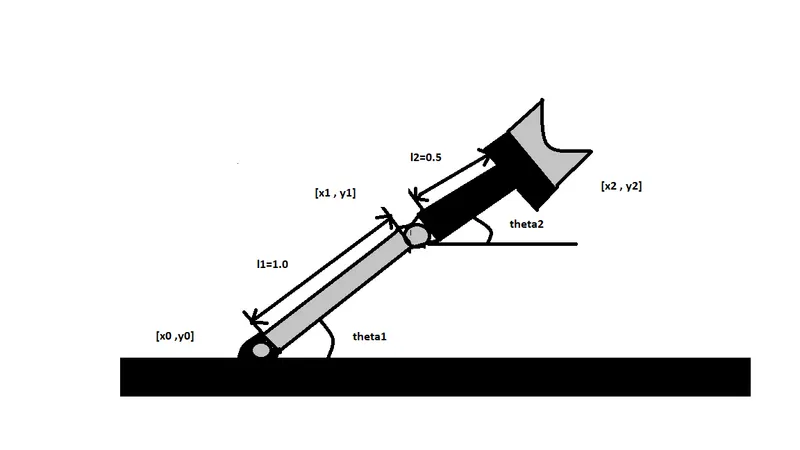
FIG 1 : Kinematics of 2R arm [dimensions]
From pythagoras theorem , the coordinates would be :
x0 = 0
y0 = 0
x1= l1cos(theta1)
y1=l2cos(theta2)
x2=l1+ l2cos(theta2)
y2=l2+l2cos(theta2)
PROGRAM :
%Kinematics of arm

close all
clear all
clc
l1=1.0;
l2=0.5;

theta1=linspace(0,90,40);
theta2=linspace(0,90,40);
ct=1
for i = 1:length(theta1)
    THETA1 = theta1(i);
      for j = 1:length(theta2)
        THETA2=theta2(j);

x0=0;
y0=0;

x1=l1*cosd(THETA1);
y1=l1*sind(THETA1);

x2=x1+l2*cosd(THETA2);
y2=y1+l2*sind(THETA2);

plot([x0,x1],[y0,y1],[x1,x2],[y1,y2],'linewidth',3)
axis([-0.1 1.5 0 1.5])
grid on
pause(0.0001)
M(ct)= getframe(gcf)
ct=ct+1;
end
end

%creating animation
movie(M)
videofile = videowriter('Kinematics_of_arm.avi','Uncompressed AVI');
open(videofile)
writeVideo(videofile,M)
close(videofile)
FIG 2 : Program for kinematics of arm
Program Explanation :
%Kinemaics
close all
clear all
clc
l1=1; //Defining Lenght1
l2=0.5; //Defining Lenght2
theta1=linspace(0,90,40); //Varying theta1 from 0-90 degree , for 40 values
theta2=linspace(0,90,40); //Varying theta2 from 0-90 degree , for 40 values
ct=1
for i = 1:length(theta1) // implementing a 'for' loop to generate various values of theta1 and theta2
THETA1 = theta1(i);
for j = 1:length(theta2)
THETA2=theta2(j);
x0=0; //Assigning the coordinates values for plotting
y0=0;
x1=l1*cosd(THETA1);
y1=l1*sind(THETA1);
x2=x1+l2*cosd(THETA2);
y2=y1+l2*sind(THETA2);
plot([x0,x1],[y0,y1],[x1,x2],[y1,y2],'linewidth',3) // Plotting of graph for the 2R various positions
axis([-0.1 1.5 0 1.5]) //setting Axis
grid on
pause(0.0001)
M(ct)= getframe(gcf) // geting the frame for each iteration
ct=ct+1;
end
end
%creating animation
movie(M)
videofile = videowriter('Kinematics_of_arm.avi','Uncompressed AVI'); //storing animation as a avi video file
open(videofile)
writeVideo(videofile,M)
close(videofile)
**************************************END****************************************
OUTPUT: Please open the below google drive link for the output animation
https://drive.google.com/file/d/1v4fRPTeY9FgtnYTKcllAfrr2TFgk4qCn/view?usp=sharing
Thank you,
Vigneshwar Viswanathan