Week 2- 2R Robotic Arm Challenge
Youtube link for the Animation
Youtube link for the Animation
AIM: MATLAB program for creating an animation of 2R Robotic Arm showing different positions of the manipulator at different angles of both the arms
THEORY:
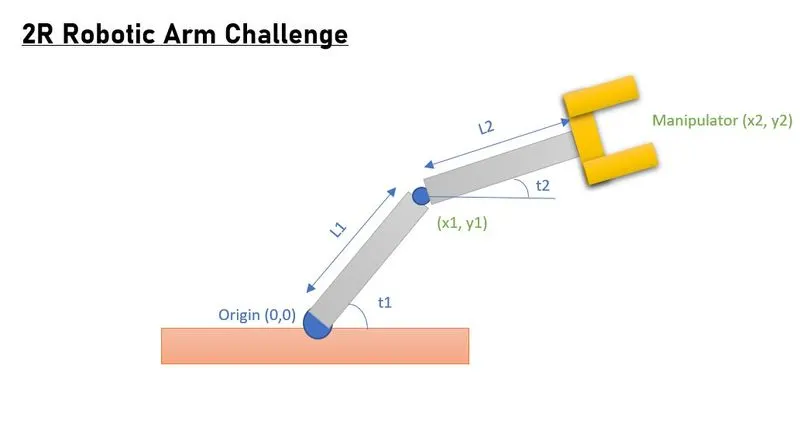
Above illustration shows a simple schematic of 2R Robotic Arm system. It has a manipulator fixed on one end of the arm 2 and one end of arm2 is pivoted to arm 1 which is fixed on origin (0,0). Arm 1 makes an angle t1 with the horizontal and arm 2 makes an angle t2 with the horizontal. The position of manipulator (x2, y2) depends on the length of Arm 1 & 2 and angles t1 & t2. Length of the arms are fixed so the position of the manipulator changes as the angles (t1 & t2) vary.
CALCULATION:
- Finding positions (x1, y1)
x1 = L1cos(t1)
y1 = L2sin(t2)
- Finding position of manipulator (x2, y2)
x2 = x1 + L2cos(t2)
y2 = y1 + L2sin(t2)
Hence, by following these simple mathematical steps, we can find the exact position of the manipulator. Now we will write a MATLAB program to compute the position of manipulator and create animation.
Stepwise explanation of the program –
- We start by clearing the editor, command window & workspace.
- We need to declare a counter variable to count frames and then use it to store each frame that we obtain from the calculation.
- Now, we will declare given values of lengths of the arms which remains fixed.
- We will now be declaring 2 arrays, values of which we will be using as angles of both the arms. Here, we have used ‘linspace’ command to declare array between 0 & 90 degree with 10 values in between them i.e., we will be using 10 values between 0 & 90 as angles of both the arms with the horizontal.
- Now, we need to make use of for loop to extract and store different values of angle into another variable t1 one by one while using the for calculation.
We require to use one more for loop for angle t2 inside the previous for loop which is for angle t1 because we need different values of t2 for each value of t1.
NOTE: It is imperative to use a for loop for angle t2 inside the for loop for angle t1.
This is done because for every combination of angle t1 & t2 , there will a different position of the manipulator.
- After the above steps, we will do the calculations and find out the position of manipulator (x2, y2) as per the steps mentioned in the report.
- Once we are done with the calculations, we will plot the values using ‘plot’ command.
- We can also extend axes to make the plot look better by defining the extremes of the cartesian plane.
- Using ‘pause’ command will make each frame pause on the screen for the defined time.
- We will be storing each frame in the array ‘M’ at the position ‘ct’ (counter variable) using ‘getframe’ And then we will increase the counter variable ‘ct’ by 1 and the for loop continues for the defined range and stores all the frames in this array. After calculations using all the values, for loop ends.
- Now we need to create a video of the obtained results. For this, we will be using ‘movie(M)’ command and generate a movie with all the frames stored in array ‘M’.
- We also need a video file to store the created movie. So, we will be using syntax –
Videofile = VideoWriter(‘2r Robotic Arm Challenge.avi’, ’Uncompressed.avi’);
This command creates videofile named “2r Robotic Arm Challenge” in ‘uncompressed avi’ format.
- Now we will open the created videofile using open(Videofile) command and then use writeVideo(Videofile,M) to write or store the movie ‘M’ in the created videofile.
- And then finally we close the video file by using close(Videofile) command to close the video file and end the program.
After removing the errors and typos(if any), we will run the program and the figure window pops up. It shows the animation and at the end stores it in the location in .avi format where the code is saved.
Errors faced while programming:
Error 1 - 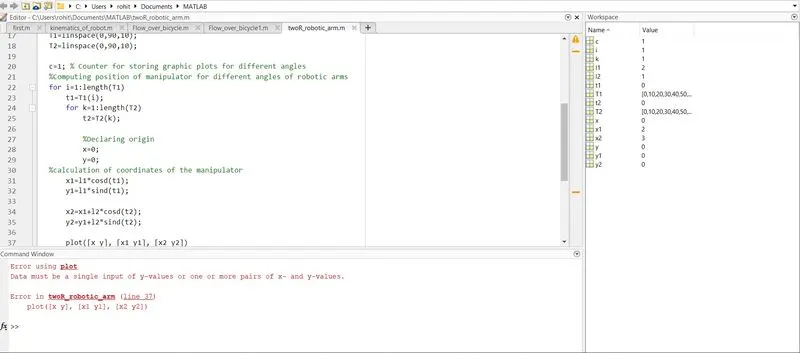
This error was faced while running the code.
While troubleshooting I found out the syntax used for plotting was incorrect. The correct format should be –
plot([x x1],[y y1], [x1,x2],[y1 y2], 'LineWidth',3);
Error 2
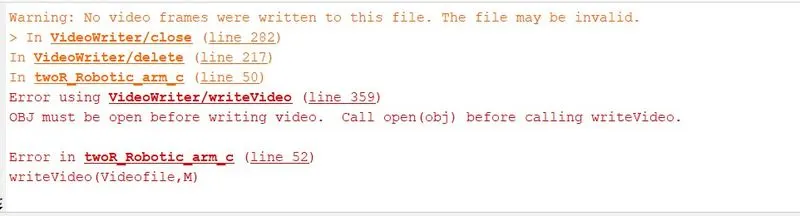
This was the second error that I faced while coding.
Command Videofile is case-sensitive. I had made a typo in the code where I used command videofile (v is smaller case) while at other instances I had used Videofile (V in upper case). This created contradiction and was giving the above error. I fixed this typo and had the program running.
Result : Animation for 2R Robotic Arm obtained
Youtube Link - https://youtu.be/qqD4jAjI65M
% 2R Robotic Arm Challenge

% Matlab code to create an animation of 2R Robotic Arm showing different
% position of the manipulator for different angles of the both arms.

% clearing command window & workspace
close all
clc

ct=1;  % counter variable for counting and storing frames of the desired animation

% Declaring given values

l1 = 2; %length of first arm pivotted to origin
l2 = 1; %length of second arm which is the manipulator end

T1 = linspace(0,90,10);   %array for angles of t1
T2 = linspace(0,90,10);   %array for angles of t2

for i=1:length(T1)       %for loop for using different values of T1
    t1=T1(i);            %using different values of T1 and storing it in t1

    for k=1:length(T2) % for loop for using different values of T2 for each value of t1
        t2=T2(k); %using different values of T2 and storing it in t2

        %declaring origins
        x=0; y=0;

        %applying basic trigonometry to find (x1,y1)
        x1=l1*cosd(t1);
        y1=l1*sind(t1);

        %further calculating (x2,y2)
        x2 = x1 + l2*cosd(t2);
        y2 = y1 + l2*sind(t2);

        % Now plotting the calculated coordinates

        plot([x x1],[y y1], [x1,x2],[y1 y2], 'LineWidth',3);

        % defining range of cartesian plane to make animation aesthetic
        axis([-0.1 3.5 0 3.5])

        pause(0.05); %pausing each frame for some time

        M(ct) = getframe(gcf); %storing each frame in each value of ct

        ct=ct+1; % increasing the counter variable

    end
end

movie(M) %Generating movie of all the frames stored in array M
Videofile = VideoWriter('2r Robotic arm challenge.avi','Uncompressed AVI'); %creating a videofile
open(Videofile) % opening the created videofile
writeVideo(Videofile,M) % Writing the movie in the new videofile created
close(Videofile)