Week 2- 2R Robotic Arm Challenge
Forward Kinematics of a robotic arm:
I have performed a program to determine the workspace of a 2 armed robot.The robot consists of two links with different lengths .
The first step for this process is we have to enter the inputs for the robotic arm
L1 = 0.3m
L2 = 0.7m
theta1 = 45
theta2 = 30
where,
L1 = length of link1
L2 = length of link 2
and theta are the angles made by the robotic arm respectively.
Now we have the coordinates x0,y0 as 0,0 respecctively and the coordinates for x1,y1 and x2,y2 are determined using the following formula.
x1 = L1*cosd(theta1)
y1 = L1*sind(theta1)
x2 = x1 + L2*cosd(theta2)
y2 = y1 + L2*sind(theta2).
Now the plots for the values of the 3 coordinates are made using the line command and the graph is obtained.The graph obtained is a single graph with two straight lines.
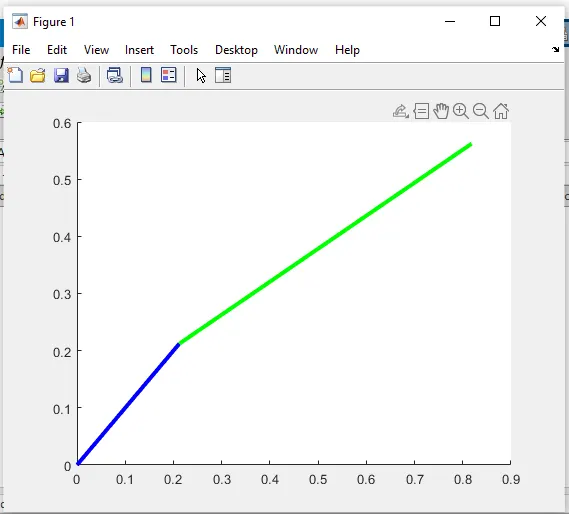
Now to obtain a series of line representation with varying angles the linspace command must be used
theta1 = linspace(0,60,10)
theta2 = linspace(0,60,20)
To use this command the For loop is used.The for loop executes the command a number of times which we have to specify.Here the for loop executes the x1 and x2 and y1 and y2 for each value of theta1 and theta2.
for i = 1:length(theta1)
THETA1 = theta1(i);
for j = 1:length(theta2)
THETA2 = theta2(j);
x0 = 0;
y0 = 0;
x1 = L1*cosd(THETA1);
y1 = L1*sind(THETA1);
x2 = x1 + L2*cosd(THETA2);
y2 = y1 + L2*sind(THETA2);
here in the above code theta 1 and theta 2 are assigned as THETA1 and THETA2.
Now if we plot this we get a line plot which has a series which looks very difficult.In order to avoid that we use the counter and hold oon command.
This counter makes the graphs by increasing the value or it gives the value one by one.As a result we get a number of graphs.
To try again to get an animation we use the plot command and use the pause option and remove the hold on command .This gives an animated plot.
plot([x0 x1],[y0 y1],[x1 x2],[y1 y2],'linewidth',3)
axis ([-0.2 1.5 0 1.5])
M(ct) = getframe(gcf)
pause(0.01)
ct=ct+1;
the axis is specified to view the plot lines properly.
To create a movie the getframe option is used.
M(ct) = getframe(gcf)
This is stored in the array M(ct) and ct is used since the counter is in function,gcf represents the figure.
The next step is to save the movie as a file.
movie(M)
videofile = VideoWriter('forward_kinematics.avi','Uncompressed AVI');
open(videofile)
writeVideo(videofile,M)
close(videofile)
The movie command is used and M is enclosed in the brackets to get the movie stored in variable M.
Now the video details are given using the videofile command and the video is stored using the write video command.The video format details are enclosed in the videofile command and the movie is created.
During this program I faced some errors such as missing brakets and change of variable names which were periodically corrected.
The youtube videolink is here
https://youtu.be/x50U9LBZzjI
%Forward kinematics of Robotic arm
clear all
close all
clc

%Inputs
L1 = 0.3;
L2 = 0.7;

theta1 = linspace(0,60,10);
theta2 = linspace(0,60,20);

ct = 1;
for i = 1:length(theta1)
    THETA1 = theta1(i);
    for j = 1:length(theta2)
    THETA2 = theta2(j);


x0 = 0;
y0 = 0;

x1 = L1*cosd(THETA1);
y1 = L1*sind(THETA1);

x2 = x1 + L2*cosd(THETA2);
y2 = y1 + L2*sind(THETA2);

%plotting

plot([x0 x1],[y0 y1],[x1 x2],[y1 y2],'linewidth',3)
axis ([-0.2 1.5 0 1.5])
pause(0.01)
M(ct) = getframe(gcf);
ct=ct+1;

    end
end

movie(M)
videofile =  VideoWriter('forward_kinematics.avi','Uncompressed AVI');
open(videofile)
writeVideo(videofile,M)
close(videofile)