Week 2- 2R Robotic Arm Challenge
Aim:
Simulation of the forward kinematics of a 2R Robotic Arm using matlab.
Objectives:
1. Writing a program in Matlab which simulates the forward kinematics of a 2R Robotic Arm.
2. Creating an animation file of the plot.
3. Understanding the kinematics of a 2R Robotic arm in a 2-D plot.
Theory:
A robotic arm is a sort of mechanical arm that performs functions comparable to those of a human arm and is usually programmable. The arm can be the sum of the mechanism or part of a larger robot. The manipulator's linkages are joined by joints that allow for either rotational (as in an articulated robot) or translational (linear) movement. [1][2] The manipulator's linkages can be thought of as a kinematic chain. The end effector, which is equivalent to the human hand, is the end of the manipulator's kinematic chain.
In the illustration below, we have a 2R robotic arm:
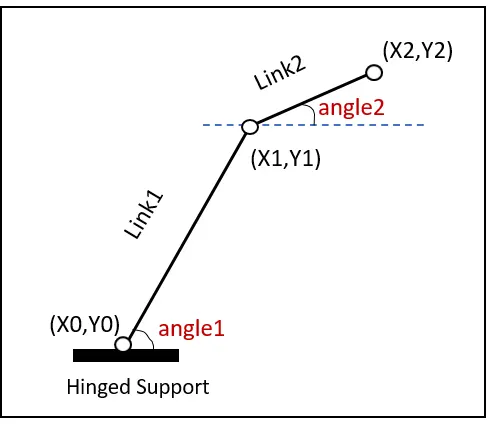
It contains two links and two rotational joints. The link 1 and link 2 are going to make angles theta1 and theta2 w.r.t the x-axis. This problem is also called as foward kinematics.
Explanation of the program:
1) Inputting the length of link1 and link2 and the angles they make with the x-coordinate.
2) The values of angles have been given as an array from 0 to 90.
3) A for loop has been used to take a single value everytime which has been assigned to another variable. This loop
continues to plot the end coordinates of link 1 for all angles between 0 to 90.
4) A nested for loop is used for link 2 end coordinates calculation as for every angle the link 1 rotates all orientations of the link 2 should be shown. A counter should be added in the loop to increment the value the 1 everytime the loop is executed.
5) All these coordinates have been plotted and shown as an animation.
6) All the frames of this animation have been taken and stored as a video file in matlab.
OUTPUT:
The output is obtaines as an animated video clip which has been uploaded in youtube. The link is provided below.
https://youtu.be/m3olzYrFnV0
Conclusion:
A simulation for the forward kinematics of a 2R Robot arm has been done using matlab.
clear all
close all
clc
% inputs
l1 = 1;
l2 = 0.5;
theta1 = linspace(0,90,10);
theta2 = linspace(0,90,10);
ct = 1;
for i = 1:length(theta1)
    THETA1 = theta1(i);
    for j = 1:length(theta2)
        THETA2 = theta2(j);
        x0 = 0;
        y0 = 0;
        x1 = l1*cosd(THETA1);
        y1 = l1*sind(THETA1);
        x2 = x1+l2*cosd(THETA2);
        y2 = y1+l2*sind(THETA2);
        % plotting

        plot([x0 x1],[y0 y1],[x1 x2],[y1 y2],'linewidth',3)
        axis([-0.1 1.5 0 1.5])
        pause(0.03)
        M(ct) = getframe(gcf);
        ct = ct+1;
    end
end
movie(M)
videofile = VideoWriter('forward_kinematics.avi','Uncompressed AVI');
open(videofile)
writeVideo(videofile,M)

close(videofile)