Week 2- 2R Robotic Arm Challenge
Aim: To Write a program in Matlab to simulate the forward kinematics of a 2R Robotic Arm.
Objective :
• Write a program to simulate forward kinematics of a 2R Robotic Arm
• To create a Movie/Animation from the plots obtained from the program
Theory:
-A robotic arm is a type of mechanical arm, usually programmable, with similar functions to a human arm; the arm may be the sum total of the mechanism or may be part of a more complex robot. The links of such a manipulator are connected by joints allowing either rotational motion (such as in an articulated robot) or translational (linear)
displacement. The links of the manipulator can be considered to form a kinematic chain. The terminus of the kinematic chain of the manipulator is called the end effector and it is analogous to the human hamd.
-In this project, we consider a 2R robotic arm. A 2R robotic arm represents a robotic arm with two rotations. i.e. it has two links which rotate or work over a two-dimensional plane with each of links having a single degree of freedom.
-Also, both the links are restricted to a 90° rotation with respect to the axes. Fig below shows the 2R robotic arm having many parts as described
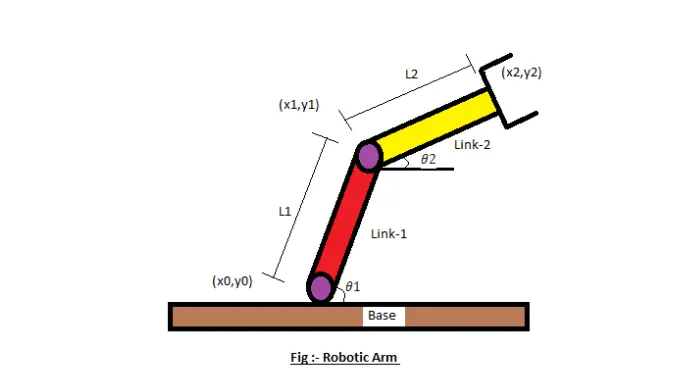
• Let, L1 & L2 be the lengths of the link-1 & link-2 Respectively.
• Let,...be the angle formed by link-1 with
horizontal. • Let,.. be the angle formed by link-2 with
horizontal.
• Let, the starting and end co-ordinates of link-1 to be (xo, Yo) and (x₁, y₁)
• Let, the starting and end co-ordinates of link-2 to be (x₁, y₁) and (x2, Y₂)
Code Explanation :
• Programing Language used Matlab Online
• starting the program by using comments Providing the input variables like
• Predefining the length/values of the robotic arms, i.e. Iland 12
• Providing the values for theta-1 & theta-2 using linspace command for theta=0 to 90
• degrees for 12 values Providing the Cr (compression ratio) value as a specific digit.
• Now Using 'for' commandfor iterating the values of the desired variable.
• Again using 'for' commandfor providing movement to the second robotic arm.
• Providing the eqn for the xl,yl,x2,y2 or say Defining the coordinates of both the robotic arms.
• Plotting all the coordinate values and providing the axis no.
• Using the pause command to make the plot look realistic
• Incrementing the cr or compression ratio value by +1 each time it executes for loop.
• All figures are assigned to a variable M, one at a time usingcr Ending the 'for' loop twice.
• using movie commandis to combine all the figures saved in the M file to make an animation/movie
• At end saving the movie in .avi format.
Result/Conclusion :- Thus we have simulated
2R robotic arm by using the matlab programming and also created a Movie/Animation from the plots obtained from the program
- below is the link given for the program output for movie/animation of a 2R robotic arm