Week 2- 2R Robotic Arm Challenge
AIM:
To simulate a foward kinematic 2R robotic arm and create an animation plot for the same.
THEORY:
A robotic manipulator arm is a reprogrammable and multifunctional mechanical device responsible for moving materials, parts, objects, or tools through programmed motions in order to perform various tasks. These mechanical devices are composed of a series of jointed segments that form an arm-like manipulator.
BODY:
The Following is the code for the forward kinematics of a 2R Robotic Arm,
% Forward Kinematics of a 2R Robotic Arm Manipulator

clear all
close all
clc

%Inputs
l1 = 2;
l2 = 1;

theta1 = 50;
theta2 = 35;

%coordinates
x0 = 0;
y0 = 0;

x1 = l1*cosd(theta1);
y1 = l1*sind(theta1);

x2 = x1 + l2*cosd(theta2);
y2 = y1 + l2*sind(theta2);

%Plotting
line([x0 x1],[y0 y1],'linewidth',2,'color','r')
line([x1 x2],[y1 y2],'linewidth',2,'color','g')
Explaination:
Line 1 Represents the title of the Code
Line 3-5 closes and clears the previous codes, calculations and functions.
Line 8 -12 represents the input values of length and angles.
Line 15-22 represents all the positional values and calculations of [x0 y0] [x1 y1] [x2 y2].
Line 25-26 represents the commands to plot a line between the points.
Following is the code for an animation file plot.
% Forward Kinematics for a 2R robotic arm

clear all
close all
clc

% Inputs
l1 = 2;
l2 = 1;

theta1 = linspace(0,90,10);
theta2 = linspace(0,90,10);

ct=1

for i = 1:length(theta1)
    THETA1 = theta1(i);

    for j = 1:length(theta2)
        THETA2 = theta2(j);

        x0 = 0;
        y0 = 0;

        x1 = l1*cosd(THETA1);
        y1 = l1*sind(THETA1);

        x2 = x1 + l2*cosd(THETA2);
        y2 = y1 + l2*sind(THETA2);

        %Plotting
        plot([x0 x1],[y0 y1],[x1 x2],[y1 y2],'linewidth',2)
        axis([-0.5 3 0 3])
        pause(0.03)
        M(ct) = getframe(gcf);
        ct = ct+1;

    end
end

movie(M)
videofile = VideoWriter('RoboticArm2R_1.avi','Uncompressed AVI');
open(videofile)
writeVideo(videofile,M)
close(videofile)
Explaination:
Line 1 Represents the title of the Code.
Line 3-5 closes and clears the previous codes, calculations and functions.
Line 8,9 represents the lengths of two links in the robotic arm.
Line 11,12 represents the variable theta values from 0-90 degrees.
Line 14 represents counter command for the loop actions, this counter command is used to create a frame for the animation video.
Line 16 represents loop counter variable ‘ i ’ for the theta 1 value.
Line 17 represents the theta1 angle between 0-90 degrees for every single variable of ‘ i ‘.
Line 19, 20 represents the same variable ‘ j ‘ for the theta2,
This for loop represents for every single value of theta1, all the theta2 values take a loop.
Line 22 – 29 represents all the positional values calculations of [x0 y0] [x1 y1] [x2 y2].
Line 32 represents the plot command of all the (x y) positions with line width of 2mm.
Line 33 represents the axes lengths.
Line 35 commands an array ‘M’ to save every frame that generates in current figure window 'gcf'.
Line 36 commands to increment value after every frame for each time the loops gets executed.
Line 38,39 represents the end of for loops.
Line 41 commands matlab to generate the movie with the frames of array ‘M’.
Line 42 commands matlab to create video file with the file name and profile.
Line 43,44 and 45 commands to open, write and close the video file repectively.
RESULT:
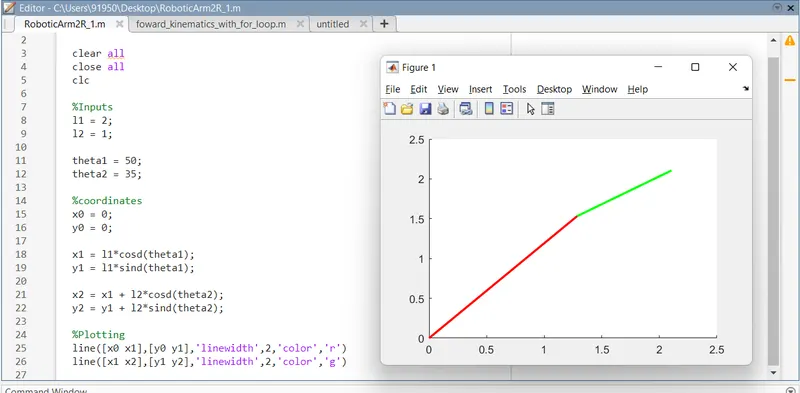
Below picture shows the first result with simple line commands, without plot and For Loop commands.
Animation video result link is provided below.
https://drive.google.com/file/d/1bX95OxMzm-yObdayPAletrk8SkxrOcN9/view?usp=sharing
ERRORS:
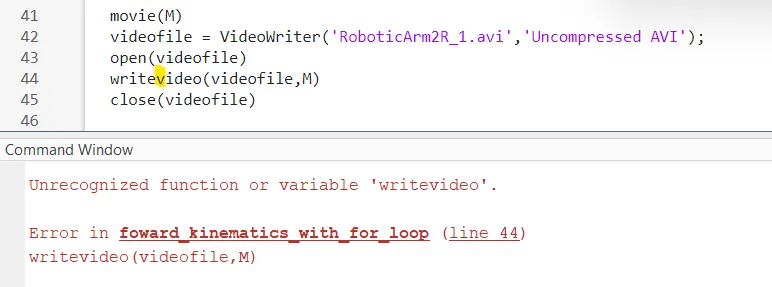
Below picture shows error occured during the 'writevideo' command execution,
later rectified by just capitalising the letter V in 'writeVideo' command as it is a case sensitive command.