Week 2- 2R Robotic Arm Challenge
AIM:-
Write a program in Matlab to simulate the forward kinematics of a 2R Robotic Arm.
CODE:-
%Defining the range of reach of link 1 and link 2
L1 = 1;
L2 = 0.5;
theta1 = (0:9:90);
theta2 = (0:9:90);

A = 1;
for i = 1:length(theta1)
       THETA1 = theta1(i)

    for j = 1:length(theta2)
        THETA2 = theta2(j)

        x0 = 0;
        y0 = 0;
        x1 = L1*cosd(THETA1);
        y1 = L1*sind(THETA1);

        x2 = x1+L2*cosd(THETA2);
        y2 = y1+L2*sind(THETA2);

      figure(1)
      plot([x0,x1],[y0,y1],[x1,x2],[y1,y2],'linewidth',2)

      axis([-0.5 2 0 2])

      M(A) = getframe(gcf);
      A = A+1;
    end
end

movie(M)
videofile = VideoWriter('robotic arm.avi', 'Uncompressed AVI')
open(videofile)
writeVideo(videofile,M)
close(videofile)
CODE EXPLANATION:-
- Defining the range of reach of link 1 and link 2 in terms of length and angular motion
- Since both links are connectedby a pin joint,the motion of link 2 will only rotate at the end of link 1.
- For every position of link 1 ,the link 2 will have multiple positions.
- To encode this in matlab we use a FOR LOOP.
- We have to use a nested FOR LOOP in order to repeat the motions of the 2 links.
- the 1st FOR LOOP will control the link 1 and the inner FOR LOOP will control the motion of link 2.
- For every increament in motion of link1 ,the link 2 will move from start to end.
- Once the angular range of motion is completed for link 2, the link 1 will move to its next increment, until it reaches both the FOR LOOPs end.
- Once all the plots for every possible postion of link 1 and link 2 are obtained,we use the getframe command to get the various positions of links in the correct order.
- The VideoWriter command allows us to save the animation as a video file in the same path.
OUTPUT:-
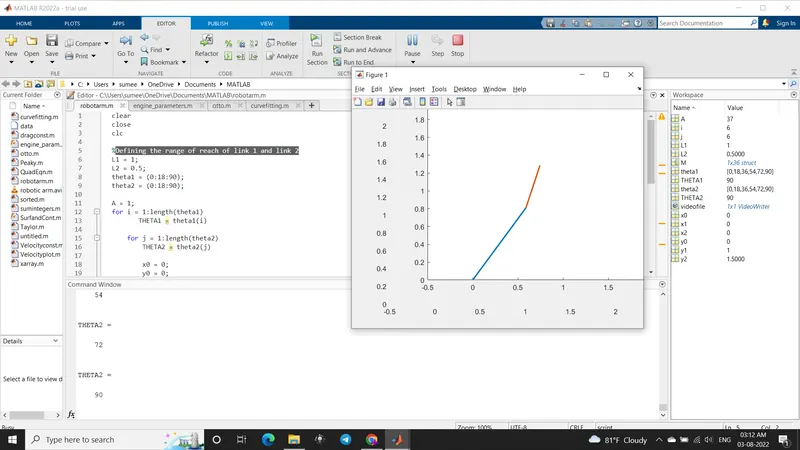
ANIMATION FILE:-
https://drive.google.com/file/d/1VYKO4ZnX7ELZi2tgeSwLIwQjeVLbPhUJ/view?usp=sharing