Week -2
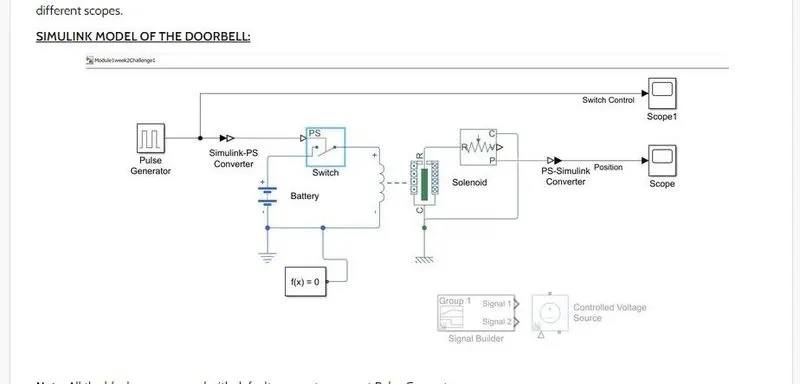
- Make a Simulink model of Doorbell using solenoid block with the following details:
In the above arrangement, when the switch is closed the electromagnet receives electrical power from the battery and pulls the metal arm to hit the bell producing sound.
Create a situation where the switch is closed for 2 seconds and then released. Observe the physical movement of the plunger
- Initially we need to switch with battery connection.
- And connect it through the solenoid actuator.
- First we need create Pulse generator to switch with simulink PS connection.
- Then we need to connected through solver configuration to avoid errors.
- For 2 seconds the switch will activate and closes the switch then the solenoid will activate and door bell will ring.
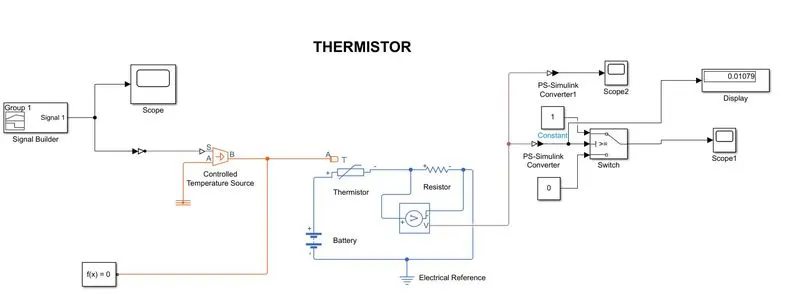
2. Use a thermistor to sense the temperature of a heater & turn on or turn off the fan as per the below conditions:
Temperature source: 20 °C from 0 to 10 seconds, 27 °C from 10 to 30 seconds, 23 °C from 30 to 50 seconds
Fan conditions: ON if the temperature above 25 °C, OFF otherwise