Week 12:Project 2-Meshing of Rear Wheel Holder challenge
AIM:
To the mesh the given component with the given quality criteria and parameter.
Procedure:
The component is imported by pressing the import solver deck there import model is used to pick the downloaded file.
After picking the file import option is clicked to import the component for the processing.
After importing the component the first work is to clear the geometry error which is on the component.
Midsurface:
After cleaning up all the geometry error the component is made to extract the midsurface.
For the floor pannel component auto midsurface can be used or the manual offset also can be done to extract the midsurface.
For that go to Geo-> Midsurface-> select the component-> Extract.
For the manual offset go to Geo-> Surface edit-> Offset-> measure the distance to which has to be midsurfaced imported the measured distance and offset.


The above pic shown for the way to extract the midsurface.
Creating a surface:
The below images shows the ways to create the surface in case there is no or deleted or to make a surface. For that go to Geom-> Surface.

For ruled go to 2D-> Ruled.

For spline go to 2D-> Spline.

Smooth:
This is used for smoothing the mesh incase there is no proper flow. For that go to 2D-> Smooth.

Quality Index:
The quality index option is used for the seeing the element failed during the meshing of the component. The option such as node/element optimize is used for the optimizing the element to its respestive size and reduce the fail. The drag tria element is used to drag the trias in the mesh or connect the opposite trias. For that go to 2D-> Quality index.

Translate:
The translate option is used for the moving the element to the desired option in order to clear warpage error. For that go to Tool-> Translate.

Project:
The project option is used for the projrct the mesh line according to the parent geometry line inorder no to change the mesh flow. For that go to Tool-> Project.

Component:
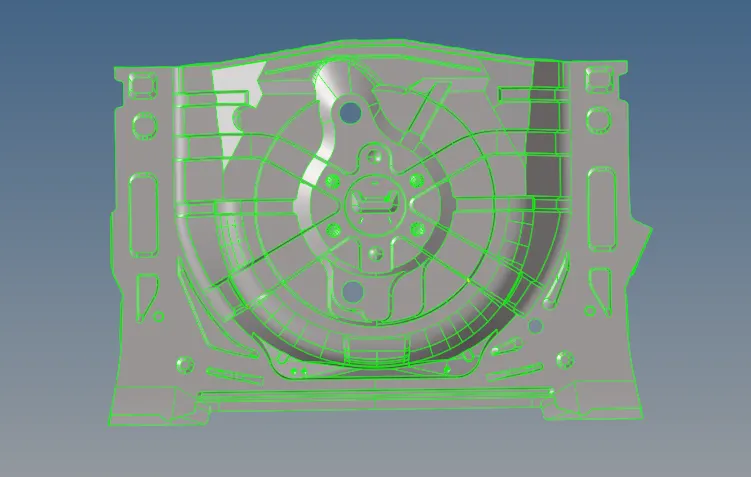
The given component Back wheel body panel which is given for meshing. Before meshing the component the main thing to check the gemetry error.
Clearing all the geometry error the midsurface has to be extracted, during the extraction of the midsurface some of the surface gets deleted for that surface option is used for creating the surface.
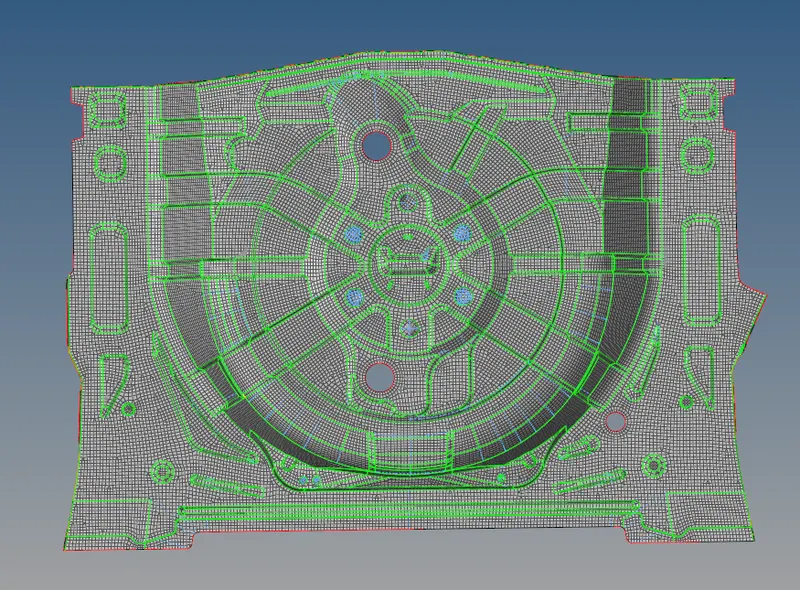
After creating the surface the meshing is done for the component. Before meshing the component the criteria for the meshing which has given should be set up in the criteria file.
After setting up the criteria file the meshing can be done. During meshing some of the element gets failed or in the place of curve region there will be some tria formed. The element failed can be controlled by quality index(node/element optimize).
Instead of meshing the hole component and clearing the error takes time instead clear the error at the time of meshing.
The component imported for meshing:
After extracting the midsurface and meshing the component:
Conclusion:
The completed model with mesh.
Result:
With following the criteria and element length the meshing is done. Following the above option by using it. Each and every element is cleared to avoid the minimum and maximum length error.