AIM:
To mesh the component and assign quality criteria of the element with the following criteria for that element.

Target Element Length = 4 Units
S.N	Quality Criteria 	Value
1	Aspect Ratio 	         5
2	Skewness	         45
3	Warping                 15
4	Taper     	        0.5
5	Min. Length	        2 Units
6	Max. Length	        6 Units
7	Min angle Quad	        45
8	Max angle Quad	        135
9	Min angle Tria	        20
10	Max angle Tria	        120
10	Tria % 	                10
OBJECTIVES:
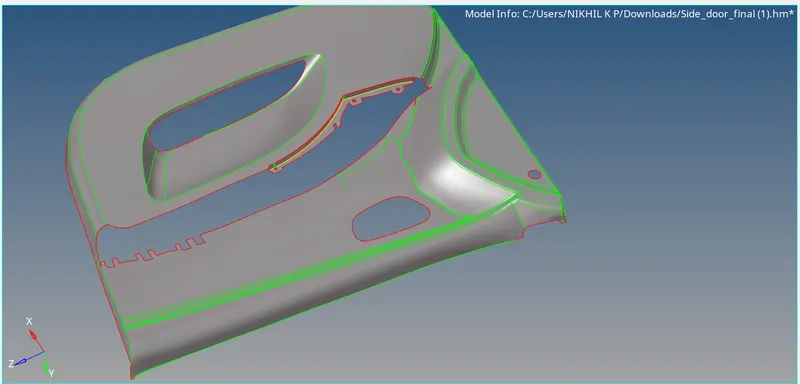
Make the mid surfacing geometry clean up and meshing of the geometry with given parameters and make it possibly looking to outout with midsurfacing in proper way some complecated protions extraction surface editing every tools familaries with the project object and making the whole part with given criteria file meshing.
PROCEDURE:
*First of open the model with the optistrut format and open it,find out the element clean up with display options and change model to TOPO mode and analysing the things that made errors ditected and corrected it.
*On midsurfacing first of check the components 2 components are there on the model then organize it thats TOOLS/ORGANIZE/COLLECTORS/COMPONENT PARENT GEOMETRY WHICH WE WOULD WANT SELECT IT/SELECT DESTINATION COMPONENT/MOVE/DELETE THE PTHER COMPONENT.
*Then analyse the parts with topo mode and make part by part measure the average thickness which portion have whole the midsurface is occured that 2.8 with measuring the geometry then for make midsurface GEO/SURFACE EDIT/OFFSET/SELECT SURFACE/MAKE DUPLICATE ON RIGHT CLICK/COLOUR NORMAL BLUE SELECT OTHERWISE REVERSE IT/SELECT OFFSET.Then check the mid surface it proper.
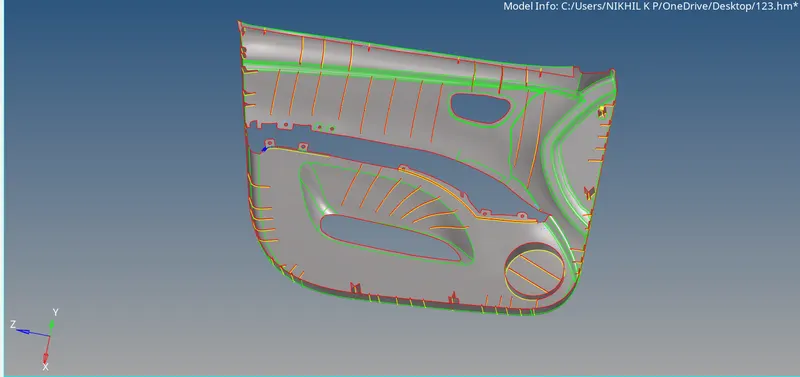
*Now other parts select RIBS for mid sufacingd ribs first of made the mid line LINES/MID LINE/SELECTH THE FIRST LINE ON TOP OF THE RIB/PRESS MIDDLE MOUSE/SELECT SECOND LINE CREATE MID LINE/THEN SURFACE EDIT/TRIM WITH LINES/WITH LINES/OFF THE PARENT GEOMETRY/SELECT SURFACE RELATED WITH MIDLINE/SELECT FREE LINE/MIDDLE MOUSE CLICK/NOW SELECT SURFACE/RULED OPTION SELECT THE TWO LINES MID SURFACE ARE CREATED.
*For the same principles of the all the ribs created then EXTEND THE SURFACE -SURFACE EDIT/EXTEND/LINE TO EXTEND OVER/SELECT THE RIB OUTER LINE TO EXTEND TO MAIN MIDSURFACE/EXTEND TO SURFACE/CREATE A EXTRACTED SURFACE.
*For the some portions with extractions with surface edge and create the object like a then same the extraction with surface edge formations.
*Next portion is DOG HOUSE ELEMNTS first of make two nodes with cross option that is LINES/SELCECT TWO NODES/MAKE CROSS LINE BETWEEN THEM/TOOLS/TRANSLATE/LINES/SELECT THEN RIGHT CLICK AND MAKE DUPLICATES/SELECT N1 AND N2 N1 FOR TOP PORTION NODE AND N2 WITH BOTTOM NODE/SELECT LINE/PRESS TRANSLATE PLUS OUT SIDE THE MODEL/THEN SELECT SURFACE/RULED OPTION MAKE THE CROSS SURFACE/THEN GOTO SURFACE EDIT TRIM WITH SURFACE OR PLANES/MAKE THE INTERSETING REGIONS MADE WITH SELECTING THE MODEL PORTION SELECT INTERSECTING SURFACES/DELETE THE OUTER REGIONS THE DOG HOUSE PORTION IS MIDASURFACED.
*Check whole portions circles are made same procedure but first of made the region filled with ruled surface option then make the connection on cylinder dog houses.
*Make sure the whole part should be midsurfaced proper save the element.
MESHING:
*After that midsurfacing create meshing element is selected for meshing quick edit panel toggle the needed surface for proper meshing and element failing avoiding.
*To select the preference/geometry criteria file/put the values of minimum quad/maximum quad/trias/minumum element size/target element size/max element size/skewness etc.Then put the parameter file put the values with element size.
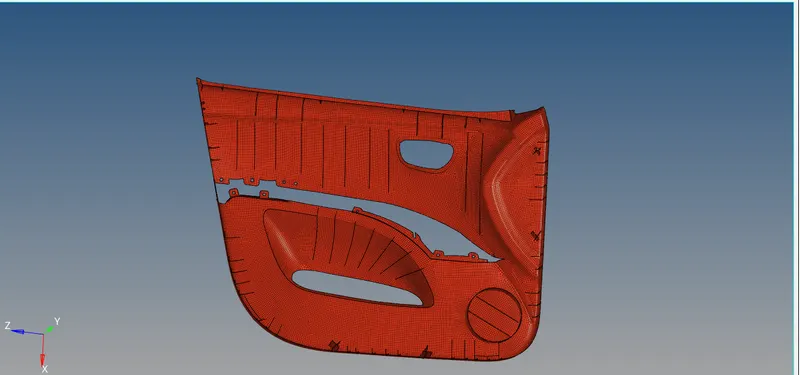
*Then meshing is done with 2D/AUTOMESH/SURFACE AUTO BIAS/SELECT THE SURAFCE AND MADE THE MESHING IN SURFACE BY SURFACE/CHECK THE MESHING ELEMENT FILES FAILED CORRRECT THE PARTS AND MAKE IT CORRECT.
*From 2D geometry cleanup are done with the edit tools smooth tria release elemnts and made the mesh with zero errors.save the file
RESULT:
Made the mid surfacing and meshing of the model with given criteria files and made it elemnts are proper and submited the element criterias.