Week - 12 - Creating the locator, writing and reading the node data
OBJECTIVE
- Connector :
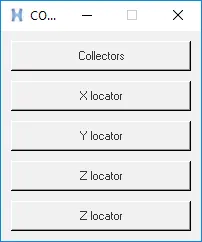
Create a macro that builds a GUI containing 4 buttons. Component creator, weld, xloc, yloc, zloc. Upon pressing the buttons corresponding 1D element must be created and moved to the desired collector.
- Reading nodes from a file :
Create a macro that asks a .csv file as input and reads nodes from the file provided and also creates tags for text in the first column.
- Identical comp identifier
Create a macro that accepts a geometric component as input from the user and shows potential duplicate geometries ( Geometries that match the surface count)
CODE
To create a GUI for weld structures with different DOF and assigned to different buttons
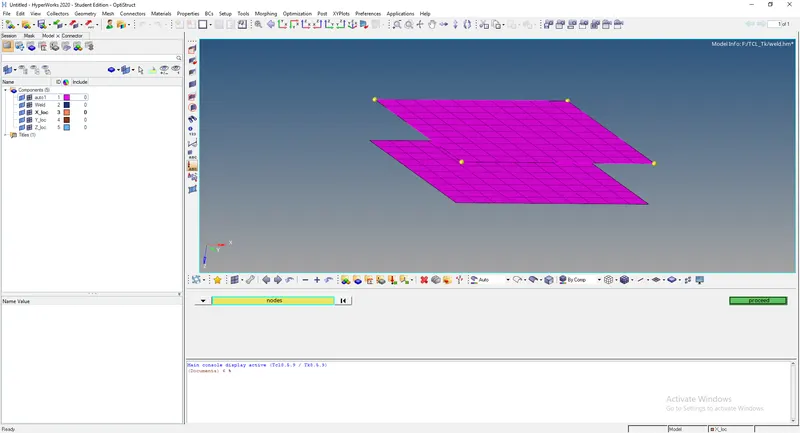
Connectors are 1D elements that made a connection between components in hypermesh model. Various connectors are available in Hypermesh which can be used for various applications. In this command, Weld and locator connectors are created between nodes.
- Initially, the component created on entity editor for weld and locators.
- Components assigned with different colors and names.
- Procedures are created for weld and locator.
- For weld, nodes are gotten as an input from the user by the command “*createmarkpanel”.
- Using the command “*rigidlinkinodecalandcreate” weld connections are made.
- An “if” condition was used to determine which axis the locator should be made.
- For each axis, different DOF will be selected in if condition.
- Node for source and target get as input from panel command.
- For locators, “*rigid” was used to create locators.
TCL Command:
*rigid - Create locators between selected nodes.
*createmarkpanel - Create a panel that can be used to select an entity.
Hm_getmark - Get marked entity’s ID.
*clearmarkall 1 ; *clearmarkall 2
set a .connectors
catch [destroy $a]
toplevel $a
wm title $a "CONNECTORS"
wm geometry $a 200x210+100+300;
wm resizable $a 0 0
wm deiconify $a
#buttons
button $a.01 -text "Collectors" -command collectors ; place $a.01 -x 10 -y 10 -width 180 -height 30
button $a.02 -text "X locator" -command X_loc ; place $a.02 -x 10 -y 50 -width 180 -height 30
button $a.03 -text "Y locator" -command Y_loc ; place $a.03 -x 10 -y 90 -width 180 -height 30
button $a.04 -text "Z locator" -command Z_loc ; place $a.04 -x 10 -y 130 -width 180 -height 30
button $a.05 -text "Z locator" -command Weld ; place $a.05 -x 10 -y 170 -width 180 -height 30


proc collectors  {} {
*createmark components 1 "Weld" ;if {[hm_marklength comp 1] == 0} {*createentity components name = Weld}
*createmark components 1 "X_loc" ;if {[hm_marklength comp 1] == 0} {*createentity components name = X_loc}
*createmark components 1 "Y_loc" ;if {[hm_marklength comp 1] == 0} {*createentity components name = Y_loc}
*createmark components 1 "Z_loc" ;if {[hm_marklength comp 1] == 0} {*createentity components name = Z_loc}
}

proc Weld  {} {
*clearmarkall 1
*clearmarkall 2
*currentcollector comp "Weld"
*createmarkpanel nodes 1 "select the nodes for spider web rep"
*rigidlinkinodecalandcreate 1 0 0 123456
}

proc X_loc  {} {
*clearmarkall 1
*clearmarkall 2
*currentcollector comp "X_loc"
*createmarkpanel nodes 1 "select the primary node "
set prim_node [hm_getmark node 1]
*createmarkpanel nodes 1 "select the target node "
set targ_node [hm_getmark node 1]
*rigid $prim_node $targ_node 156
}

proc Y_loc  {} {
*clearmarkall 1
*clearmarkall 2
*currentcollector comp "Y_loc"
*createmarkpanel nodes 1 "select the primary node "
set prim_node [hm_getmark node 1]
*createmarkpanel nodes 1 "select the target node "
set targ_node [hm_getmark node 1]
*rigid $prim_node $targ_node 246
}

proc Z_loc  {} {
*clearmarkall 1
*clearmarkall 2
*currentcollector comp "Z_loc"
*createmarkpanel nodes 1 "select the primary node "
set prim_node [hm_getmark node 1]
*createmarkpanel nodes 1 "select the target node "
set targ_node [hm_getmark node 1]
*rigid $prim_node $targ_node 345
}
This is the code for reading the nodes from the file. we first set the filename we need to open. For that the Tcl/Tk command tk_getOpenFile is used which will show the open window and ask the user to select the file having the nodes information. Then we set the file channel by opening the file in read mode.
Using the gets command the file will be read by the code and the data in it will be set to the variable and thedata will be displayed in the command window.
*createnode [lindex $1st_nodecord 0] [lindex $1st_nodecord 1] [lindex $1st_nodecord 2]
This will create the nodes at the places whose cordinates given by the lindex command on the variable we just created and the 0 indicates the x file which is the first value , 1 indicates the Y value and the 2 indicates the Z value of the cordinates and these actions will be carrid out for the entire nodes info in the file until the file end reaches.
*clearmarkall 1
*clearmarkall 2

proc Rnode_data {} {
set filename [tk_getOpenFile -title "select the file that contains node data"]
set F_id [open $filename r]
set i 0
while {[eof $F_id]==0} {
set cord [gets $F_id]
*createnode [lindex $cord  0] [lindex $cord  1] [lindex $cord  2]
}
close $F_id
}
Wnode_data
proc Wnode_data {} {
*clearmarkall 1
*clearmarkall 2
*createlistpanel nodes 1
set node [hm_getlist nodes 1]
set f_id [open Nodedata w]
puts $node
foreach i $node {
puts $i
set N_info [hm_nodevalue $i]
puts $N_info
puts $f_id [lindex $N_info 0]
}
close $f_id
}
set a .R_W
catch {destroy $a}
toplevel $a
wm geometry $a 230x60+200+200
wm resizable $a 0 0
wm deiconify $a
button $a.01 -command Rnode_data -bg "grey"
place $a.01 -x 10 -y 10 -width 100 -height 40
button $a.02 -command Wnode_data -bg "grey"
place $a.02 -x 110 -y 10 -width 100 -height 40
This process will show identical or same surface count components. For this surface counts for each component were saved to a file and compare with user-selected components.
- Create a selection of all components in a model.
- Get surface count for each component by using the command “hm_marklength”.
- By using “*createmarkpanel” command, the target component selected by the user.
- The surface count for the target component was calculated by command.
- Matched components list was saved in a separated variable.
- This variable contains a position of the matched components in the list.
- Mask all components.
- For each variable, a component was identified and unmasked.
*clearmarkall 1 ; *clearmarkall 2
*unmaskall2
#select all displayed components
*createmark comp 1 "displayed"
set all_comp [hm_getmark comp 1]
puts $all_comp

set all_comp_surf {}
foreach i $all_comp {
*createmark surfaces 1 "by collector" $i
lappend all_comp_surf [hm_marklength surfaces 1]
}
puts $all_comp_surf
#user defining the comp
proc panel {} {
*createmarkpanel comp 2 "select the components"
set ::d_comp [hm_getmark comp 2]
set ::l [hm_marklength comp 2]
}
panel
if {$::l==0} {
tk_messageBox -message  "no components were selected " -icon info -type ok
} else {
*createmark surfaces 1 "by collector" $::d_comp
set d_comp_surf [hm_marklength surfaces 1]
puts $d_comp_surf


set match_list [lsearch -all $all_comp_surf $d_comp_surf]
puts "Match $match_list"

 set comp_name {}
 set n 0
 *createmark comp 1 "all"
*maskentitymark comp 1 0
foreach j $match_list {
set comp_id [lindex $all_comp $j]
puts $comp_id
lappend comp_name [hm_entityinfo name component $comp_id]
*displaycollectorwithfilter components "on" [lindex $comp_name $n] 0 1
set n [expr ($n + 1)]
}
}