Evaluation of Braking Energy - Study of Braking - Plotting of Motor Efficiency Contour
STUDY OF BRAKING :-
AIM :-
To evaluate braking energy, study about braking and plot the motor efficiency contour.
PLATFORM USED :-
- Software – MATLAB R2020a
SYSTEM SPECIFICATIONS :-
- Manufacturer - DELL
- Model – Vostro 3478
- Operating System - Windows 10
- Processor - Intel(R) Core(TM) i5-8250U CPU @ 1.60GHz 1.80GHz
- RAM – 8 GB
OBJECTIVE :-
- To calculate braking energy for a drive cycle.
- Study about electric motor braking torque and coordination of brakes.
- To plot contour of the motor speed, torque and efficiency parameters.
QUESTION & ANSWER :-
1)For a defined driving cycle, calculate the energy required for braking.
The energy required to apply brakes to a running vehicle is known as braking energy and it’s associated with the kinetic energy.
WKT,
Kinetic Energy (K.E) = 0.5*m*v^2
For Deceleration,
K.E = 0.5*m*(v_i – v_f)^2
The total vehicle mass we are considering is 1000 Kg.
The driving cycle we are going to consider is as follows,
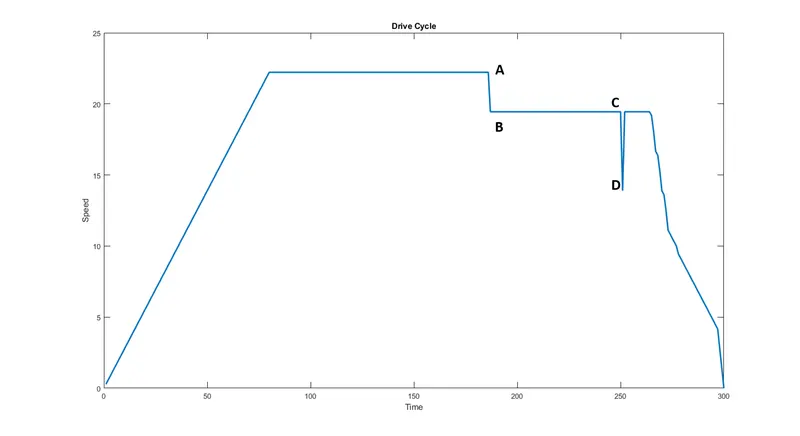
In the above drive cycle, we are going to evaluate the braking energy required for only two braking situations AB & CD.
Braking Energy for AB,
Mass (m) = 1000 Kg
Initial Velocity (v_i) = 22.22 m/s
Final Velocity (v_f) = 19.44 m/s
Now,
K.E = 0.5*m*(v_i – v_f)^2
K.E = 0.5*1000*(22.22-19.44)^2
K.E. = 0.5*1000*7.7284
K.E = 3864.2 J
Braking Energy for CD,
Mass (m) = 1000 Kg
Initial Velocity (v_i) = 19.44 m/s
Final Velocity (v_f0 = 13.88 m/s
Now,
K.E = 0.5*m*(v_i – v_f)^2
K.E = 0.5*1000*(19.44-13.88)^2
K.E. = 0.5*1000*30.9136
K.E = 15456.8 J
Total Kinetic Energy,
T.KE = AB + CD
T.KE = 3864.2 + 15456.8
T.KE = 19321 J
T.KE = 19.321 KJ
T.KE = 0.0053 kWh
Here we have considered only the two braking situations AB & CD but the total braking energy is the energy for complete braking of the duty cycle, for simplicity purpose these two deceleration points are considered.
2)Why electric motor can’t develop braking torque at high speed similar to starting? How electric and mechanical brakes are coordinated?
Braking Torque at Higher Speed :-
- The torque developed by the vehicle during initial stage is constant and peak till the vehicle is being accelerated to maximum speed.
- Once the vehicle reaches the maximum speed the torque starts the fall where it has satisfied the load already.
- If the driver wishes to apply brake to the vehicle, the torque generated during that time is not equal as generated during the initial period of time.
- The reason behind the torque not matching as of initial period of time during braking at higher speed is that due to losses.
- The losses associated are copper loss (K_c), iron loss (K_i), windage / friction loss (K_w) and constant loss (K_cons).
So, we could conclude that the motor cannot generate higher torque at maximum speed as the torque in the initial period of time.
Electrical & Mechanical Brakes :-
Electrical Braking :-
Electric brakes are devices that use an electrical current or magnetic actuating force to slow or stop the motion of a rotating component. They are used in industrial and vehicular braking applications that require fast response times and precise tension control.
Types :-
- Regenerative Braking
- Dynamic Braking
- Plugging
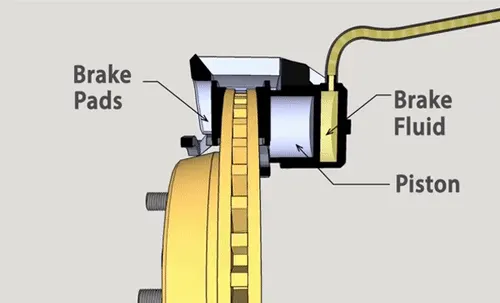
Mechanical Braking :-
Mechanical Brakes are assemblies consisting of mechanical elements for the slowing or stopping of shafts in equipment drives. They use levers or linkages to transmit force from one point to another. Braking slows or stops the movement of the coupled shafts.
Types :-
- Drum Brakes
- Disc Brakes
- Band Brakes
- Pawl and Ratchet Brakes
Braking Effect :-
Coordination of Brakes :-
In the brake control strategy, there are two different types as follows,
- Series – One after another (Mechanical or Electrical)
- Parallel – Bothe Mechanical and Electrical simultaneously
The coordination of brakes is the situation where when the electrical brakes are being applied and the vehicle doesn’t generate the required braking braking power the mechanical braking will be applied. The electrical braking scenario will not be experienced by the passengers in a vehicle, whereas the mechanical braking scenario can be experienced by the passengers in the vehicle.
3) Make a MATLAB program which plots contour of given motor speed, torque and efficiency values. Attach the code as a .m file attach a screenshot of all the plots.
CODE :-
x = linspace(1,1000); % Speed in rad/s
y = linspace(1,250); % Torque in N-m
Kc = 0.2; % Copper Loss Constant
Ki = 0.008; % Iron Loss Constant
Kw = 0.00001; % Windage Loss Constant
Kconst = 20; % Constant Loss

% Meshing Speed & Torque
[X, Y] = meshgrid(x,y);
Output_Power = (X.*Y); % Power = Torque*Speed
B = (Y.^2)*Kc; % Copper Loss
C = X*Ki; % Iron Loss
D = (X.^3)*Kw; % Windage Loss
Input_Power = Output_Power + B + C + D + Kconst;
E = Output_Power./Input_Power; % Efficiency
V = [0.7, 0.8, 0.85, 0.9, 0.91, 0.92, 0.95, 0.93]; % Rated Efficiency
box off
grid off
contour(X,Y,E,V); % Plotting the efficiency w.r.t speed & torque
xlabel('Speed in rad/s')
ylabel('Torque in N-m')
title('Motor Efficiency Plot')
colorbar
PROGRAM PROCESS :-
- The compiler starts the program.
- Speed and Torque array are generated.
- All the loss constant is being checked.
- Speed and Torque array are being merged together to calculate the power.
- All the losses are being evaluated.
- Input power is being evaluated.
- Motor efficiency is being evaluated.
- The rated efficiency is being checked.
- The box and grid is removed in the plot.
- The contour is plotted
- Appropriate title, labels and color bar is turned ON.
- The compiler terminated the program.
RESULTS :-
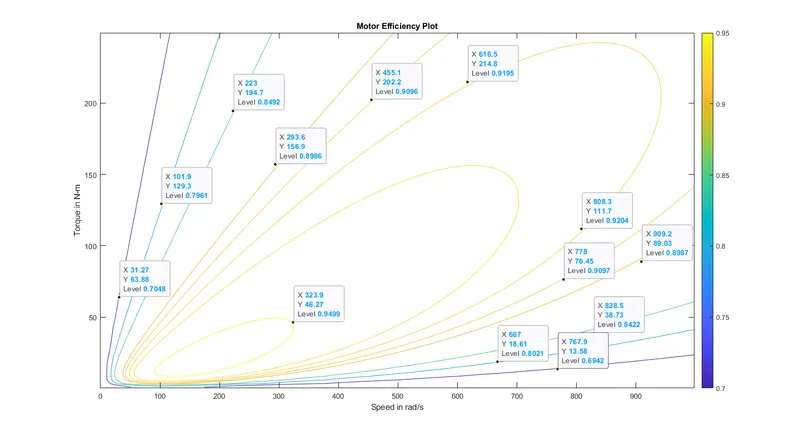
We could see that the motor efficiency contour is plotted successfully and when we observe them that the efficiency is decreased from the inner ellipse from the contour.