Week - 10 - Creating the midline and spot weld
OBJECTIVE:
Part A:
- Create a macro to calculate the midline of a given tubular component
- Select one end of the lines using line by path
- Similarly, select the other ends using line by path option
- Now calculate midline for each pair
- Combine all these midlines to create a single midline.
Part B:
- Create a macro to create spot welds
- Select source nodes by the path from the user
- Select target nodes by the path from the user
- Create 1D spot welds for each node pair inappropriate component
PROCEDURE:
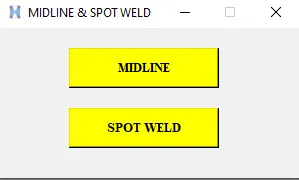
- First, create a window with two buttons named spotweld and midline.
- In the midline section, ask the user to select two lists of lines by path and then create a line at the centre of the two lists. Then, combine all the lines together.
- Similarly, in the spotweld section, ask the user to select two lists of nodes by path and then create rigids.
CODE:
set a .window
catch {destroy $a}
toplevel $a -class Toplevel
wm title $a "MIDLINE & SPOT WELD"
wm geometry $a 300x150+100+100
wm resizable $a 0 0
wm deiconify $a

button $a.1 -text "MIDLINE" -command {A} -bg yellow -font {times 10 bold}; place $a.1 -x 70 -y 20 -width 150 -height 40
button $a.2 -text "SPOT WELD" -command {B} -bg yellow -font {times 10 bold}; place $a.2 -x 70 -y 80 -width 150 -height 40


proc B {} {
	*clearmarkall 1
	*createlistbypathpanel nodes 1 "Select the source nodes by path"
	set source [hm_getlist nodes 1]
	*createlistbypathpanel nodes 2 "Select the target nodes by path"
	set target [hm_getlist nodes 2]
	if {[hm_getlist nodes 1]!=0 && [hm_getlist nodes 2]!=0} {
		foreach i $source j $target {
			*elementtype 5 1
			*rigid $i $j 123456
		}
	} else {tk_messageBox -message "No node selected" -icon warning -type ok -title Message}
}

proc A {} {

	*createlistbypathpanel lines 1 "Select the source lines by path"
	set source [hm_getlist lines 1]
	*createlistbypathpanel lines 2 "Select the target lines by path"
	set target [hm_getlist lines 2]
	if {[hm_getlist lines 1]!=0 && [hm_getlist lines 2]!=0} {
		foreach i $source j $target {
			*linescreatemidline 1 1 2 2
			*linecombine $i $j 1
		}
	} else {tk_messageBox -message "No lines selected" -icon warning -type ok -title Message}
}
GRAPHICAL USER INTERFACE:
CONCLUSION:
- Learned to create a GUI to help the user to speed up the midline and spot weld creation.