Unsupervised Learning - Kmeans Week 11 Challenge
K-means Clustering for Car Dataset:
The aim of this project is to cluster the data into different classes depending upon the price.
Let us import all the required libraries.
import pandas as pd
import numpy as np
import matplotlib.pyplot as plt
import seaborn as sns
from sklearn.cluster import KMeans
Import the data into python compiler
df = pd.read_csv('CarPrice_Assignment.csv')
df.head() 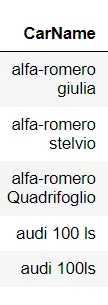
The car name includes the Brand and model, so we will use only the brand name, we will be splitting the columns using the delimitters '-' & ' '. And, replace the wrong spellings of the brands.
df['CarName']=df['CarName'].str.split('-| ').str[0]

replace_values = {'maxda':'mazda','Nissan':'nissan','porcshce':'porsche','toyouta':'toyota','vokswagen':'volkswagen','vw':'volkswagen'}
df=df.replace({'CarName':replace_values})
Let us check for any missing values.
#check missing values
plt.figure(figsize=(12,4))
sns.heatmap(df.isnull(),cbar=False,cmap='Wistia',yticklabels=False)
plt.title('Missing value in the dataset');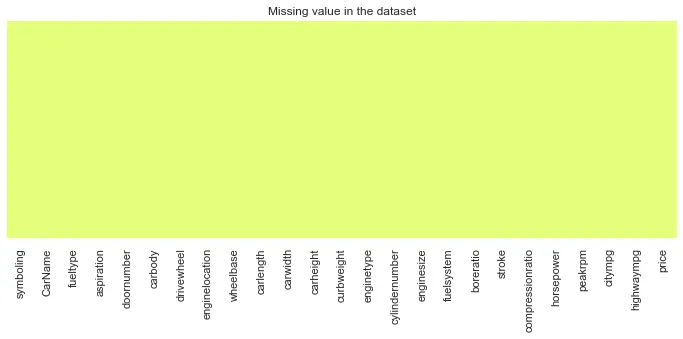
There are no missing values in the dataset.
Only categorical data is studied in this section.
Now lets check how data is classified for each brand of car.
target_counts= df['CarName'].value_counts()

fig, ax = plt.subplots(1, 2, figsize=(15,7))
target_counts_barplot = sns.barplot(y = target_counts.index,x = target_counts.values, ax = ax[0])
target_counts_barplot.set_ylabel('Models of Car Brand')
ax[0].set_facecolor('white')
#colors = ['#8d99ae','#ffe066', '#f77f00','#348aa7','#bce784','#ffcc99',  '#f25f5c']
target_counts.plot.pie(autopct="%1.1f%%", ax=ax[1])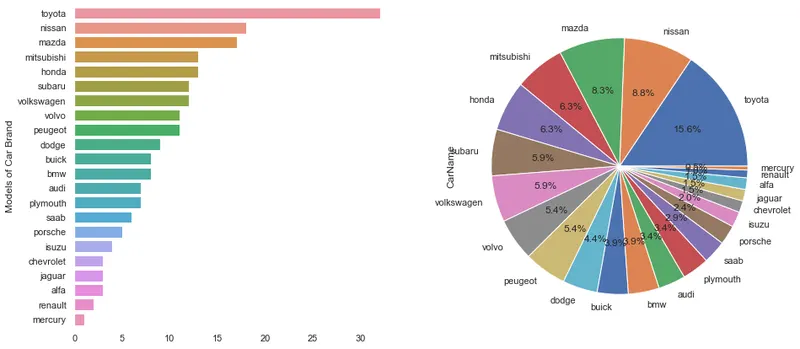
Classification Fuel Type
target_counts= df['fueltype'].value_counts()

fig, ax = plt.subplots(1, 2, figsize=(15,7))
target_counts_barplot = sns.barplot(x = target_counts.index,y = target_counts.values, ax = ax[0])
target_counts_barplot.set_ylabel('Count')

#colors = ['#8d99ae','#ffe066', '#f77f00','#348aa7','#bce784','#ffcc99',  '#f25f5c']
target_counts.plot.pie(autopct="%1.1f%%", ax=ax[1])
fig.suptitle('Fuel Type')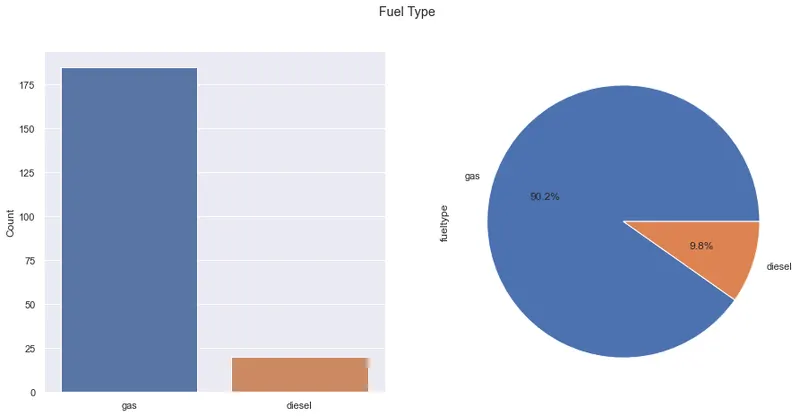
Classification of Aspiration
target_counts= df['aspiration'].value_counts()

fig, ax = plt.subplots(1, 2, figsize=(15,7))
target_counts_barplot = sns.barplot(x = target_counts.index,y = target_counts.values, ax = ax[0])
target_counts_barplot.set_ylabel('Count')

#colors = ['#8d99ae','#ffe066', '#f77f00','#348aa7','#bce784','#ffcc99',  '#f25f5c']
target_counts.plot.pie(autopct="%1.1f%%", ax=ax[1])

fig.suptitle('Aspiration')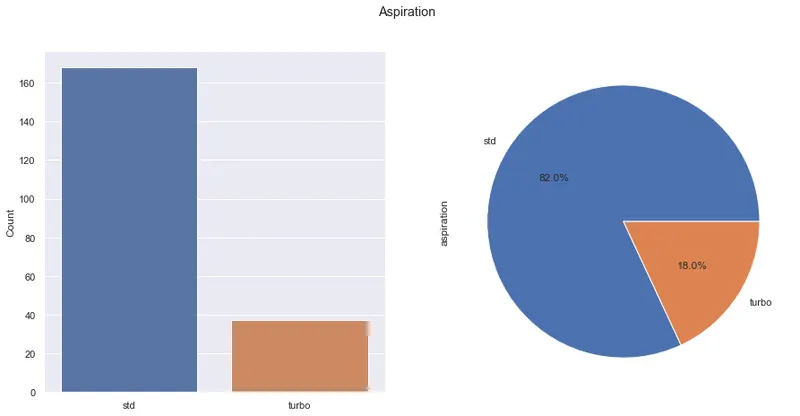
Classification of Number of Doors
target_counts= df['doornumber'].value_counts()

fig, ax = plt.subplots(1, 2, figsize=(15,7))
target_counts_barplot = sns.barplot(x = target_counts.index,y = target_counts.values, ax = ax[0])
target_counts_barplot.set_ylabel('Count')

#colors = ['#8d99ae','#ffe066', '#f77f00','#348aa7','#bce784','#ffcc99',  '#f25f5c']
target_counts.plot.pie(autopct="%1.1f%%", ax=ax[1])
fig.suptitle('Number of Doors')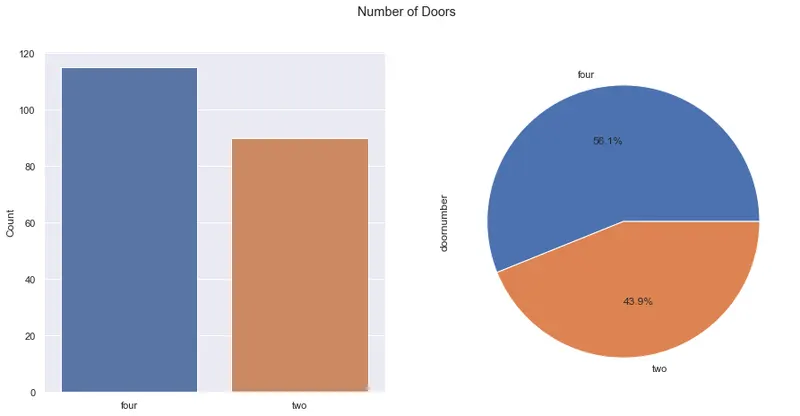
Classification of Body Type:
target_counts= df['carbody'].value_counts()

fig, ax = plt.subplots(1, 2, figsize=(15,7))
target_counts_barplot = sns.barplot(x = target_counts.index,y = target_counts.values, ax = ax[0])
target_counts_barplot.set_ylabel('Count')

#colors = ['#8d99ae','#ffe066', '#f77f00','#348aa7','#bce784','#ffcc99',  '#f25f5c']
target_counts.plot.pie(autopct="%1.1f%%", ax=ax[1])
fig.suptitle('Body Type')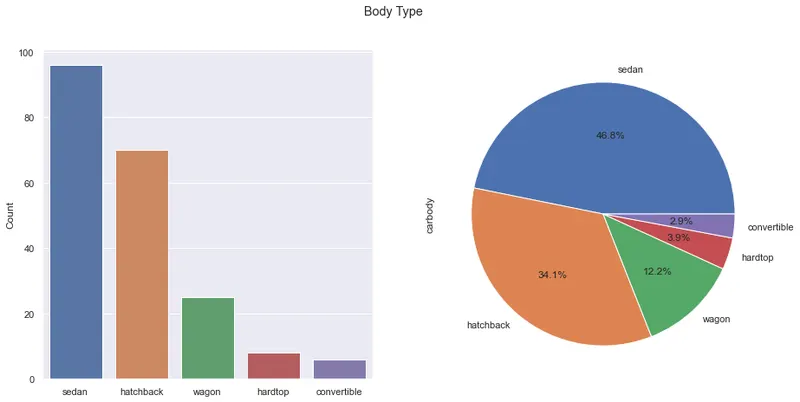
Classification of Drive Wheel:
target_counts= df['drivewheel'].value_counts()

fig, ax = plt.subplots(1, 2, figsize=(15,7))
target_counts_barplot = sns.barplot(x = target_counts.index,y = target_counts.values, ax = ax[0])
target_counts_barplot.set_ylabel('Count')

#colors = ['#8d99ae','#ffe066', '#f77f00','#348aa7','#bce784','#ffcc99',  '#f25f5c']
target_counts.plot.pie(autopct="%1.1f%%", ax=ax[1])
fig.suptitle('Drive Wheel')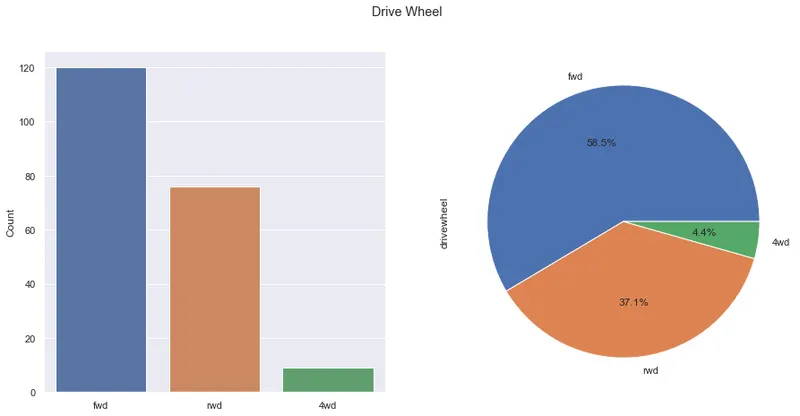
Classification of Engine Location:
target_counts= df['enginelocation'].value_counts()

fig, ax = plt.subplots(1, 2, figsize=(15,7))
target_counts_barplot = sns.barplot(x = target_counts.index,y = target_counts.values, ax = ax[0])
target_counts_barplot.set_ylabel('Count')

#colors = ['#8d99ae','#ffe066', '#f77f00','#348aa7','#bce784','#ffcc99',  '#f25f5c']
target_counts.plot.pie(autopct="%1.1f%%", ax=ax[1])
fig.suptitle('Engine Location')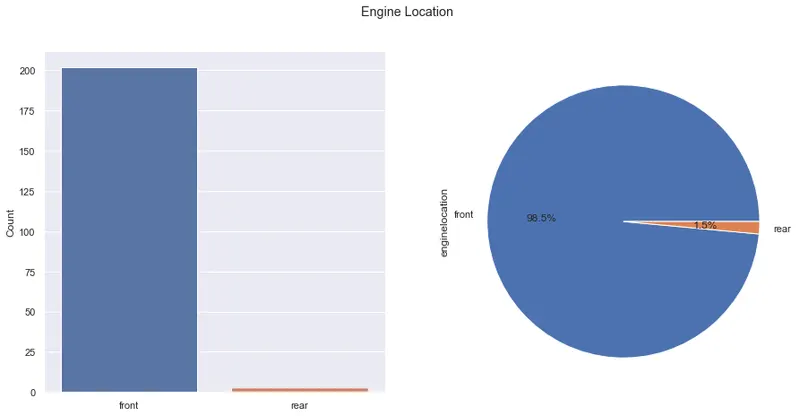
Classification of Engine Type:
target_counts= df['enginetype'].value_counts()

fig, ax = plt.subplots(1, 2, figsize=(15,7))
target_counts_barplot = sns.barplot(x = target_counts.index,y = target_counts.values, ax = ax[0])
target_counts_barplot.set_ylabel('Count')

#colors = ['#8d99ae','#ffe066', '#f77f00','#348aa7','#bce784','#ffcc99',  '#f25f5c']
target_counts.plot.pie(autopct="%1.1f%%", ax=ax[1])
fig.suptitle('Engine Type')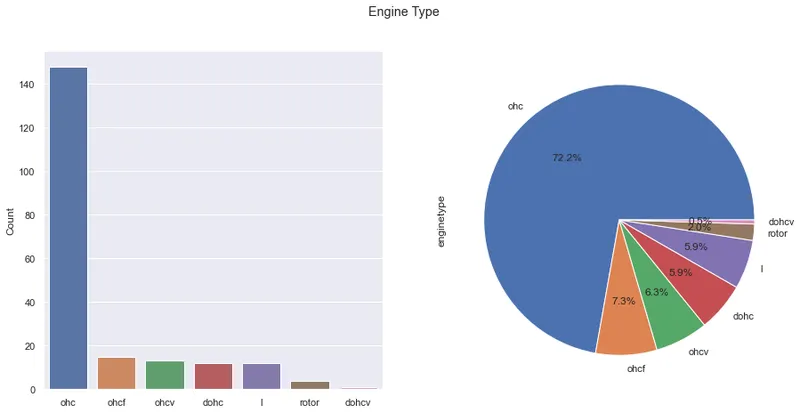
Classification of Number of Cylinders:
target_counts= df['cylindernumber'].value_counts()

fig, ax = plt.subplots(1, 2, figsize=(15,7))
target_counts_barplot = sns.barplot(x = target_counts.index,y = target_counts.values, ax = ax[0])
target_counts_barplot.set_ylabel('Count')

#colors = ['#8d99ae','#ffe066', '#f77f00','#348aa7','#bce784','#ffcc99',  '#f25f5c']
target_counts.plot.pie(autopct="%1.1f%%", pctdistance=0.6, ax=ax[1])
fig.suptitle('Number of Cylinders')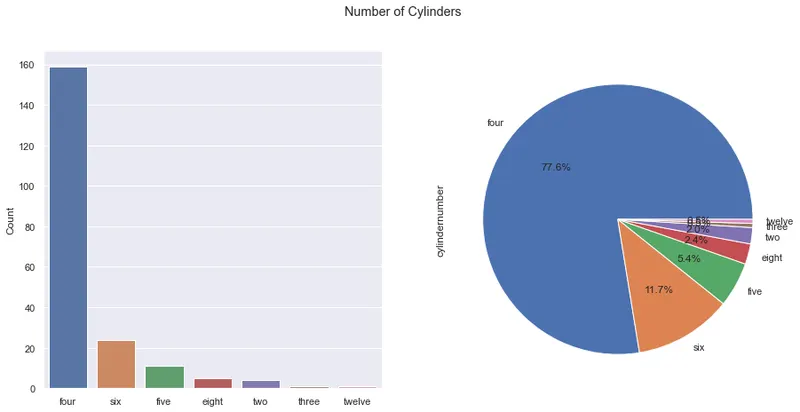
Classification of Fuel System:
target_counts= df['fuelsystem'].value_counts()

fig, ax = plt.subplots(1, 2, figsize=(15,7))
target_counts_barplot = sns.barplot(x = target_counts.index,y = target_counts.values, ax = ax[0])
target_counts_barplot.set_ylabel('Count')

#colors = ['#8d99ae','#ffe066', '#f77f00','#348aa7','#bce784','#ffcc99',  '#f25f5c']
target_counts.plot.pie(autopct="%1.1f%%",pctdistance=0.8, ax=ax[1])
fig.suptitle('Fuel System')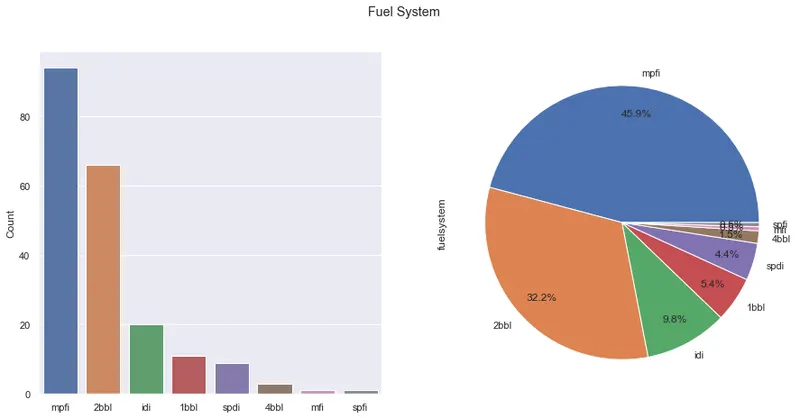
Let us look at the distribution plot of compression ratio.
sns.displot(df, x="compressionratio", hue='fueltype',kde=True)
plt.gcf().set_size_inches(11.7, 8.27)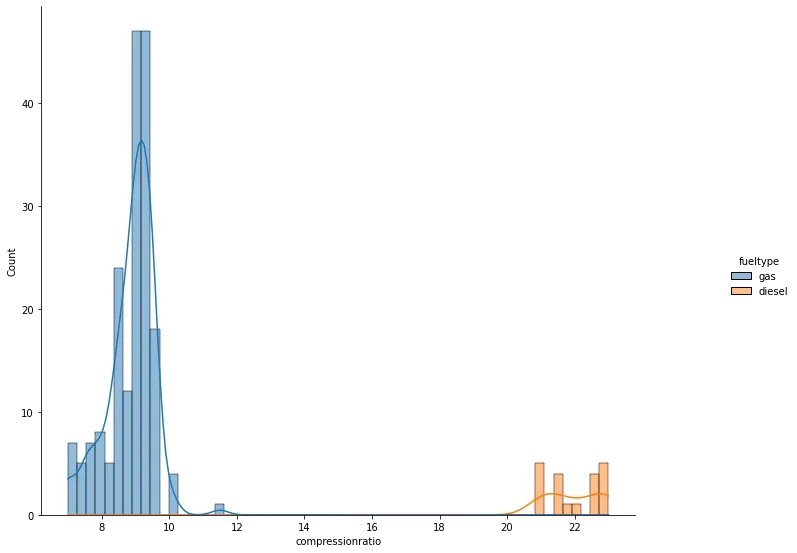
Looking from the data compression ratio is easily classified depending upon the fueltype. So we can remove either of one column to progress with our analysis.
Only numerical data distribution and linear and polynomial regression of order 4 is considered to look at the distribution of data.
The green line represents the linear regression line and the red line represents the polynomial fit of order 4 and with confidence interval of 90%.
g=sns.PairGrid(data = df,vars = ['wheelbase','horsepower','carlength','carwidth','price'])
g.map_upper(sns.regplot,ci=None, scatter_kws={'s':15}, line_kws={"color": "green"})
g.map_upper(sns.regplot,ci=90,line_kws={"color": "red"},order=3,scatter=False)
g.map_diag(sns.histplot)
g.map_lower(sns.scatterplot)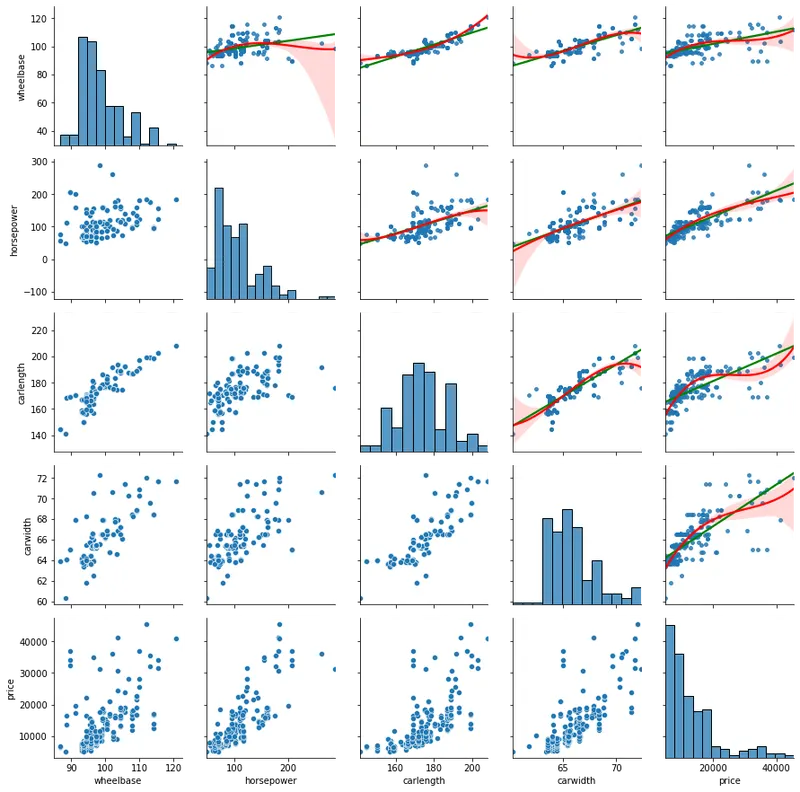
g=sns.PairGrid(data = df,vars = ['carheight','curbweight','enginesize','boreratio','price'])
g.map_upper(sns.regplot,ci=None, scatter_kws={'s':15}, line_kws={"color": "green"})
g.map_upper(sns.regplot,ci=90, line_kws={"color": "red"},order=3,scatter=False)
g.map_diag(sns.histplot)
g.map_lower(sns.scatterplot)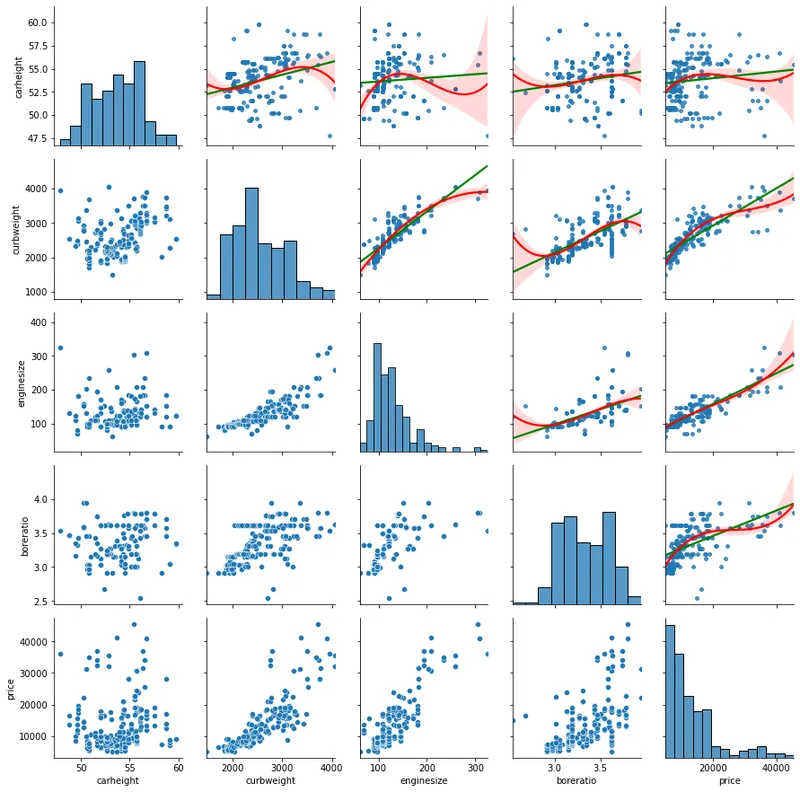
g=sns.PairGrid(data = df,vars = ['stroke','peakrpm','citympg','highwaympg','price'])
g.map_upper(sns.regplot,ci=None, scatter_kws={'s':15}, line_kws={"color": "green"})
g.map_upper(sns.regplot,ci=90, line_kws={"color": "red"},order=3,scatter=False)
g.map_diag(sns.histplot)
g.map_lower(sns.scatterplot)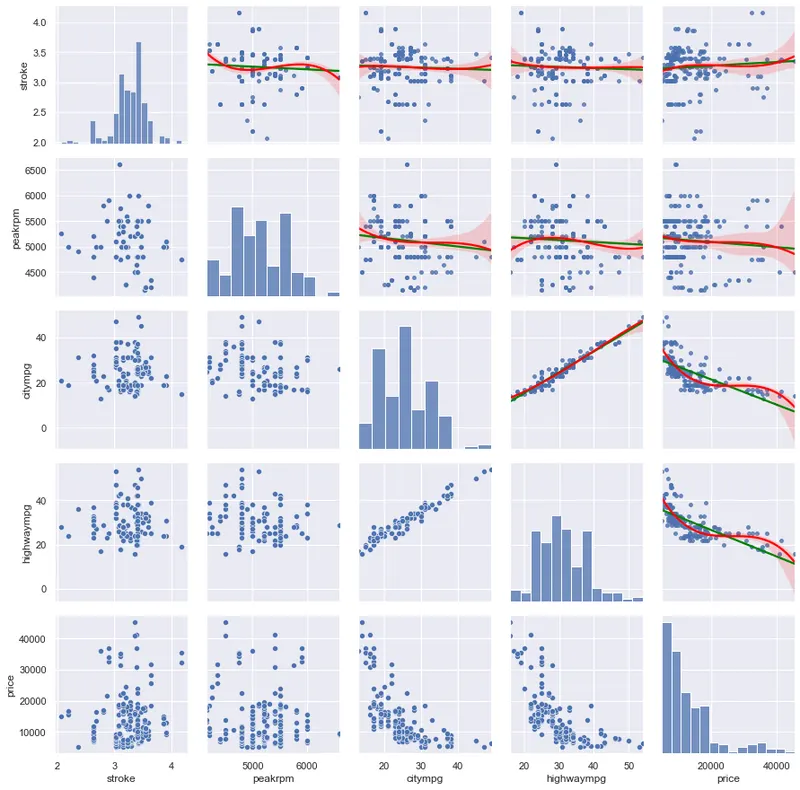
Now lets start with K-means algorithm.
Before we go further let us perform OHE (one hot encoding) for categorical data and the scaling for numerical data.
First lets drop the compression ratio column as this information can be obtained from fuel type column.
df_encode = pd.read_csv('CarPrice_Assignment.csv')
df_encode=df_encode.drop(columns=['car_ID'])

df_encode['CarName']=df_encode['CarName'].str.split('-| ').str[0]
replace_values = {'maxda':'mazda','Nissan':'nissan','porcshce':'porsche','toyouta':'toyota','vokswagen':'volkswagen','vw':'volkswagen'}
df_encode=df_encode.replace({'CarName':replace_values})


df_encode=df_encode.drop(columns=['compressionratio'])

df_encode['symboling'] = df_encode.symboling.astype('category')
df_encode['CarName'] = df_encode.CarName.astype('category')
df_encode.dtypes

from sklearn.preprocessing import MinMaxScaler

sc = MinMaxScaler(feature_range =(0,1))

for col in df_encode.columns:
    if df_encode[col].dtypes=='float64' or df_encode[col].dtypes=='int64':
        df_encode[col]=sc.fit_transform(df_encode[[col]])
df_encode.head(10)
Moreover, door number has the same catgorical information as number of cylinders. so lets add the string to the door column to avoid the confusion with naming the columns same in OHE.
df_encode['doornumber']=df_encode['doornumber'].map('door{}'.format)
df_encode.head()
Noe collecting all the column names with categorical data.
cat_cols=[]
for col in df_encode.columns:
    if df_encode[col].dtypes=='object':
        cat_cols.append(col)
cat_cols
Encoding the categorical data and droping one column to avoid the dummy trap variable.
df_encode = pd.get_dummies(data = df_encode, prefix = 'OHE', prefix_sep='_',
               columns = cat_cols,
               drop_first =True,
              dtype='int8')
df_encode.head(10)
Now we will collect the data required for applying the clusters.
X=df_encode.drop(columns=['price','CarName'])We are dropping Car name and price, as we want to cluster depending upon this variables.
Lets identify the optimum K value for K-means.
k_rng = range(1,10)

sse1 = []

for k1 in k_rng:
    km1 = KMeans(n_clusters = k1)
    km1.fit(X)
    sse1.append(km1.inertia_)

plt.plot(k_rng,sse1,marker='*')
plt.ylabel('SSE')
plt.xticks(k_rng)
plt.xlabel('K_values')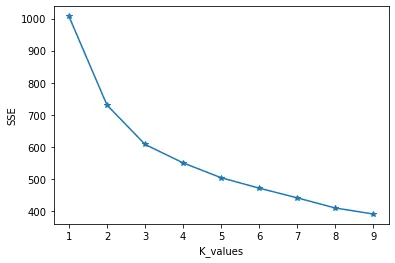
Now we will consider '4' as the optimum K-Value for our analysis. We will classify the cluster names as 'Economy', 'Budget', 'Premium' and 'Luxury'. These can be set looking further into price and classify the cluster category to a particular cluster name.
Performing our clustering
km = KMeans(n_clusters = 4)
km.fit(X)
y_predict = km.predict(X)
df_encode['cluster_Number']=y_predict
We have added the cluster number to our data frame.
By using the dictionary as shown below we will map these cluster values to new column.
cluster_category = {0:'Budget',1:'Luxury',2:'Premium',3:'Economy'}

df['cluster'] = df['cluster_Number'].map(cluster_category)
Now let us look at the results:
sns.scatterplot(data=df, x = "symboling", y="price",hue="cluster",palette=['green','orange','brown','dodgerblue'])
plt.legend(bbox_to_anchor=(1.25, 1),
           borderaxespad=0)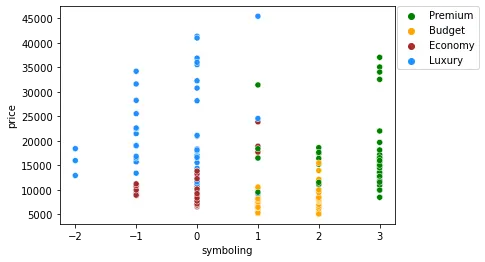
We can look at the symboling data all the symbol '3' data are Premium cars. High end cars with high prices belong to luxury cluster. The ones with low cost are classified into Premium and Budget.
You can look into further categorical columns and it gives the similar information depending upon the clusters.
How the similarity is calculated for categorical data?
- For categorical data it is better to use the hamming distance. But K-means work only on Euclidean distance.
- So, it is better to classify the categorical data using one hot encoding and removing one extra column of each feature (Dummy Variable). Thus all the columns are binary in nature which gives the same sense as of hamming distance.