Simulink model of Doorbell using solenoid block
Aim:- To create a simulation of electrix doorbell using SIMULINK
Objectives:-
- Understand the wroking of a solenoid
- Built the simulink model of a doorbell with certain assumptions
- Analyse the result of the same
Schematic Diagram:-
Solenoid is the generic term for a coil of wire used as an electromagnet. It also refers to any device that converts electrical energy to mechanical energy using a solenoid. The device creates a magnetic field from electric current and uses the magnetic field to create linear motion, and hence it causes the hammer to strike the gong at regular intervals.
Blocks Used:-
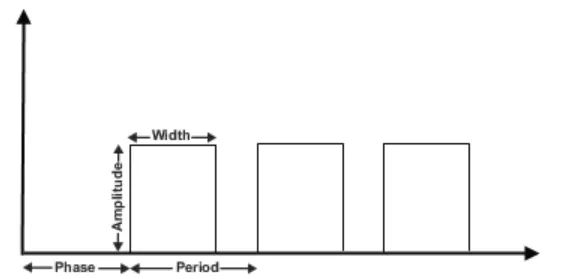
- Pulse Generator:- The Pulse Generator block generates square wave pulses at regular intervals. The block waveform parameters, Amplitude, Pulse Width, Period, and Phase delay, determine the shape of the output waveform.
- Simulink-PS Convertor:- Converts the Simulink input signal to a Physical Signal.
- Switch:- The block represents a switch controlled by an external physical signal. If the external physical signal PS is greater than the threshold, then the switch is closed, otherwise the switch is open.
- Battery :- It provides voltage to the system
- Solenoid Block:- Shows the position of the plunger with respect to the EMF induced, which depends on the initial position of the plunger. The spring constant is set to zero
- Mechanical & electrical reference :- these provides the reference point to the respective signals
-
Ideal Translational Motion Sensor :- The block represents an ideal mechanical translational motion sensor, that is, a device that converts an across variable measured between two mechanical translational nodes into a control signal proportional to velocity and position.
- Scope :- to view te characterictics of a property with respect to the time(Simulation Time)
SImulink model:-
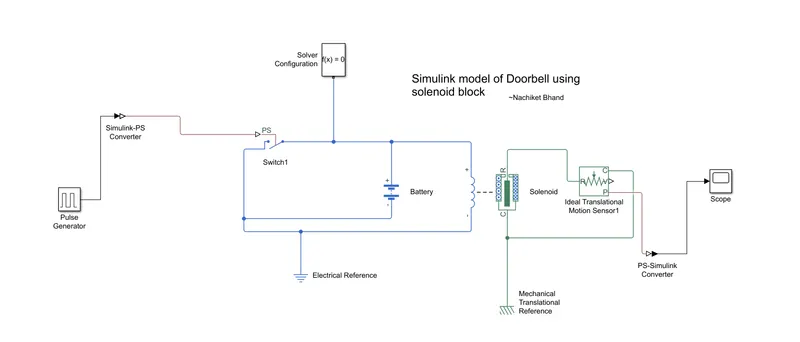
Condition :- Create a situation where the switch is closed for 2 seconds and then released
Result obtained 1):-
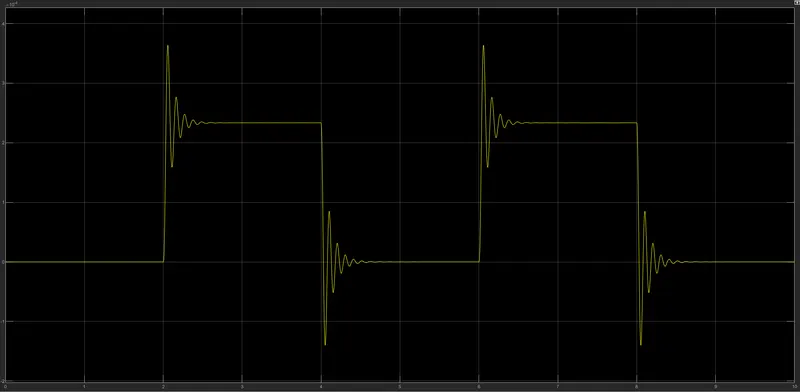
This is the result obtained for a time period for 10 seconds of the given simulation
For every interval of 2 seconds the switch is turned on and off, hence such waveform is obtained
Damping effect is observed because of the damping parameter which was set in solenoid block of 1N/(m/s)
The curve is positive as motion direction is set as 'Port R moves away from port C'
Result 2):-
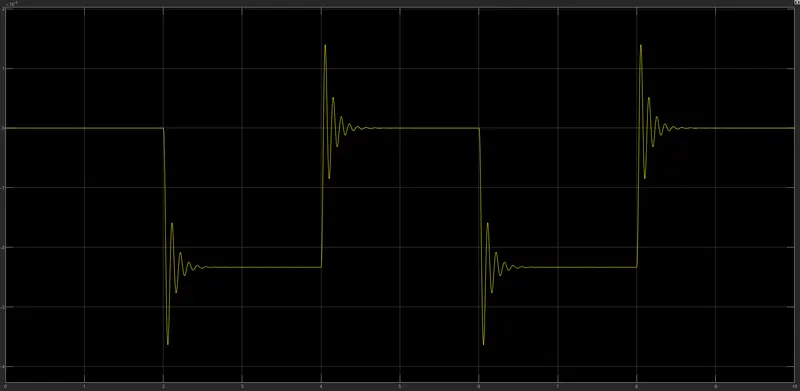
If the solenoid parameter is set is 'Port R moves toward port C', following negative waveform is obtained
Conclusion :-
- Undertansing of the changes in curve characterictics upon changing the solenoid parameters
- Understansing the principle if working of a Doorbell and its construction
- Analyzing the various Simulink library blocks.